threads automation
Threads Automation: Architecture, APIs & Workflows
Master threads automation with practical architecture, API constraints, and real-world workflows. Includes a 7-day trial recommendation for effortless reach.
You've got a strong post ready, but now you're staring at the same problem every growth team hits. The content is good, the timing matters, and the challenge is turning one idea into a consistent flow across Threads, X, Bluesky, and Mastodon without burning half your day on formatting and copy-paste.
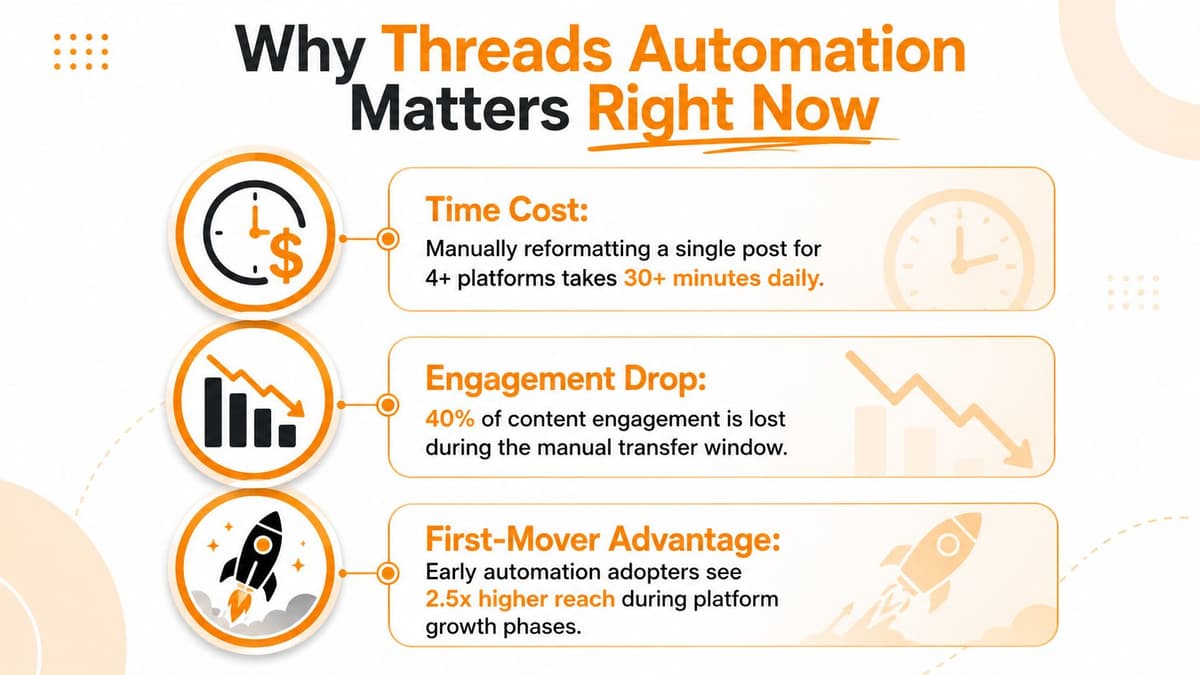
Threads automation makes sense right where the manual work starts to slow you down. Threads reached 100 million sign-ups in its first five days and later 275 million monthly active users by November 2024, up by 100 million from July 2024, according to Business of Apps' Threads statistics. That scale means a reliable publishing workflow isn't just a convenience, it's a real distribution lever for founders, creators, and small teams.
The platform also matters because it's still relatively young and still being shaped by product limits. Threads launched in July 2023 as Meta's text-first social network, and by May 2026 the API still centers on publishing and scheduling posts, with no DM functionality in the Threads API, as described in this breakdown of Threads creator and DM automation limits. That narrow scope is useful for teams that want to automate delivery without pretending the platform supports full social CRM workflows.
A good setup doesn't chase every platform trick. It gives you one dependable path from draft to publish, then lets you spend your energy on the parts Threads still rewards most, original writing, fast distribution, and real replies.
Understanding the Threads API Architecture
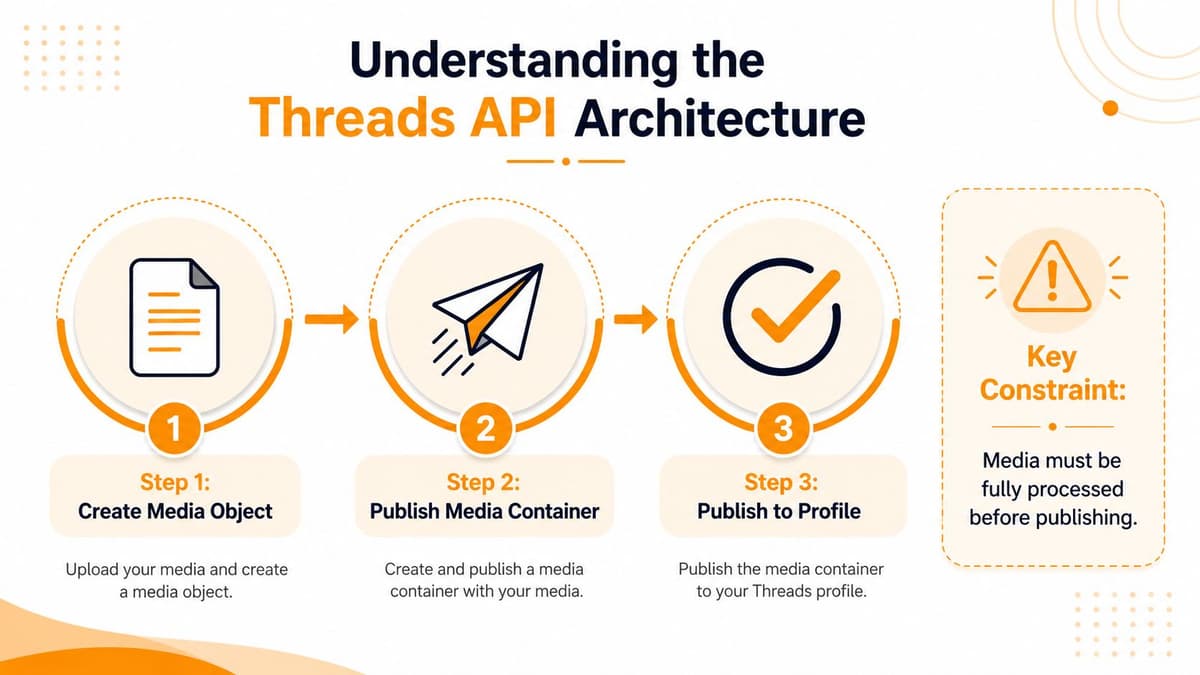
Threads automation lives or dies on the publishing flow. The API is built as a two-step publish pipeline, first create a media container with POST /me/threads, then publish it with POST /me/threads_publish, and that container expires in 24 hours. That one constraint changes the whole system design, because a post can't sit around in a queue forever while you wait for “later.”
Build for time, not just for content
In production, the safest pattern is simple. Authenticate with a long-lived OAuth token, store the post payload in your database, create the container close to execution time, then publish immediately before expiry. The moment you create containers too early, you've built a failure mode into your scheduler.
Practical rule: never treat Threads like a fire-and-forget queue. Treat it like a timed handoff, because the container window is part of the workflow.
The other hidden constraint is that the API does not include DM automation. That means inbox workflows stay outside Threads and, if needed, belong in Instagram Graph API tooling instead. For teams, that's a blessing and a limit at the same time, because it keeps the automation surface smaller, but it also rules out the kind of full-funnel social automation people sometimes assume exists.
The scheduling layer therefore has to live outside Meta. A cron job, a database-backed job queue, or cloud functions are the normal pattern, because Threads does not give you native scheduling. That external scheduler should also keep retry logic conservative, since Meta applies per-user daily caps on published posts and replies, and those limits have changed over time, according to Bolta's Threads automation guide. In practice, that means staying well below the cap and backing off cleanly when the API pushes back.
An architecture like this needs a few decisions up front. Which token refresh flow will you use, where do drafts live, how do you recover from a failed publish, and what happens when a job misses the 24-hour window? If those answers aren't clear, the pipeline will look fine in staging and then fail at the worst possible time in production.
A useful mental model is that Threads automation is not just about posting. It's about keeping the right object alive for the right amount of time, then publishing it before it expires.
For a deeper implementation walkthrough, the Threads API automation guide is worth reading alongside your own tests.
Choosing Between Building and Using a Platform
The build-versus-buy decision is usually obvious once you map the work involved. Custom code gives you total control, but it also means you own OAuth handling, job retries, media lifecycle logic, post splitting, and every future API change. A managed platform gives you the workflow layer immediately, which is often the better trade if your team cares more about publishing than about maintaining infrastructure.
What custom code actually buys you
If you build it yourself in Node or Python, you can wire Threads into very specific internal systems. That matters when you have unusual compliance requirements, a private approval chain, or a product workflow that has to talk to internal databases in a very precise way. You also get exactly the logic you want for things like queue prioritization and custom failover.
The downside is the maintenance tax. Someone has to watch token refreshes, container expiry, link preview handling, and rate-limit behavior every time Meta changes something. For a small team, that usually means the automation project turns into a backend service that never really stops needing attention.
Where managed platforms save time
Managed tools are strongest when your goal is auto crossposting, auto reposting, and broader social media automation rather than a single custom integration. MicroPoster fits that pattern because it handles native crossposting, thread splitting, handle mapping, media resizing, link previews, and scheduling across networks, while also adding built-in AI for tone and send-time help. It's a sensible option if you want one workflow that covers distribution instead of a hand-rolled script per platform.
The biggest difference is operational. With a platform, OAuth, scheduling, and rendering are already packaged, so the team can spend time on content and review instead of debugging jobs at midnight. That's especially useful if you're comparing a few platforms at once, because the same post has to behave differently on each one.
| Dimension | Custom Code | Managed Platform (MicroPoster) |
|---|---|---|
| OAuth handling | You own token storage and refresh logic | Secure OAuth connections without stored passwords |
| Thread splitting | You build it yourself | Auto-splits long updates into native threads |
| Media formatting | You write resizing and upload rules | Resizes images and videos for native uploads |
| Handle mapping | Manual logic required | Maps mentions and handles across networks |
| Link previews | Needs custom handling | Optimizes links for rich previews |
| Hashtag and mirroring rules | Fully custom | Granular rules for hashtags, threading, and pure mirroring |
| Send-time optimization | You build heuristics or models | Built-in AI can help refine timing |
| Best fit | Deep internal systems | Founders, creators, small teams |
If you're leaning toward a platform because you don't want to own this stack long term, the case for buying is strong. The article Why custom automations become a bad idea lays out the maintenance burden well, especially for teams that only need reliable publishing and republishing.
A simple test usually settles it. If your team wants to ship custom logic that no off-the-shelf tool can express, build. If you mainly want dependable distribution with minimal engineering overhead, use a platform and keep your developers on product work.
Implementing Authentication and Content Pipelines
A production pipeline starts with security, not with posting. Use OAuth, keep passwords out of the system entirely, and store only the tokens and metadata you need for scheduled jobs. If a workflow asks people to paste credentials into scripts or spreadsheets, it's already too brittle for serious use.
Make the content model fit Threads
The most common failure in threads automation is forcing one long draft into a format that doesn't belong on the platform. Threads works better when your source content is split into native post-sized units, then published as a sequence rather than flattened into one block. That split can happen from a rich-text editor, a CMS entry, or a repurposing pipeline, but the key is to preserve meaning while breaking the text cleanly.
Media needs the same treatment. Resize images and videos for native uploads instead of treating them like generic attachments, and keep link previews under control so the published result looks intentional. Handle mapping matters too, because mentions that work on one network can look wrong on another if you don't normalize them before publish.
A reliable scheduler should also respect the 24-hour container window from the earlier section. Drafts can live in your database, but containers should be created close to execution time, then published immediately. That keeps the system safe from the silent failure where a post looks queued but its container has already expired.
A scheduler that's “almost ready” isn't ready. If it can miss the publish window once, it'll do it again under load.
Build rules, not just buttons
Good pipelines include rules for hashtags, pure mirroring, and review states. Some posts should go out unchanged, some need platform-specific edits, and some should never be automated at all. That's where a visual calendar helps, because your team can see what's queued, what's approved, and what still needs human editing before the job runs.
MicroPoster's rich-text editor and auto-hashtag features fit neatly into this kind of workflow because they reduce the number of places where formatting can break. In practice, that means less time fighting markdown, less risk of broken formatting on publish, and fewer last-minute edits when a post is already scheduled.
The failure modes are predictable once you've shipped a few pipelines. Expired containers mean your timing is off. Rate-limit warnings mean your queue is too aggressive. Broken link previews usually mean the source content was optimized for the wrong network first. Fix those three, and most of the chaos disappears.
Where Automation Helps and Where It Hurts
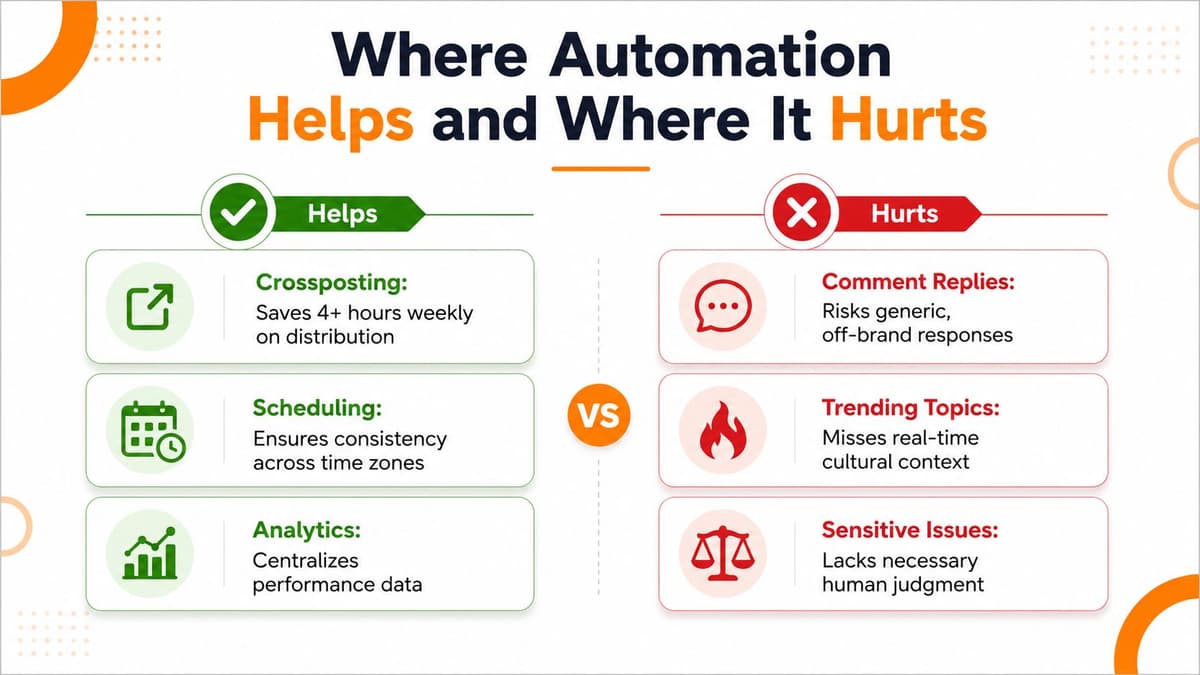
Automation helps most when the task is repetitive and the output can stay consistent. It also helps when you need one source of truth to distribute content to several channels without doing manual rewrites all day. That's the sweet spot for crossposting, scheduling, reply monitoring, and insight collection.
Keep the human parts human
The boundary shows up fast on Threads. Recent 2026 guidance describes engagement bait, copy-paste content, and posting bursts followed by silence as algorithm killers, which makes sense on a platform that still rewards conversational context and originality. Automation can move the post, but it can't fake judgment, taste, or a real response to what someone just said.
Replies are the clearest example. A bot can monitor incoming comments, but a generic response often feels off-brand the moment a thread gets specific or sensitive. The same goes for trending topics, where context matters more than speed.
If a post needs nuance, let a person answer it.
That's why the safest automation pattern is selective, not total. Use it for distribution, scheduling, and surfacing engagement signals. Keep replies, escalation, and brand voice in human hands.
Safe patterns that usually hold up
- Crossposting with light adaptation: Keep the core message, then trim or expand it per network instead of force-fitting one version everywhere.
- Scheduled publishing: Let the system handle timing so the team isn't online just to hit a slot.
- Reply triage: Route comments into a queue, then have a person answer the ones that need thought.
- Content mirroring with checks: Republish the same idea only when it still makes sense in the destination network's culture.
That approach keeps automation useful without turning the account into a feed of recycled posts. For teams trying to grow on Threads without sounding robotic, that balance matters more than raw volume.
Real-World Templates and a 7-Day Trial Plan
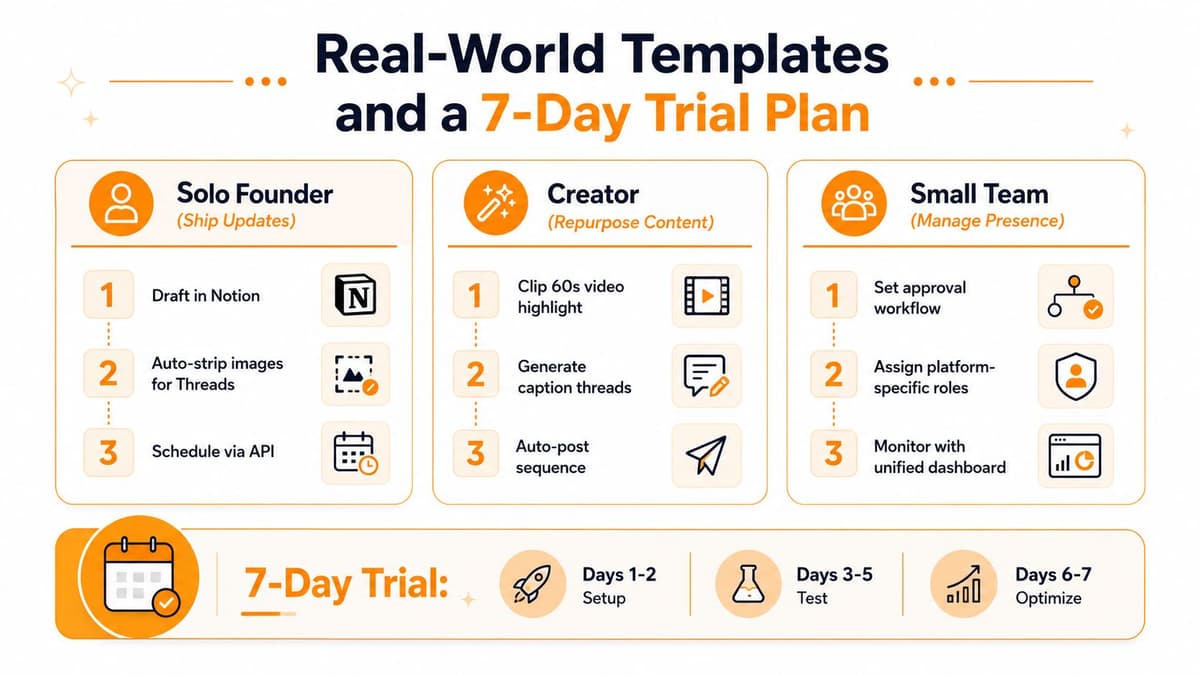
A founder shipping product updates needs a different setup than a creator repurposing long-form content. One workflow is about speed and consistency. The other is about turning one piece of work into several native posts without losing the original voice. Small teams usually need both, plus a review layer so nothing publishes accidentally.
Three templates that actually work
For a solo founder, draft once in Notion or a similar source, strip heavy formatting, and schedule the post so it lands when you're not distracted by launch-day noise. Keep mirroring rules tight, because product updates usually need one clean message more than they need clever rewriting.
For a creator, clip a short highlight from the long-form piece, generate a thread sequence from the core ideas, and let the system post the sequence automatically. The important part is not the automation itself. It's preserving the structure of the original argument while making it readable in a feed.
For a small team, create an approval workflow, assign platform-specific roles, and watch everything from one dashboard. That gives you a clean separation between writing, review, and publish, which is the easiest way to avoid accidental brand drift.
A simple 7-day trial rhythm
MicroPoster offers a 7-day free trial, with no credit card required and cancel anytime on the Creator and Pro plans. A practical trial usually looks like this: days 1 and 2 for setup, days 3 to 5 for live testing, and days 6 and 7 for tuning cadence, hashtags, and scheduling rules.
Keep a short monitoring checklist during that trial:
- Failed jobs: check whether the queue is missing any posts or timing out.
- Rate-limit warnings: watch for backoff messages and slow the queue before they become a problem.
- Engagement signals: review which post shapes feel native on Threads instead of merely imported.
- Approval friction: note where the team is still editing manually and simplify that step.
A trial only works if you treat it like a real workflow test, not a demo. If the system survives a full week of normal posting, it's probably ready for a longer run.
If you want a cleaner way to run Threads automation without owning every brittle detail yourself, MicroPoster is built for crossposting, scheduling, and native republishing across the social networks most teams use. Try the 7-day trial at MicroPoster and see whether the workflow fits your publishing rhythm before you commit to a paid plan.