
how to automate social media posts
How to Automate Social Media Posts and Save Time
Learn how to automate social media posts with our practical guide. Discover the right tools, content strategies, and workflows to boost engagement and grow.

Automating your social media is more than just loading posts into a queue. It’s about using a specialized tool to schedule your content well in advance, which frees you from the daily grind of posting manually. The basic idea is pretty straightforward: you pick a tool you like—something like Buffer or MicroPoster—hook up your social accounts, create your content in batches, and tell the tool when to push it live.
Why Automate Your Social Media Posts
Everyone talks about saving time, and sure, that's a huge perk. But the real magic of automation is what you do with that extra time. Instead of frantically trying to think of something clever to post right now, you can step back and build a thoughtful, cohesive story for your brand that plays out over weeks or even months.
Automation is what makes consistency possible. It keeps your profiles active and your brand visible, even when you’re swamped with client work or deep in product development. That steady presence is what builds trust and keeps you on your audience's radar.
The Strategic Edge of Automation
When you get the hang of automating your social media, you stop being reactive and start being proactive. You can actually plan your content around big moments—product launches, holidays, industry events—way ahead of time. This means your messaging is sharp, polished, and perfectly timed.
More than anything, it frees up your brainpower. All that creative energy you were spending on last-minute posts can now go toward things that truly move the needle:
- Actually talking to your community: You’ll have the time to respond to comments and DMs, building real relationships that no scheduled post can replicate.
- Digging into the data: With the posting handled, you can finally analyze what’s working, spot trends, and tweak your strategy based on what your audience loves.
- Building connections: You can invest time in networking with peers and influencers, which is all about genuine, unhurried interaction.
The market is clearly catching on to this. The global social media automation tool market was valued at around USD 4.5 billion in 2024 and is expected to skyrocket to USD 12.8 billion by 2033. This isn't just hype; it's driven by real results. Brands using automation often see engagement jump by 20-30% per post and slash their content creation time by 30%. You can dive deeper into these trends by exploring more social media automation statistics.
From Manual Chaos to Automated Clarity
The difference between a manual workflow and an automated one is like night and day. Manually posting usually means inconsistent timing, rushed content, and that constant feeling that you’re falling behind. An automated system, on the other hand, gives you a clear, high-level view of your entire content calendar.
Here’s a quick look at how the two approaches stack up.
Comparing Manual vs Automated Social Media Workflows
| Aspect | Manual Posting | Automated Posting |
|---|---|---|
| Time Investment | Daily, reactive effort; high time drain. | Upfront planning; minimal daily management. |
| Consistency | Often erratic; depends on daily availability. | High; posts go out at optimal times, always. |
| Strategic Planning | Difficult; focus is on the next post. | Easy; enables long-term campaign planning. |
| Content Quality | Can be rushed and less polished. | Higher quality due to batching and review time. |
| Analytics & Insight | Time-consuming to gather and analyze. | Centralized data makes it easy to spot trends. |
Simply put, automation brings structure to the creative process. Instead of a jumble of disconnected ideas, you get a clear workflow where your strategy informs your content, which then feeds into a predictable schedule.
This diagram helps visualize how it all connects:
By putting a system like this in place, you’re creating a reliable content machine that works for you, consistently nurturing your audience and growing your brand without demanding your constant attention.
Choosing the Right Automation Tool for Your Goals
Trying to automate your social media without the right tool is a recipe for frustration. You'll spend more time fighting with the software than you'll save on posting. The market is flooded with options, but the best way to cut through the noise is to start with a clear picture of what you actually need.
Think about it: are you a one-person show trying to build a community on X and LinkedIn? Or are you part of a small team juggling multiple brands and platforms? The answer will completely change what features are essential versus what's just a "nice-to-have."
Define Your Must-Have Features
Before you even glance at a pricing page, make a list of your non-negotiables. It’s easy to get distracted by shiny features you’ll never use. For most creators and small teams just getting started with automation, this is what truly matters:
- Multi-Platform Support: The tool has to play nice with the platforms where your audience hangs out. It doesn't matter how slick an app is if it can't post to the one network that drives all your engagement.
- An Intuitive Content Calendar: You need a clean, visual layout of your upcoming posts. A confusing calendar makes it impossible to spot content gaps or see the bigger picture, defeating the whole purpose of getting organized.
- Bulk Scheduling: This is a genuine game-changer. The ability to upload a simple spreadsheet with a month's worth of posts at once will save you countless hours.
- Actionable Analytics: Automation isn’t just about firing and forgetting. You need clear data on what's working—engagement, reach, clicks—so you can double down on your best content and ditch the rest.
Starting with this checklist keeps you grounded and focused on solving your biggest workflow headaches first.
Don't get caught up in the hype. Your goal is to find a tool that solves your 2-3 biggest problems right now. You can always level up to a more powerful system as your strategy and team grow.
Comparing Top Social Media Automation Tools
The right tool for you will hit the sweet spot between power, ease of use, and price. While there are tons of options out there, a few names come up again and again for good reason. Each has its own philosophy and is built for a different kind of user.
To give you a better idea, here's a quick comparison of some of the most popular platforms.
| Tool | Ideal For | Key Features | Pricing Model |
|---|---|---|---|
| Buffer | Solo Creators & Small Businesses | Simple queue-based scheduling, an AI assistant for rephrasing, and an included "link in bio" page. | Freemium, with affordable per-channel plans. |
| Later | Visually-Focused Brands (Instagram) | Strong visual planner, hashtag suggestions, and detailed analytics for visual content. | Tiered monthly plans, with a limited free option. |
| Sprout Social | Agencies & Larger Teams | Advanced collaboration, deep analytics, social listening, and a unified Smart Inbox. | Premium, higher-priced monthly subscriptions. |
As you can see, there's no single "best" tool—just the best tool for the job at hand. A creator focused on crafting thoughtful X threads will find Buffer's simplicity a huge plus. But an agency that needs to pull detailed client reports and manage community interactions will see the value in Sprout Social's robust feature set.
For a more comprehensive look, we've put together a guide on the best https://microposter.so/blog/scheduling-tools-for-social-media that breaks down even more options.
Making the Final Decision
You’re not alone in looking for a better way to manage social media. As of 2025, a whopping 47% of small businesses worldwide use automation tools for their social channels. It's the go-to solution for social media management (50% of users), content management (33%), and campaign tracking (28%).
The only way to know for sure is to take a couple of contenders for a test drive. Sign up for the free trials of your top two choices and use them for your real scheduling needs for a full week.
This hands-on experience will tell you more than any review ever could. Ask yourself:
- Which interface just feels right? Is it clean and easy to navigate?
- How long does it realistically take to schedule a week of content?
- Are the analytics easy to find, understand, and act on?
Pay close attention to the little things. A tool that feels intuitive and saves you a few clicks every time you use it is the one you’ll stick with for the long haul. That’s how you turn social media from a relentless daily chore into a streamlined, strategic part of your workflow.
Building a Smart Content Scheduling Strategy
Let’s be honest: successful social media automation isn't about finding a magic "post now" button. The real power comes from the strategy you build before you even touch the software. A smart scheduling plan makes your automated content feel intentional and genuinely valuable, not like a robot shouting into the void. This is how you turn a simple time-saver into a potent growth engine.
It all starts with your content pillars. Think of these as the 3-5 core topics your brand will consistently own. For a freelance graphic designer, these pillars might be "Design Tips," "Behind-the-Scenes Projects," and "Client Success Stories." This structure keeps your content focused and, more importantly, teaches your audience exactly what to expect from you. That's how you build a loyal following over time.
Master the Art of Content Batching
Once you’ve got your pillars locked in, it’s time to embrace content batching. This is a game-changer. Instead of scrambling for a new post idea every single day, you dedicate one focused session—say, a single afternoon—to write all your "Design Tips" posts for the entire month.
This approach just works better. Here's why:
- Keeps Your Voice Consistent: When you write everything in one sitting, your tone and style stay uniform. No more mood swings in your content.
- Unlocks Creativity: It helps you get into a deep creative flow without the constant interruption of other daily tasks. The ideas just start coming.
- It’s Just More Efficient: You're grouping similar tasks together—writing, then designing visuals, then scheduling. This is so much more effective than switching hats every few hours.
If you ever hit a wall during a batching session, our guide on social media post ideas is packed with inspiration to get your calendar filled.
A lot of people think automation means you can stop thinking about content. It’s actually the opposite. Great automation demands thoughtful, upfront planning. Your tool handles the delivery; your strategy is what creates the impact.
And the stakes are high. With social media users projected to hit over 5.4 billion by 2025, all spending an average of 2 hours and 24 minutes scrolling daily, you need a plan to cut through the noise. It’s no wonder 66% of marketers report better campaign performance when using AI to refine their strategies. That directly influences the 49% of consumers who make monthly purchases based on what they see on social media. You can find more of these social media statistics to see the full picture.
Use Optimal Timing and Evergreen Content to Your Advantage
Okay, you’ve batched a library of fantastic content. Now what? The next step is to schedule it intelligently. Don't just throw posts on the calendar at random times; this is where you let your automation tool do the heavy lifting.
Most modern scheduling platforms, like Sprout Social, have a "best time to post" feature. It analyzes when your specific audience is most active and engaged. Leaning on this data takes all the guesswork out of timing, ensuring more of the right people see your posts right when they’re published.
A visual calendar, like the one below, is your command center for this.
It gives you a bird's-eye view of your entire content plan, making it easy to spot gaps and ensure you have a healthy mix of topics from your different pillars.
Here’s another powerful tactic: create a queue for your evergreen content. These are your timeless, high-value posts—think foundational tips, key case studies, or links to your most popular blog articles. Set up your automation tool to automatically reshare these gems every 45 or 60 days. This keeps your calendar full and consistently drives traffic to your best resources with practically zero extra effort. This is a cornerstone of learning how to automate social media posts like a pro.
Bringing Your Automation Workflow to Life
Alright, you've got your strategy mapped out and a tool picked. Now comes the fun part: putting it all together. This is where we move from theory to practice, building the engine that will power your social media presence day in and day out. The goal isn't just to automate for the sake of it, but to create a smart, flexible workflow that handles the repetitive stuff, freeing you up for genuine, in-the-moment engagement.
Take your time with this initial setup. A little extra care now saves a ton of headaches later. Let's walk through how to build a system that works for you, not against you.
Getting Your Accounts Connected Securely
First things first, you need to link your social profiles to your automation tool. Every scheduler—whether it's Buffer, Later, or something else—handles this a bit differently, but the core process is the same. You'll be authorizing the tool to post on your behalf through an official, secure API.
This is a crucial point: your login details are never shared directly with the tool. The platform (like X or LinkedIn) grants access through a secure token.
When you're authorizing the connection, you'll see a list of permissions the tool is requesting. This is totally normal. You should expect it to ask for permissions like:
- Publishing new posts
- Accessing profile info and analytics
- Managing comments or messages (on some platforms)
If a tool asks for permissions that seem weird or unrelated to its job, that's a red flag. Always stick with well-known tools that are official partners of the social platforms themselves. It's the best way to keep your accounts safe.
This visual shows how a solid workflow turns big ideas into a concrete schedule. It's all about moving from high-level pillars to batching your content, and finally, to scheduling.
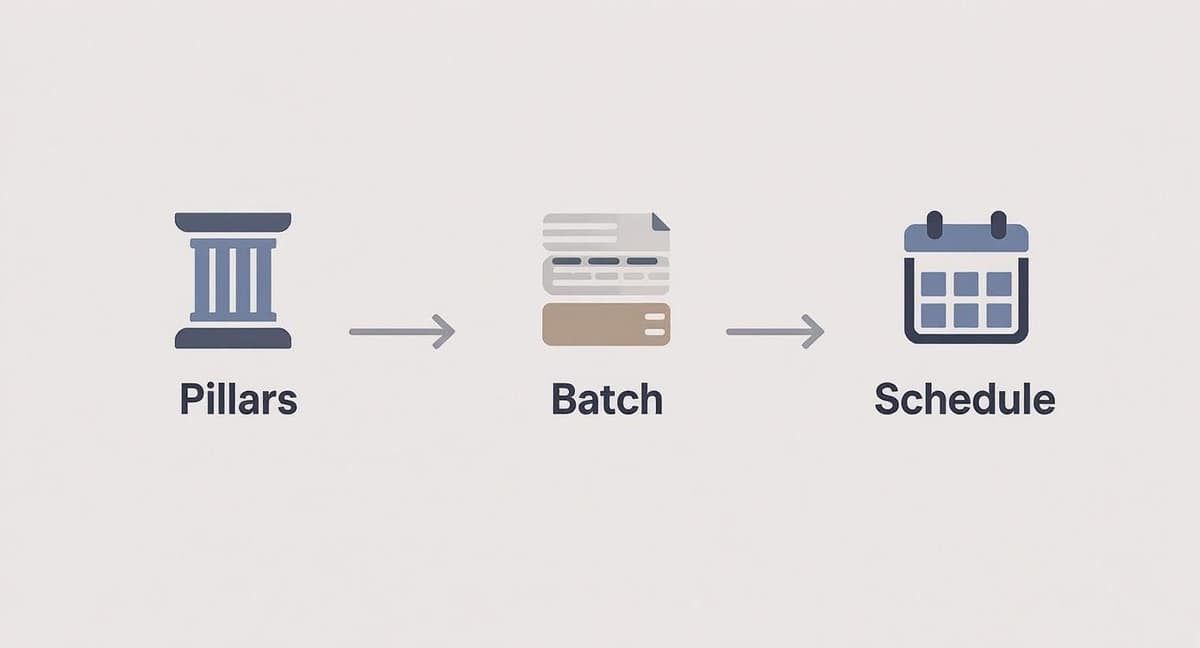
This flow creates a repeatable system that makes your content strategy a reality.
Setting Up Your Schedules and Content Categories
With your accounts connected, it's time to build your posting schedule inside the tool. Instead of manually picking a time for every single post, you’ll create pre-set time slots. Think of them as empty containers waiting for content. For example, you might set up slots for 9:00 AM, 12:30 PM, and 4:00 PM on weekdays.
Once that’s done, any post you add to your queue automatically finds the next open slot. This is the magic of automation—you can focus on what to say, and the tool worries about when to say it. Many tools also have an "optimal timing" feature that analyzes when your audience is most active. My advice? Use it. It takes the guesswork out of the equation.
To get even smarter, start organizing your posts with categories or labels. These should directly reflect the content pillars you came up with earlier.
For instance, a financial advisor I worked with set up categories for "Market News," "Retirement Tips," and "Client Q&A." This let them see, at a glance, if they were hitting all their key topics or accidentally posting too much about just one thing.
Categories also unlock some really powerful automation rules. You could set a rule to ensure a "Market News" update goes out every Monday morning, or to prevent two "Retirement Tips" from being posted back-to-back. This adds a layer of intelligence to your schedule that keeps your feed feeling fresh and balanced.
Putting Evergreen Content and Bulk Scheduling to Work
One of the biggest wins in automation is recycling your best evergreen content. These are your timeless, high-value posts—the ones that are just as relevant today as they were six months ago. Think of a link to a cornerstone blog post or a killer case study.
You can create a separate library or queue in your tool just for this content. Then, set a simple rule: pull one post from this evergreen library and share it every 60 or 90 days. This simple trick keeps your best stuff circulating, drives traffic, and fills gaps in your content calendar with almost zero effort.
For all your new content, the bulk scheduler will become your best friend. Seriously. Most tools let you upload a simple CSV spreadsheet with the text, links, and desired post times for dozens—or even hundreds—of posts at once.
Imagine you batch-write all your X (formerly Twitter) posts for the month in a spreadsheet on a Monday morning. A few clicks later, you can upload that file and your entire calendar for the next 30 days is populated. This feature alone can save you hours and hours every month, turning one of the most tedious social media tasks into a quick, efficient process.
Refining Your Automation: How to Monitor and Iterate
Getting your automation up and running is a fantastic first step, but the real magic happens next. This isn't a "set it and forget it" machine. The most successful creators treat their social media strategy as a living, breathing thing—something that needs regular attention and fine-tuning. This is where you close the loop, turning the data from your automated posts into smarter decisions for what comes next.
Think of your automation tool's analytics dashboard as your mission control. It's time to move beyond guesswork and see what’s actually connecting with your audience. The key is to avoid getting distracted by vanity metrics and instead focus on the numbers that signal genuine community engagement.
What to Look For: Your Key Performance Indicators
Before you dive into a sea of charts and graphs, you need a plan. Knowing what you're looking for is half the battle. For most creators and small teams, the metrics that truly matter fall into just a few buckets.
Here are the essentials to keep an eye on:
- Engagement Rate: This is your true north. It’s the percentage of your audience that is actively liking, commenting on, or sharing your posts. This number tells you if your content is actually hitting the mark.
- Reach and Impressions: This is your visibility score. Reach tells you how many unique people saw your post, while impressions track the total number of times it was viewed. It's a great pulse check on how far your content is traveling.
- Click-Through Rate (CTR): If your goal is to get people to your website, blog, or a product page, this metric is non-negotiable. It shows what percentage of people who saw your post cared enough to click the link.
By focusing on these specific numbers, you cut through the noise and get a clear, honest picture of what’s working and what isn't.
The goal of monitoring isn't just to see what happened; it's to understand why it happened. A spike in engagement isn't just a number—it's a clue telling you what your audience wants to see more of.
From Insights to Action: Making Smart Adjustments
Once you start spotting patterns in the data, you can begin making small, strategic changes. This feedback loop is the heart of a successful automated strategy. The process is simple: review the data, form a theory, make a change, and measure the outcome.
Let's say you notice that posts published between 8 AM and 10 AM on weekdays consistently get more engagement than any other time slot. The data is practically screaming at you: that's when your audience is online and ready to interact.
With that insight, you could:
- Shift Your Schedule: Make this two-hour window your new prime time for posting.
- Test Your Best Content: Try scheduling your most important content—like new blog posts or major announcements—during these peak hours to maximize their impact.
- Align Content to Time: You might even discover that "behind-the-scenes" content does great in the morning, while "deep-dive" topics perform better in the afternoon. This lets you match the right message to the right moment.
This isn't about throwing out your entire strategy every month. It’s about making small, data-backed adjustments over time. These little tweaks add up, leading to big gains in engagement and a much deeper connection with your community. This disciplined, iterative approach is how you make automation a real engine for growth.
Frequently Asked Questions About Social Media Automation
Diving into social media automation can feel like a big step, and it's totally normal to have some questions. Is it the right call for your brand? Will your posts lose their human touch? Let's tackle some of the most common worries that creators and small teams run into when thinking about automating their social media.
The whole point is to use these tools to make your human voice louder, not to replace it. Once you get these questions answered, you can build a strategy that’s both smart and authentic.
Will Automating Posts Make My Brand Sound Like a Robot?
This is easily the number one fear, and it's a good question to ask. The short answer? Not if you do it right. Automation is about handling the when of posting, not the what or the why. You're still the one dreaming up the ideas and injecting your personality into every single post.
The trick is to think of automation as a highly efficient delivery service for content you've already put your heart into.
- Write in creative bursts. When you batch-create your posts, you get into a flow state. This is where you write the good stuff—the engaging, valuable, and genuinely you content.
- Lean into real-time engagement. Automation buys you back time. Use it to hop into the comments, reply to DMs, and have real conversations. That’s where communities are actually built.
- Customize for each platform. A good tool will let you tweak your message for each network. A post on X should feel different from its cousin on LinkedIn, even if they share the same core idea.
Your scheduler is just a personal assistant handling logistics. It frees you up to focus on the creative and strategic work that a machine could never do.
What’s the Real Difference Between Scheduling and Automation?
People often use these words interchangeably, but they're really two different things. Getting the distinction is key to making your workflow truly powerful.
Scheduling is simple and direct. You take one post and tell your tool, "Post this on Tuesday at 10:00 AM." It’s a one-time command for a future event.
Automation, on the other hand, is about building a bigger system that runs on its own with very little day-to-day meddling. It’s a workflow governed by rules you create.
For example, you might create content queues that automatically publish posts from different categories. Or you could set a rule to resurface your best evergreen content every 90 days. You could even connect an RSS feed to instantly share new blog posts. Scheduling is a task; automation is a strategy.
How Often Should I Check In on My Automated Posts?
Automate and abdicate are two very different things. Your presence is still crucial for nurturing the community that your consistent posting helps you build. You have to find the right balance.
A good rule of thumb is to block out 15-20 minutes every day just for engagement. During this time, you’re not posting—you’re checking notifications, responding to comments, and answering messages. This is the human side of the equation that can't be automated and is absolutely essential for a healthy community.
Then, once a week, peek at your analytics to see what resonated. And once a month, do a deeper dive to review your entire strategy. Are your content pillars working? Do your scheduling rules need a tweak? Let the data guide you.
Can I Really Automate Posts on Every Social Platform?
For the most part, yes—but there are a few important things to keep in mind. Most of the big players like X (formerly Twitter), LinkedIn, Facebook, and Pinterest have open APIs that let automation tools connect and publish without a hitch.
However, some platforms, especially the visual-first ones like Instagram, have stricter rules. They might put limits on automating certain post types, like Stories or Reels. To play it safe, always use an official platform partner tool. These tools have been vetted and approved, so you know you're working within the platform's terms of service and keeping your account secure.
Ready to go beyond basic scheduling and build a true automation engine for your text-first content? MicroPoster gives you the specialized tools to draft, schedule, and grow on X, Bluesky, and Mastodon. Start your free 7-day trial and see how our text-first suite helps you publish smarter and faster.


