
So, what exactly is a Twitter automation tool? At its core, it’s software built to manage your X/Twitter account by handling specific tasks for you, freeing you from constant manual oversight. Think of it as your own personal social media assistant, taking care of the repetitive, but essential, jobs like scheduling posts, analyzing performance, and engaging with content.
The whole point is to help you maintain a consistent, active presence without being chained to your screen all day.
What Does a Twitter Automation Tool Really Do?

Let’s get one thing straight right away: modern, ethical automation has nothing to do with spam bots or fake engagement. A high-quality twitter automation tool isn't a shortcut to phony metrics; it's a strategic partner. Its real job is to reliably execute the predictable parts of your social media plan so you can pour your energy into the creative, human side of things.
Think about it. Manually posting content every single day, right at the peak time your audience is online, is a logistical headache. It’s the fastest path to burnout. Automation simply takes over that tedious, mechanical work that a successful account needs to thrive.
This shift is huge. It moves your focus from when you need to post to what you should post—the killer ideas, genuine insights, and real conversations that actually build your brand and connect with people.
Reclaiming Your Time and Beating Burnout
The first thing you’ll notice is how much time you get back. Instead of having to log in several times throughout the day just to get content out, you can sit down and schedule an entire week's or month's worth of posts in one go. For busy founders, marketers, and creators, this is an absolute game-changer.
But this isn't just about being more efficient; it's about being sustainable. Everyone knows a consistent posting schedule is vital for growth on X, but the daily grind is draining. Automation lifts that weight off your shoulders, preventing the burnout that forces so many great accounts to go silent.
A great automation tool transforms your social media management from a reactive, daily chore into a proactive, strategic activity. It gives you the breathing room to think bigger.
By letting a twitter automation tool handle the repetition, you can keep your momentum going without sacrificing your creativity or well-being. It’s how you play the long game and win.
Moving from Guesswork to Data-Driven Decisions
Beyond just scheduling, the best automation tools give you the hard data you need to sharpen your strategy. They help you stop posting based on a gut feeling and start making decisions backed by real evidence. What type of content gets the most replies? What time of day earns you the most link clicks? Which topics truly connect with your audience?
A solid tool will present you with a clean dashboard highlighting the metrics that matter most, including:
- Engagement Rates: Pinpoint which posts are sparking conversations, likes, and reposts.
- Impression and Reach Data: Get a clear picture of how many people are actually seeing your content.
- Follower Growth: Track how your posting activity is impacting audience growth over time.
- Best Performing Content: Instantly identify your hits so you can double down on what works.
This is where real, sustainable growth comes from. It allows you to put your effort behind proven strategies instead of wasting time on content that doesn't land. When you use a sophisticated twitter automation tool like MicroPoster, you're not just saving time—you're getting smarter with it. If you want to dive deeper into the art of scheduling, our guide on choosing a Twitter post scheduler is a great next step.
The Features That Separate Good Tools From Great Ones
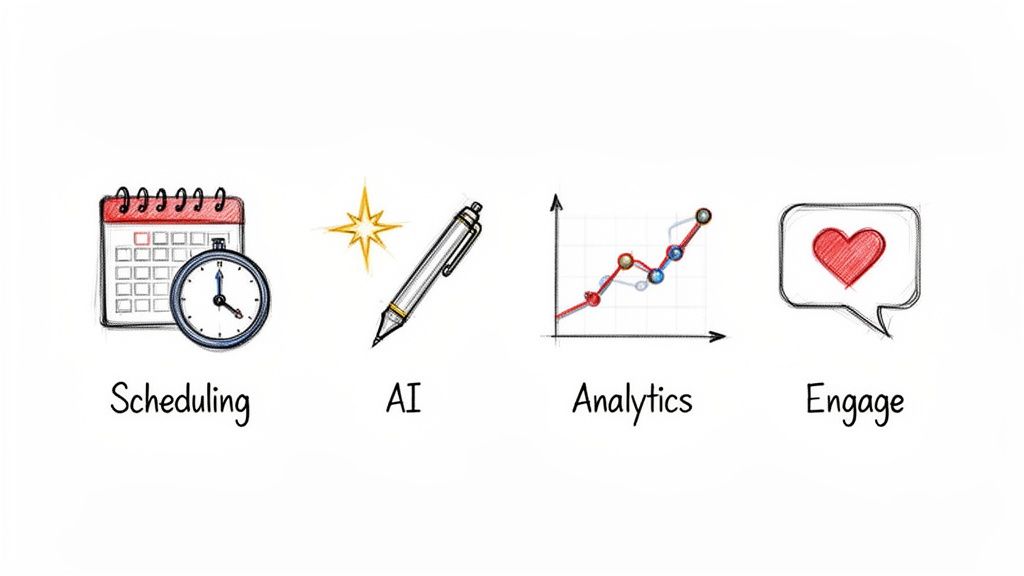 Once you start searching for an X automation tool, you'll see a ton of options. But here’s the truth: they aren't all the same. Some are pretty basic, offering just enough to get by, while others are packed with features built for real, tangible growth.
Figuring out the difference is crucial. A simple tool might just handle posting for you, which is fine. A truly great twitter automation tool, on the other hand, becomes the command center for your entire microblogging strategy.
Let's break down the features that matter, starting with the must-haves and moving into the advanced capabilities that really give you an edge.
Content Scheduling and Queues
This is the absolute foundation of any decent automation platform. The ability to schedule posts ahead of time is why most people even start looking for these tools. It lets you batch-create your content, keep your account active, and hit the perfect posting times without having to live on your phone.
A good tool will give you a simple calendar where you can drag and drop your posts. But a great one takes it much further.
- Content Queues: This is a game-changer. You can build up a bank of your best evergreen content, and the tool will automatically pull from it and repost it on a schedule. Your best stuff gets seen over and over again.
- Best Time to Post Suggestions: Instead of guessing, the platform looks at your audience's activity and tells you exactly when to post for the most impact.
- Multi-Platform Support: With a tool like MicroPoster, you can write something once and schedule it across X, Bluesky, and Mastodon. It can even tweak the post automatically to fit each platform.
These advanced features turn scheduling from a simple chore into a smart, strategic engine that’s constantly working for you.
AI-Powered Content Creation
This is where things get really interesting. AI isn't just a buzzword anymore; it's a genuine co-pilot that can help you bust through writer's block, sharpen your message, and pump out better content, faster.
A good AI integration isn't about spitting out generic text. It's more like having a built-in editor and strategist. For instance, MicroPoster's AI enhancers don't just write posts from scratch. They help you nail your opening hook, find the right hashtags, and even score your content for readability and its potential to go viral—all before you publish.
An advanced AI doesn't replace your voice; it amplifies it. It helps you articulate your ideas more effectively and ensures every post has the best possible chance to succeed.
This kind of power is why the market is blowing up. The global social media automation space was valued at USD 4.5 billion and is expected to climb to USD 12.8 billion by 2033, with teams reporting they're spending 30% less time creating content.
Analytics and Performance Tracking
If scheduling is the engine, then analytics is your GPS. Without data, you're just throwing content out there and hoping for the best. A top-tier twitter automation tool gives you a dashboard that translates those raw numbers into insights you can actually use.
It goes way beyond just counting likes and retweets. It helps you understand what's really working.
- Post-Level Analysis: Pinpoint which specific posts are bringing in new followers or sparking the most conversations.
- Audience Demographics: Get a clear picture of who you're talking to so you can tailor your content to them.
- Trend Identification: See the patterns in your top-performing content so you know what to do more of.
This data-driven feedback is what allows you to stop wasting time on posts that fall flat and double down on what your audience loves.
Essential vs. Advanced Automation Features
To make it even clearer, not all features are created equal. Some are table stakes, while others are what separate the professional growth tools from the basic schedulers. Here's a quick breakdown.
| Feature Category | Essential Feature (Standard Tools) | Advanced Feature (Growth-Focused Tools like MicroPoster) |
|---|---|---|
| Scheduling | Simple calendar-based posting. | Smart content queues, optimal posting time suggestions, and multi-platform support. |
| Content Creation | Basic text editor for writing posts. | AI-powered writing assistance, hook/hashtag generation, and virality scoring. |
| Analytics | Basic metrics (likes, retweets, followers). | In-depth post-level analysis, audience insights, and performance trend identification. |
| Engagement | Manual reply and mention management. | Unified inbox for all interactions and specialized content creation tools. |
As you can see, the advanced features are less about just "doing" social media and more about doing it strategically to drive growth.
Audience Engagement Tools
Finally, the best tools understand that social media is a conversation, not a broadcast. Automation should also help you build a community, not just push out content. This means giving you features that make interaction easier.
This might look like a unified inbox where you can manage all your replies and DMs in one spot, or tools that help you create polls and other engaging formats. Some of the best platforms also offer unique ways to create eye-catching visuals, like an advanced Tweet to Image conversion feature.
By bringing all these pieces together—creation, scheduling, analysis, and engagement—a great twitter automation tool helps you manage the entire lifecycle of your content from start to finish.
How to Automate Safely Without Risking Your Account
The biggest thing that holds people back from using a Twitter automation tool is the fear of getting suspended. It’s a totally valid concern, especially when you hear stories about accounts getting flagged for "bot-like" activity. But there's a huge difference between smart, ethical automation and the spammy tactics that land people in hot water.
The key is to understand one core idea: X (formerly Twitter) wants to stop spam and manipulation, not prevent you from scheduling your content efficiently. The best tools are designed to play by the platform's rules, not to find ways around them.
The API Is Your Best Friend
Think of X's official API (Application Programming Interface) as a secure, official gateway into the platform. Reputable automation tools, like MicroPoster, are given a special key to this gateway. This allows them to perform approved actions—like publishing a scheduled post or grabbing analytics data—in a way that's completely above board and visible to X.
Shady tools, on the other hand, try to sneak in through the back door. They often rely on unauthorized scripts to scrape data or perform actions that try to fool X's systems, which is a massive red flag for spam. Using an API-approved tool is the single most important step to keeping your account safe.
The line between safe and risky automation is crystal clear. Safe tools use the official API to help you publish authentic content. Risky tools use sketchy methods to do spammy things like aggressive following or sending unsolicited messages.
What X Considers Platform Manipulation
To stay on the right side of the rules, you need to know what X is actually looking for. Their guidelines are pretty straightforward once you cut through the jargon. Here are the main activities to avoid at all costs:
- Aggressive Follow/Unfollow Churn: Rapidly following and then unfollowing tons of accounts just to get noticed is a classic spam tactic. A good Twitter automation tool won't even have this as a feature.
- Posting Identical or Substantially Similar Content: You can't just copy and paste the same tweet across multiple accounts. That's a surefire way to get flagged. Your content should always feel relevant to the account it's posted from.
- Automating Engagement Without Context: Auto-liking tweets based on a keyword or sending out generic, automated replies and DMs will get you suspended fast. All your engagement should be real.
Basically, if it feels fake or manipulative, it probably is. If you want to dive deeper, you can learn all about safe Twitter automation to make sure you're always playing it smart.
Focus on Publishing, Not Spamming
This all boils down to the real purpose of a modern Twitter automation tool. Its job isn’t to fake engagement—it's to make your content publishing workflow smoother and more consistent. The whole point is to help you share your valuable, authentic ideas with your audience on a regular basis.
When you focus your automation on scheduling well-crafted posts, building out thoughtful threads, and analyzing what your audience actually responds to, you're not just staying safe. You're using the technology exactly as it was intended. This is how you build a real community around your content, which is what the platform wants to see in the first place. A tool like MicroPoster is built entirely on this philosophy of ethical, growth-focused publishing.
Proven Automation Workflows That Drive Real Growth
Knowing what a great X automation tool can do is one thing. Actually putting it to work is something else entirely. It’s time to get practical and look at some specific workflows that save you time, get your message out there, and deliver real results.
Think of these less as abstract ideas and more as mini-playbooks you can start using today. Let's dig into three powerful strategies that turn your automation tool into a growth engine. Each one solves a common headache for creators and marketers, from making old content work for you again to keeping your presence consistent across multiple platforms.
Before we jump in, the diagram below lays out the golden rule for any automation: keep it safe and smart.
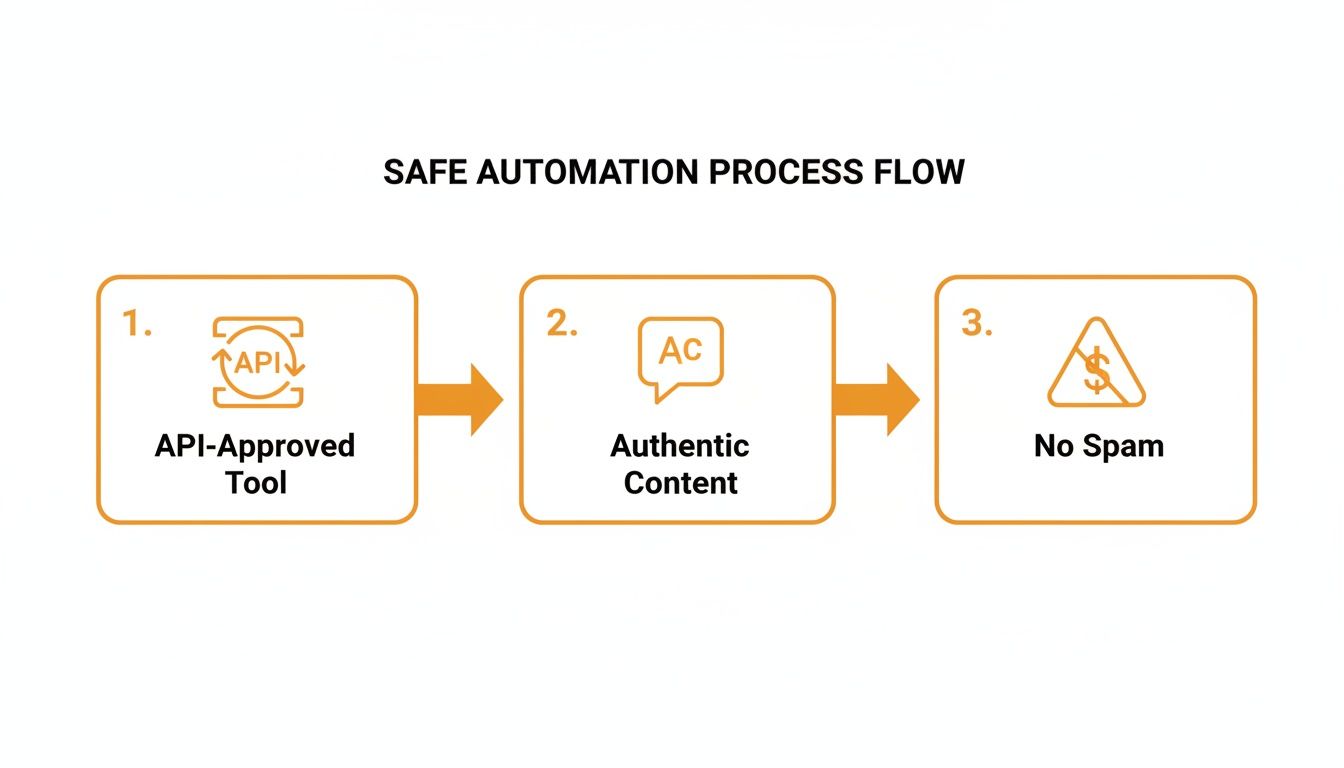
It all comes down to using an API-approved tool, focusing on authentic content, and never, ever spamming. With that in mind, let’s get to the workflows.
The Evergreen Content Engine
Every creator has those "greatest hits"—posts that just clicked with your audience, sparking tons of engagement and driving traffic. The problem? The feed moves so fast that this amazing content gets buried in just a few days. The Evergreen Content Engine is a simple workflow designed to rescue your best posts from the archives and put them back to work.
Here’s how you set it up in three easy steps:
- Find Your Winners: Dive into your analytics and pinpoint the posts from the last few months with the highest engagement, replies, or link clicks. These are your proven performers.
- Build Your Evergreen Queue: Take those posts and add them to a dedicated content library or queue in your automation tool. To keep things from getting stale, you can tweak the wording slightly or add a new image.
- Set It and Forget It: Schedule the queue to automatically re-publish one of these gems every few days or once a week.
Just like that, you’ve built a system that ensures a steady stream of high-quality content for your feed. It keeps your account active and engaging, even when you're swamped with other work. It's the best way to get more mileage out of your best ideas.
The Seamless Thread Publisher
Threads are one of the best ways to tell a story or share deep expertise on X. But let's be honest, manually posting a long thread is stressful. One wrong click, a lost connection, and your whole narrative falls apart.
The Seamless Thread Publisher workflow takes all that risk and anxiety off the table. It lets you write, edit, and schedule an entire thread as one complete piece.
A dedicated thread publisher transforms a high-anxiety manual task into a calm, strategic process. You can perfect your story, schedule it for the optimal time, and trust your tool to deploy it flawlessly.
With a tool like MicroPoster, you can draft the entire thread in an advanced editor, easily rearrange posts with a simple drag-and-drop, and then schedule it to go live whenever you want. This frees you up to focus on what matters: crafting a compelling story. The tech will handle the rest.
Write Once, Publish Everywhere
Your audience isn't only on X. They’re hanging out on Bluesky, Mastodon, and maybe soon, Threads. Trying to create unique content for every single platform is a recipe for burnout. This workflow uses a powerful automation tool to solve that problem by intelligently sending your content to multiple platforms.
Here’s the game plan:
- Draft in One Place: Write your core post or thread in a single, unified content studio.
- Automate Cross-Posting: Use a feature that automatically adapts and publishes that content to your connected Bluesky and Mastodon accounts.
- Let the Tool Handle the Details: A good tool will automatically adjust for platform-specific quirks, like character limits or hashtag formats, so every post feels native.
This approach is a massive time-saver. And the data backs it up. Users of multichannel automation tools see 3.5x more replies and cut down the time they spend on strategy by up to 40%. More broadly, marketing automation has been shown to deliver a 14.5% boost in productivity and a 12.2% reduction in overhead costs. You can discover more insights about these automation statistics to see the full picture.
By putting these workflows into practice, you stop using your software as just a simple scheduler. It becomes a strategic partner that actively helps you build your brand across all the platforms that matter.
How to Pick the Right Tool for the Job
With so many automation tools out there, trying to pick the right one can feel like a chore. It’s easy to get bogged down comparing feature lists and pricing tables. But finding the perfect fit really just comes down to asking the right questions about what you actually need.
Think of it less like a technical deep-dive and more like hiring an assistant. You wouldn't hire a personal chef to do your accounting, right? The same logic applies here. Picking a tool that doesn't match your goals just creates more work, cluttering your screen with bells and whistles you'll never use while missing the one feature that could save you hours.
This simple framework will help you cut through the marketing fluff and find a tool that genuinely makes your life easier.
Twitter Automation Tool Evaluation Checklist
Before we dig into the specifics, here's a quick checklist you can use to compare different tools side-by-side. It’s designed to help you think critically about each option and make a decision that aligns with your specific needs and resources.
| Evaluation Criteria | Key Questions to Ask | What to Look For |
|---|---|---|
| Platform Integrations | Does it connect to all the platforms I use now and might use later? | Support for not just X, but also emerging networks like Bluesky and Mastodon. A single dashboard for all is a huge plus. |
| User Experience (UX) | Can I figure this out quickly, or will I need a user manual? Is it enjoyable to use? | An intuitive, clean interface. The tool should feel like it's helping, not getting in your way. |
| Analytics & Insights | Does it tell me why something worked, not just that it did? | Actionable data that goes beyond likes and retweets. Look for insights on follower growth, best-performing content, and audience resonance. |
| Pricing & Scalability | Is the price fair for the features I get? Can this tool grow with me? | Transparent pricing without hidden fees. Plans that let you add more accounts or unlock new features as your brand grows. |
| Customer Support | If I get stuck, can I talk to a real person who can actually help? | Responsive support from a team that knows the product. Look for live chat, email, and positive user reviews about their help desk. |
A great tool checks all these boxes, ensuring it not only works today but will continue to be a valuable part of your strategy for the long haul.
Platform Integrations
First things first: where are you talking to people? A tool is completely useless if it doesn't work on the platforms where your community hangs out. Your main focus might be X right now, but what about next year?
Look for a tool that gets this. You want something that not only handles your primary network but also has an eye on what's next. For instance, if you're thinking about building a presence on Bluesky or Mastodon, you'll want a studio that can manage everything from one central hub. It just makes sense.
User Experience
There's nothing worse than a powerful tool with a clunky, confusing interface. You’re looking for automation to save time and mental energy, not to spend an afternoon watching tutorials just to schedule one tweet.
The best tools just feel right the moment you log in. The whole experience should be clean and logical. Can you find the scheduler in two seconds? Is the analytics dashboard actually understandable? A great interface doesn't make you think; it lets you create.
A great user experience means you spend less time fighting with the software and more time creating. The tool should feel like an extension of your workflow, not an obstacle within it.
Analytics and Insights
Any tool can just post content for you. That's the easy part. But to really move the needle, you need a platform that gives you clear, actionable data on what's working and what’s falling flat. Otherwise, you’re just guessing.
Good analytics go way beyond vanity metrics. You need to know which posts are bringing in new followers, what content formats get people talking, and which topics truly connect with your audience. That data is gold—it’s the feedback loop that helps you get smarter with every single post. In a world where X's user base faces a projected 2.7% contraction, making data-driven decisions is non-negotiable. It's why creators are chasing 20-30% engagement lifts and why you need to explore the role of data in your social strategy.
Pricing and Scalability
Of course, budget matters. But the cheapest tool on the market is rarely the best value. Take a hard look at the pricing structure and ask yourself if it makes sense for your growth. Does the tool charge you per account, or is it a flat rate for everything? Are you going to get hit with surprise fees for features that should be standard?
Even more important: can the tool scale with you? A solid platform offers plans that grow as your audience does, letting you add more accounts or unlock advanced features without having to jump ship and learn a whole new system. You want an investment that pays off six months and a year from now, not just today.
Customer Support
Sooner or later, something will go wrong. An API will break, a post will fail, or you’ll just have a question. When that happens, you need to know a real human has your back.
Before you commit, do a little digging on their customer support. Do they offer live chat or email support with a real person, or do they just send you to a generic FAQ page? Hunt for reviews that mention how quickly and effectively their support team solves problems. A company that invests in helping its customers is a company that believes in its product, and that’s a partner you want in your corner.
So, Why Do Smart Creators Pick MicroPoster?
After digging into all the features, safety measures, and smart workflows, it's pretty obvious that the right X automation tool is more than a simple scheduler. It becomes a strategic partner in your growth, freeing up your time, elevating your content, and helping you build a genuine community. And that’s exactly what MicroPoster was built for.
Forget about bouncing between a dozen different apps. MicroPoster gives you one unified studio for X, Bluesky, and Mastodon. This isn't just about making life easier; it's about getting back countless hours every week by handling your entire microblogging strategy from a single, clean dashboard. Write it once, and let MicroPoster take care of posting it everywhere.
More Than Just a Scheduler
Most tools hit a wall once you’ve scheduled a post. That's where MicroPoster is just getting started. The advanced editor acts like a creative sidekick, giving you instant feedback with readability and virality scores before you publish. This means you’re not just being consistent—you’re consistently putting out content that's fine-tuned to get people talking.
Our AI enhancers are there to sharpen your ideas, not write them for you. They help you nail that perfect opening hook, discover relevant hashtags, and craft calls-to-action that actually lead to real conversations.
The point of smart automation isn’t to post more; it’s to post better. It’s about making your unique voice louder and giving every single post its best shot at connecting with people.
Designed for Real, Authentic Growth
At the end of the day, MicroPoster is for creators who want to grow without selling out. Every feature is designed to help you work smarter, not harder. It’s about building a loyal following with high-quality content, not chasing vanity metrics with spammy, impersonal tactics.
By combining content creation, multi-platform scheduling, and AI-driven insights into one package, it gives you everything you need for modern microblogging. If you're tired of the daily content grind and want to build a more meaningful presence, this is your tool.
Ready to feel the difference? Start your free 7-day trial of MicroPoster and see what it’s like to have a real growth partner in your corner.
Still Have Questions? Let's Clear Things Up
Even after mapping out a solid plan, a few questions might still be bouncing around in your head. That's perfectly normal. Let's tackle some of the most common ones I hear so you can move forward with confidence.
Is It Safe to Automate My Twitter/X Account?
Yes, it's completely safe—if you do it the right way. The key is to use a reputable tool that plays by the rules and connects through the official X API. Tools like MicroPoster are designed for publishing real content, not for spamming.
Where people get into trouble is with sketchy tools that promise aggressive, bot-like actions—think mass-following hundreds of accounts, auto-liking everything in sight, or spamming DMs. Stick to an API-approved tool focused on smart scheduling and content management, and your account will be perfectly fine.
Will a Tool Just Write All My Tweets for Me?
Many modern tools have AI built-in to help you brainstorm and create content. They can definitely help you polish your ideas, find good hashtags, or even draft a post based on a simple prompt.
But here’s the thing: you should think of AI as a creative assistant, not a replacement for your own voice. Nothing beats genuine authenticity when it comes to connecting with people and building a real following.
Use AI to break through writer's block or to refine your message, but always make sure your unique perspective is what shines through. It's your co-pilot, not the one flying the plane.
How Much Time Will I *Actually* Save?
Honestly, most people save several hours every single week. But the real game-changer isn't just about clawing back time; it's about what you can do with that newfound freedom. The biggest advantage is being able to batch your work.
Think about it: you can sit down for one focused session and schedule an entire week's worth of content. That alone gets rid of the daily pressure to constantly be "on" and posting manually. This frees you up to focus on what really matters—strategy, looking at what's working, and actually talking to the people in your community.
Ready to stop the daily grind and start growing strategically? MicroPoster gives you the unified studio, AI-powered editor, and smart scheduling you need to build a powerful presence on X, Bluesky, and Mastodon. Start your free 7-day trial of MicroPoster and reclaim your time.