custom automation
Why Creating Custom Automations Is a Bad Idea?
Discover why creating custom automations is a bad idea in 2026. Avoid hidden costs and security risks by exploring more reliable, scalable alternatives.
A custom automation usually starts as a tiny act of relief.
You're tired of reposting the same launch update to X, Threads, Bluesky, and Mastodon. You already wrote the post once. Copying it four times feels insulting. So you open Zapier, Make, a cron job, or a quick Python script and wire something together in an hour or two. It works. You feel clever. The task disappears.
That first version is what gets people hooked.
I get the appeal because I've built plenty of these. The first pass often does exactly what you wanted. It removes friction fast, gives you a visible win, and creates the feeling that more automation will keep compounding those gains. That's the part nobody regrets.
The regret shows up later, when the “simple automation” becomes a small product with no roadmap, no support team, and no owner who wants it.
The Siren Song of the "Simple" Automation
The first build always looks reasonable.
You have one trigger. A new post appears on your main account. Your script grabs the text, maybe trims it, maybe swaps a handle, maybe pushes it to another API. If you're using Zapier or Make, the flow diagram looks clean. If you're coding it yourself, the file is short enough to understand in one sitting.

That's why this phase feels so convincing. There's almost no visible downside yet.
Why the first version feels like a win
A social reposting workflow is the perfect trap because the happy path is easy to demo:
- Short text post: It mirrors fine.
- One image attached: Still fine.
- A single source account: Easy to reason about.
- No platform-specific formatting: Nothing looks broken yet.
The team sees a repetitive task vanish. Nobody thinks about lifecycle cost on day one. They think about the ten annoying minutes they just saved.
Build-time is the cheapest moment in an automation's life. Everything after launch gets more expensive.
The emotional payoff matters too. Founders and indie hackers love having an advantage. Developers love eliminating toil. Social teams love anything that removes copy-paste work. A custom automation promises all three.
The crack appears quietly
Then reality starts introducing details your demo never covered.
A thread is too long for one network. A mention maps cleanly on one platform but not another. An image ratio that looked fine on the source post gets cropped badly elsewhere. A poll, quote post, video, hashtag rule, or link preview behaves differently than expected.
None of those failures looks catastrophic on its own. That's what makes them dangerous.
The script still “basically works,” so people keep trusting it. They patch around one issue at a time. Soon the automation isn't just reposting content. It's making editorial decisions, translating platform quirks, and guessing at edge cases it was never designed to own.
That's when people start searching for “why creating custom automations is a bad idea?” Usually after they've already built one.
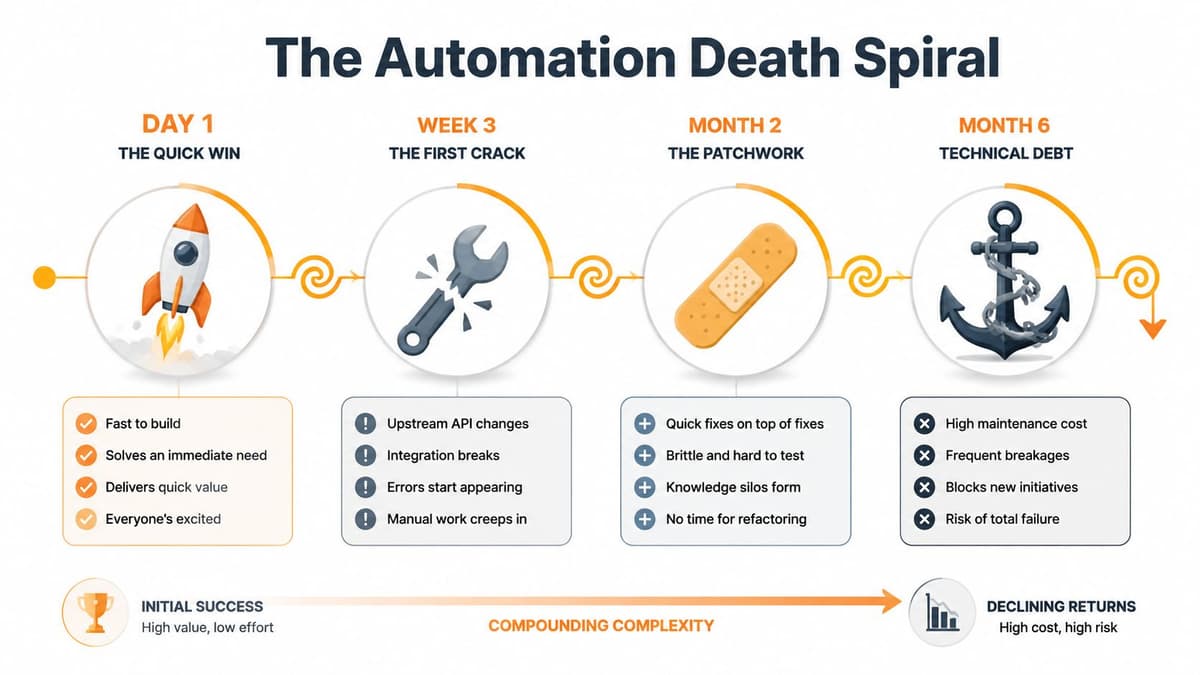
The Automation Death Spiral From Quick Win to Technical Debt
Most custom automations don't fail in a dramatic way. They decay.
At first, the problem is small. A platform changes an API response, rate limit behavior, auth flow, or payload format. You make a quick fix. A few days later, a weird post breaks the formatter. You patch that too. Then someone asks why the script strips one hashtag, preserves another, and splits some posts into threads but not others. Nobody is fully sure.
The decay pattern is predictable
The common lifecycle looks like this:
The quick win
One repetitive task disappears, usually with very little code.The first patch
A dependency changes. You fix it fast and tell yourself it was minor.The workaround phase
Edge cases pile up. Logic branches multiply. Comments become the only documentation.Ownership confusion
The original builder gets busy. Everyone else is afraid to touch it.Permanent maintenance mode
The automation now needs logs, alerts, docs, retry logic, and a human on call.
That progression isn't bad luck. It's what happens when a workflow grows without product discipline.
Broken process in, brittle software out
A big reason these projects rot is that teams automate before they standardize the workflow itself. A Bain-linked analysis notes that 88% of business transformations, including automation initiatives, fail because companies automate broken processes first (Entrepreneur coverage of the Bain findings).
That maps perfectly to social automation. If your team hasn't decided how to handle thread splitting, media variations, links, mentions, repost rules, or network-specific tone, your script doesn't solve the ambiguity. It hardcodes it.
Later, when the process changes, the code becomes wrong even if it still runs.
Islands of automation become a tax
Custom workflows often evolve into a scenario that operators dread: isolated systems only one person understands. Research summarized by Crown Records Management says 70% of automation projects fail due to poor process understanding, and these “Islands of Automation” can create 4-8 hours of downtime when fixes depend on the original developer (hidden risks of automating without clear process).
That number feels believable to anyone who has inherited an undocumented script.
If a workflow needs the builder's memory to survive, it isn't automated. It's outsourced to tribal knowledge.
This is also why technical debt advice applies here. Once an automation starts collecting patches, you're no longer evaluating a convenience script. You're evaluating a small codebase. If you're already in that situation, these strategies to modernize your codebase are useful because the problem is no longer just tooling. It's maintainability.
The trap is simple. The thing you built to reduce work becomes another thing that needs care, context, and ongoing engineering time.
The Hidden Costs and Security Risks You Did Not Calculate
The expensive phase starts after the automation seems finished.
At first, the script posts on time, saves a few hours, and feels like a small win. Then it gets trusted. People stop checking it closely. Credentials spread across tools. One platform changes an API response, another changes a posting rule, and now a workflow that looked cheap has become part of your operating system.

Security gets messy the moment a script becomes infrastructure
Custom automations often start with shortcuts that make sense in week one and look reckless by month six. Tokens live in environment variables, copied config files, CI secrets, browser extensions, or old repos nobody cleaned up. A founder grants broad account access just to get the workflow running, then never revisits the permission scope because nothing appears broken.
That pattern is common in script-heavy environments. SMA Technologies research warns that custom scripts often require embedded credentials and can force dozens to hundreds of manual updates whenever credentials rotate (research discussion on credential exposure in custom scripts). The immediate pain is operational churn. The bigger problem is exposure. One forgotten script can keep an outdated credential active long after the team assumes it has been locked down.
In social automation, that risk is easy to underestimate. Posting tokens, webhook secrets, and account permissions end up scattered across jobs, no-code tools, personal machines, and shared workspaces. Once that happens, access control stops being a policy and becomes a scavenger hunt.
Reliability failures rarely announce themselves
Breakage is frustrating. Incorrect output is worse.
A post publishes without the image. A thread goes live in the wrong order. A link parameter gets stripped. A platform returns a partial success response, your script treats it as a win, and nobody notices until performance drops or a customer points out the missing update.
The most dangerous automation bug isn't a crash. It's bad output that looks close enough to correct.
DIY projects get expensive in a way founders usually do not model. The system still appears to work, so the team trusts it more than it should. Research from the National Institute of Standards and Technology on automation bias describes the same failure pattern. Operators tend to accept automated output and miss errors, especially when the system has worked reliably in the past (NIST discussion of automation bias in human-system decisions).
This short clip is a useful reminder that hidden failure modes tend to be operational, not theoretical.
Opportunity cost is what turns a side project into a drag on the business
Founders and creators usually price the first build. They do not price the ownership.
That missing math matters more than the initial setup. Every hour spent tracing a failed webhook, rotating credentials, checking logs, or manually verifying posts is an hour pulled from product work, sales, customer support, or the content itself. I have seen teams save a few hours on paper and then lose those gains every month to low-grade maintenance they never planned for.
The overhead is predictable, even if the exact failure is not:
- Documentation debt: someone has to explain what the workflow does, what can break, and how to recover it.
- Operational ownership: someone has to watch alerts, inspect failures, and decide when to retry versus when to intervene.
- Dependency management: someone has to track API changes, auth updates, and platform behavior shifts.
- Trust repair: someone has to audit output after a failure because once automation loses credibility, people start double-checking everything.
That is the lifecycle founders miss at the start. The script feels like a quick build, then becomes a small internal product with no roadmap, no support team, and no budget. By the time that cost is obvious, the automation is already wired into the business.
DIY Custom Scripts vs Managed Automation Platforms
The decision isn't really build versus buy. It's whether you want to own a fragile automation system as a side business.
That trade-off gets clearer when you compare the day-two responsibilities, not just the day-one setup. The core problem in many automation efforts is premature implementation. As noted earlier, 88% of business transformations tied to automation fail when teams automate broken processes instead of fixing them first. That's why managed tools tend to win in social publishing. They package the process decisions, operational safeguards, and platform adaptation that DIY projects keep rediscovering the hard way.
DIY Automation vs. Managed Platform (like MicroPoster)
| Factor | DIY Custom Automation | Managed Platform (e.g., MicroPoster) |
|---|---|---|
| Initial Setup Cost | Looks cheap if you already know Zapier, Make, or code | Paid tool, but setup is usually faster and more structured |
| Long-Term Maintenance | You own fixes, documentation, monitoring, and edge cases | Vendor handles platform upkeep and productized workflows |
| Security & Compliance | Credentials, token handling, and access patterns are your responsibility | Typically centralized auth and safer operational defaults |
| Reliability & Uptime | Depends on your logs, retries, alerts, and discipline | Managed infrastructure with built-in operational oversight |
| Scalability | Each new platform or rule adds branching complexity | Expansion is part of the product model |
| Feature Adaptability | You must keep up with API changes and formatting differences | Platform updates are handled centrally |
Where DIY loses its appeal
DIY is strongest when the task is tiny and isolated. Social automation is neither.
Each network behaves differently. Character limits differ. Media handling differs. Link previews differ. Threading differs. Mention mapping differs. If you also care about workflow quality upstream, content teams often need adjacent systems too. For example, teams trying to automate photo and video production workflows usually discover that media preparation and distribution have to work together, not as disconnected scripts.
That's where managed systems make more sense. They're designed for the messy middle.
If you're still tempted to build around direct APIs, it helps to understand what maintaining that stack involves. This guide on the master API for social media is useful because it shows how much integration surface area social publishing really has once you move past the simple demo.
Professional tooling removes amateur chores
The biggest advantage of a managed platform isn't convenience. It's not having to become the maintainer of a hidden system.
A workflow is “cheap” only if nobody has to think about it after setup.
Most founders, creators, and small teams shouldn't spend their best hours defending a reposting script against platform churn. They should spend those hours creating better content and shipping the product people follow them for.
When Does Building a Custom Automation Make Sense
A custom automation makes sense in fewer cases than builders want to admit.
I say that as someone who likes building these things. The first version is fun. The second version still feels manageable. Trouble starts when the script survives long enough to become infrastructure.
Build your own only when the workflow clears a high bar. It should be tightly tied to how the business wins, hard to buy off the shelf, and stable enough that you are not signing up for constant rewrites. That usually means proprietary internal logic, unusual data handling, or compliance requirements that standard tools cannot meet cleanly.
A throwaway script can also be fine. If it runs once, touches a fixed dataset, and dies after the job is done, the maintenance bill stays small.
A practical test before you build
Before writing code, answer four questions:
- Is this part of your moat? If the automation captures logic that competitors cannot easily copy, owning it may be justified.
- Will the environment stay stable? If the job depends on third party APIs, changing auth rules, or platform-specific behavior, you are not building once. You are accepting recurring maintenance.
- Who owns it after launch? Name a person, not a team. If nobody is clearly responsible for monitoring, fixes, and updates, the project already has a failure mode.
- What happens when it breaks? Quiet internal failures are one thing. Public output, customer-facing actions, or anything tied to revenue raises the cost fast.
That ownership question matters more than the build itself. Teams rarely abandon automations because the code was impossible. They abandon them because the original builder moved on, the edge cases piled up, and nobody wanted to inherit a small system with real consequences.
Good exceptions are usually boring
The safest custom automations tend to look unremarkable:
- A local cleanup script for a one-time migration
- A narrow internal transform with fixed inputs and outputs
- A proprietary workflow that supports a product feature you cannot outsource
- A controlled back-office process with clear ownership and low failure impact
Those cases stay manageable because the boundaries are clear. The inputs do not keep changing. The blast radius is limited. The business case is easy to defend.
Social publishing rarely qualifies. It looks small at the start, but it ages badly because the surrounding systems keep changing while the script becomes something the team depends on.
Security can also push teams toward custom code, but that decision deserves scrutiny. Homegrown does not automatically mean safer. It often means your team now owns secret storage, access control, logging, and incident response for one more internal tool. If security is the argument, review what automated internal and web pentesting can and cannot catch before assuming custom code is the safer path.
Custom automation makes sense when the workflow is rare, durable, and strategically important. If it is common, exposed to outside change, and easy to replace with a managed tool, building it yourself is usually the expensive version of a short-term win.
The Smart Migration to Reliable Social Automation
Custom social automation rarely dies in one dramatic failure. It hangs around as a collection of scripts, zaps, tokens, and half-documented rules that still sort of work, so nobody wants to touch them. Then a platform changes an API, a token expires on a Friday night, or a post goes out mangled, and the team remembers how much operational risk is hiding in a "small" system.
The practical move is to treat migration like cleanup after a project that outgrew its original shape. Keep what is stable and narrow. Replace what keeps demanding attention.
Audit what you actually own
Start by tracing the full path from draft to published post. In many teams, that path is longer than anyone expects. A scheduler triggers a script. The script reformats text. Another step resizes media. A webhook passes the payload to a second tool. Then each platform gets its own exception handling, if anyone ever wrote it.
A useful audit answers a few blunt questions:
- What is still running: Include Zapier zaps, Make scenarios, cron jobs, GitHub Actions, serverless functions, browser automations, and forgotten scripts on someone's laptop or VPS.
- Who is responsible: Every automation needs one clear owner.
- What can break: List APIs, tokens, media constraints, formatting rules, rate limits, and account-specific logic.
- How failure shows up: Does the team get an alert, or does someone discover the problem after a post is missing or broken?
- What manual work remains: Token rotation, QA checks, retries, and exception handling count as part of the system.
This exercise usually changes the conversation. What looked cheap as a side project starts to look like an internal product with no roadmap, no support plan, and no one eager to maintain it.
Migrate the parts that create public failures
Do not start with the cleanest workflow. Start with the one that burns trust fastest.
That usually means the automation that publishes to customer-facing channels, depends on several external services, or rewrites content differently for each network. Social posting breaks in annoying ways because every platform has its own edge cases for threads, mentions, image handling, link previews, and rate limits. Those are exactly the parts that age badly in DIY systems.
The migration goal is boring reliability. One place to prepare content. Clear publishing rules. Fewer credentials. Fewer hidden transformations. Fewer places where one stale assumption can break the whole chain.
If you want a practical model, this guide on how to automate your social media workflow shows the operating setup many teams should aim for.
Buy back operating time
The genuine return is not cleaner architecture diagrams. It is fewer interruptions.
Founders should not spend Tuesday morning checking why Threads formatting failed again. Social teams should not need a part-time engineer to keep reposting alive. Creators should not have to remember which platform still needs a manual fix after every publish.
Good automation fades into the background because it keeps working. That is the point.
If you are done maintaining brittle posting workflows, MicroPoster is worth a look. It handles secure OAuth connections, cross-posting to X, Threads, Bluesky, and Mastodon, plus platform-specific formatting for threads, mentions, images, videos, and links, along with scheduling and always-on automation without pushing the maintenance burden back onto your team. There is a 7-day free trial, no credit card required.