Automate social media workflow
Automate Social Media Workflow for 2026 Success
Learn to Automate social media workflow for 2026. This guide covers planning, content rules, AI optimization, and maintaining an authentic voice.
You open X to post a product update. Then you copy it into Threads. Then Bluesky. Then Mastodon. Then maybe LinkedIn if the wording still fits. You tweak a mention because handles differ. You shorten one version, split another into a thread, remove a hashtag that feels wrong on one platform, and fix an image crop that broke on upload.
That routine feels manageable when you're posting once in a while. It becomes a drag when you're shipping often, building in public, or trying to stay visible across several networks without turning content distribution into half your job.
The shift in 2026 isn't whether social media should be automated. It's whether your workflow is smart enough to automate the repetitive parts without flattening your voice. Good automation removes copy-paste labor. Bad automation makes every post sound like it was pushed through the same template.
Moving Beyond Manual Social Media Updates
Most creators don't start with a workflow. They start with effort. Post something good on one platform, then manually rework it everywhere else until the task becomes annoying enough to postpone.

I've seen the same pattern with founders, indie hackers, and small teams. They don't avoid social because they lack ideas. They avoid it because distribution turns one finished thought into a chain of tiny chores. Each platform asks for a slightly different version, and those small changes add up.
That manual system breaks first in two places. Consistency drops, and quality drops right after it. You either skip platforms entirely or rush the reposting step and publish weak duplicates that don't feel native anywhere.
Automation is now normal, not experimental
By 2026, 83% of marketing departments automate their social media posting processes, which shows how widely teams have moved toward efficiency without increasing manual workload in step with output, according to Templated's social media automation statistics roundup.
That matters even if you're a solo creator. Bigger teams have already accepted that repeated publishing work should be systemized. Smaller teams usually feel the pain earlier because one person is often doing strategy, writing, publishing, and replies.
Manual posting feels productive because you're busy. A workflow feels productive because the same effort keeps working after you've moved on.
The real shift is mental
The useful mindset change is simple. Stop thinking only about writing posts. Start thinking about designing the system that handles distribution.
That doesn't mean handing your presence to a bot and disappearing. It means deciding where you post first, what gets mirrored, what needs adaptation, and where a human should still intervene.
A manual workflow asks, "Did I publish this everywhere?"
An automated workflow asks, "What should happen automatically after I publish this once?"
That second question is where scale starts. It also protects your energy. The best creators and operators still spend time on hooks, opinions, timing, and replies. They stop wasting attention on repetitive transfer work between apps.
Set Your Workflow Goals and Content Sources
A lot of people approach automation backwards. They pick a tool first, connect accounts, turn on cross-posting, and only later realize the system is publishing content they didn't want repeated everywhere.
The better starting point is a short strategic brief. Not a slide deck. Just enough clarity to answer three questions: what you're trying to achieve, where your original posts should live, and what must never get lost when a post moves to another platform.
Don't optimize for speed alone
Efficiency is part of the value, but it isn't the whole value. Research highlights a recurring problem: businesses often either underuse automation or over-automate and lose engagement quality. The useful middle ground is keeping an authentic voice across platforms, as noted in Blaze's discussion of social media automation tools.
That's the part many workflows miss. A faster system can still be a worse system if it produces generic output.
Practical rule: If automation makes you sound interchangeable, it isn't helping your brand. It's just increasing volume.
A founder posting product notes, shipping updates, and sharp opinions doesn't need every platform to receive the same exact payload. They need each platform to receive the same intent.
Pick a source of truth
Most lean teams do better with one source account. That's the place where posts are created natively first.
For some people, that's X because short-form writing starts there. For others, it's Threads or LinkedIn because the tone is more conversational or professional. The right answer depends on where your writing feels most natural.
A clean setup usually looks like this:
- One source platform: Write natively where your ideas come out fastest.
- A defined set of destination platforms: Don't mirror everywhere just because you can.
- A content filter: Decide which post types should spread and which should stay local.
- A voice rule: Keep your personality, but allow formatting changes.
Decide what deserves automation
Not every post belongs in the system. That's where people get into trouble.
A useful split looks like this:
| Content type | Good candidate for automation | Better handled manually |
|---|---|---|
| Product updates | Yes, if wording can be adapted | No, if timing is sensitive |
| Evergreen lessons | Yes | Rarely |
| Personal replies | Usually no | Yes |
| Community-specific jokes | Usually no | Yes |
| Launch threads | Yes, with review | Sometimes |
Authenticity is safeguarded. You're not building a machine that republishes everything. You're building a filter that knows what should travel.
Define the non-negotiables
Before you automate social media workflow decisions, write down your constraints.
- Voice constraints: Are you crisp and technical, or warm and conversational?
- Platform constraints: Which networks reward short punchy posts versus more context?
- Brand constraints: What phrases, claims, or formatting habits should stay consistent?
- Human review constraints: Which posts need approval before they go out?
That simple exercise prevents the worst kind of automation mistake. Not technical failure. Tone failure.
Build Your Core Automation Rulebook
Once the strategy is clear, the workflow needs rules. Not broad intentions. Actual if-this-then-that logic that governs what happens after a source post goes live.
Expert-benchmarked approaches to multi-account workflows show 40-60% time savings on publishing tasks when teams use rule-based queues, intelligent scheduling, and platform-specific optimizations such as auto-threading, according to Hootsuite's guide to social media automation.
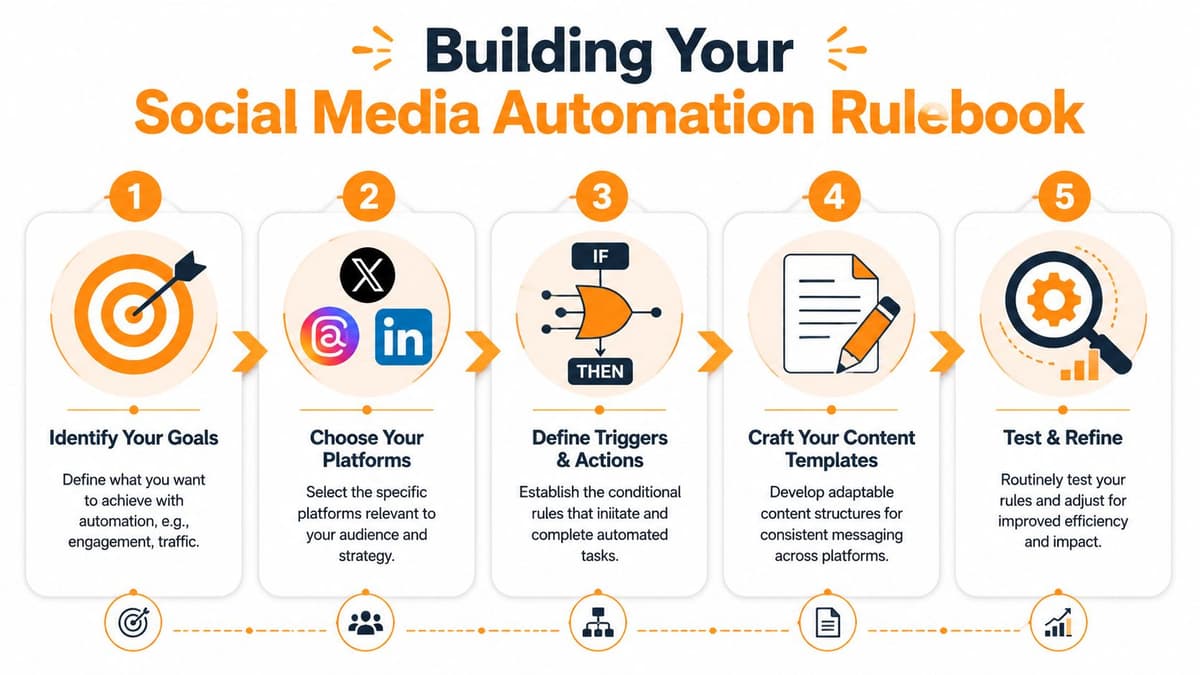
That kind of gain doesn't come from one magic feature. It comes from a rulebook that handles the repetitive publishing decisions you keep making by hand.
Start with mirroring rules
Mirroring is the base layer. A source post appears, and your system decides where it should go and in what form.
The key mistake is setting this to pure duplication. Good mirroring is selective.
A practical mirroring rule might look like this:
- New post appears on source account.
- System checks whether the post includes a link, media, or a reply marker.
- Replies are ignored.
- Standalone posts are mirrored to chosen destinations.
- Platform-specific formatting gets applied before publishing.
That keeps your public content pipeline clean. It also prevents accidental reposting of quick replies or context-specific chatter that only made sense on the original platform.
Add thread logic
Threading is where automation starts feeling intelligent instead of mechanical.
A long post might work as one update on Threads or LinkedIn, but it can require splitting on X. If you don't define this behavior, someone ends up manually rewriting every long-form post after the fact.
Use rules like these:
- Long text to X: Auto-split into a numbered thread.
- Compact source post to Threads: Publish as one post unless it exceeds your readability limit.
- Educational post series: Keep grouped content threaded on text-first platforms.
- Short announcement posts: Avoid unnecessary threading.
The point isn't just character compliance. It's readability. Some ideas lose force when cut badly. A smart rule preserves the order of thought.
A thread should feel written, not chopped.
If you're using a specialized cross-posting workflow, a tool like MicroPoster is well-suited. It can detect new source posts, mirror them across networks such as X, Threads, Bluesky, and Mastodon, and apply rules for threading, hashtag behavior, and formatting adaptations without storing passwords because it uses OAuth.
Handle mentions and hashtags deliberately
Cross-platform mentions break more often than people expect. One handle might exist on X but not on Bluesky, or the naming format may differ enough to create dead references.
Your rulebook should account for that.
- Mention mapping: Replace source handles with the correct destination handles where possible.
- Fallback behavior: If no account exists, keep the brand name in plain text instead of a broken mention.
- Selective hashtags: Add or remove hashtags based on platform norms.
- Link treatment: Preserve clean previews where they matter and avoid clutter where they don't.
A simple example helps. If your source post includes #buildinpublic, you may want that tag on X and Threads but not on LinkedIn. If you're announcing a release, you may want product mentions converted into plain text on networks where exact handles don't line up.
Keep a human override
The most useful rulebooks always leave room for exceptions.
Create a short override checklist:
- Skip automation when the post depends on platform-native context.
- Review before publish when the message includes pricing, launches, or partnerships.
- Post manually when the content depends on a live conversation.
- Pause mirroring when a destination platform is behaving unpredictably.
That last point matters more than people think. A workflow should reduce labor, not remove judgment.
Implement Scheduling and Performance Monitoring
A rulebook handles publishing logic. Scheduling and monitoring determine whether the system stays healthy over time.

The fastest way to ruin an automated workflow is to treat it as "set and forget." Posts keep going out, but nobody checks whether the timing still makes sense, whether mirrored posts feel native, or whether engagement quality is slipping.
Use queues for repeatable content and fixed times for important posts
Not all content should be scheduled the same way.
Queues work well for evergreen content, routine updates, and repeated content categories. Fixed-time scheduling works better for launches, announcements, coordinated campaigns, and posts tied to an event.
A simple operating rhythm works well:
| Scheduling type | Best use |
|---|---|
| Queue-based | Evergreen content, educational posts, recurring themes |
| Fixed-time | Launches, product updates, event-driven posts |
| Manual publish | Sensitive posts, reactive commentary, community replies |
That distinction prevents one common issue. Teams often force all content into a rigid calendar, then wonder why the output feels robotic.
Track signals that reveal quality
Monitoring shouldn't stop at views or likes. You need signs that your automation is preserving relevance.
Look at:
- Conversation quality: Are people replying with actual questions or just ignoring the post?
- Link behavior: Are destination platforms driving useful clicks, not just impressions?
- Platform fit: Does the same mirrored post earn discussion on one platform and silence on another?
- Reply burden: Is automation creating extra cleanup work because posts need context afterward?
If you need a practical reference for interpreting reporting screens, FOMOchat has a helpful guide on how to use your analytics dashboard.
A related workflow pattern is using a dedicated scheduler that supports channel-aware publishing. This overview of a cross-platform social media scheduler is useful if you're comparing how centralized scheduling differs from simple one-click cross-posting.
Run a weekly workflow health check
A lightweight review beats deep analysis done too rarely.
Use a weekly check like this:
- Scan the last batch of mirrored posts.
- Flag anything that looked awkward in a destination feed.
- Review engagement quality, not just totals.
- Adjust queue timing if posts are landing poorly.
- Note any handle, link, or media formatting errors.
A short walkthrough can make this easier to operationalize:
The point isn't to micromanage every post. It's to keep control of the system you built.
Advanced Optimizations with AI and Fail-Safes
Once the basic workflow is stable, AI becomes useful in places many teams initially overlook. Not just drafting content, but refining distribution, triaging responses, and protecting the system from brittle behavior.
Modern tools use AI for more than scheduling. They can route comments, parse performance data, and suggest post timing, leading to up to a 30% lift in engagement and 50% faster response times, according to Socialinsider's overview of social media automation tools.

Use AI for adaptation, not replacement
This is the practical use case I trust most. Let AI reshape a post for a destination platform without changing what you're trying to say.
Useful applications include:
- Tone adjustment: Tighten a post for X, soften it for Threads, or make it more direct for a technical audience.
- Summarization: Turn a longer source update into a shorter version for faster-moving feeds.
- Expansion: Add context when a mirrored post would otherwise feel abrupt on a platform that rewards more explanation.
- Comment clustering: Group common reactions so you can see what people are responding to.
If you're experimenting with drafting support, a simple external option is this AI tool for social media posts. The important part is how you use a generator. Ask it to adapt and refine, not to invent your point of view.
Watch for this: If every platform version sounds equally polished in exactly the same way, you've probably sanded off too much personality.
Build fail-safes before you need them
Most social automation problems aren't dramatic. They're annoying. A post fails because an API call times out. A media attachment doesn't fit a destination format. A mention breaks. A queue publishes something that should have been paused.
A durable workflow includes safeguards:
- Retry logic: Failed publishes should retry automatically instead of disappearing silently.
- Error visibility: You need a clear alert when a mirrored post fails.
- Media handling rules: Resize or swap assets when formats differ.
- Permission safety: Use OAuth-based connections so you don't pass around passwords.
- Pause controls: Make it easy to stop automations during launches, incidents, or platform instability.
The teams that trust automation long term usually have boring infrastructure habits. They don't assume platforms always behave consistently, and they don't assume one successful week means the workflow is bulletproof.
Route insights back into creation
AI gets more valuable when it closes the loop.
If your system can identify recurring questions, weak-performing topics, or comments that keep surfacing after certain posts, that information should shape what you publish next. That turns automation from a distribution layer into a feedback layer.
For founders and indie hackers, this is often more useful than fancy content generation. You already know what you're building. The harder part is spotting how each audience interprets it across different networks. If you're exploring that angle, this piece on an AI social media assistant for indie hackers is a practical companion.
The strongest automated workflows don't just save time. They keep getting smarter about what deserves human attention.
Your Path to Effortless Social Media Growth
To automate social media workflow well, you don't need a giant stack or a complicated approval tree. You need a clear source of truth, a rulebook that respects platform differences, and a habit of checking whether the system still sounds like you.
That's the trade-off. Automation buys reach and consistency. Careless automation drains character from the content. The answer isn't staying manual forever. It's becoming selective about what gets automated and how.
Start smaller than you think.
Pick one source platform. Add one or two destination platforms. Set a few rules for mirroring, threading, and hashtag behavior. Watch the output for a week. Fix whatever feels off. Then expand.
That approach works because it keeps automation grounded in observation instead of wishful thinking. You're not trying to build a perfect machine on day one. You're building a publishing system that removes repetitive labor while preserving intent, voice, and platform fit.
For most creators and founders, that's the advantage that matters. More presence, less copy-paste, and more time to spend on the work that only a human can do.
If you want to test this without rebuilding your whole process, MicroPoster is built for exactly that kind of experiment. You can post from one source account, mirror to multiple text-first platforms with platform-aware formatting, and see whether the workflow fits your voice. There's a 7-day trial, so you can try it with a small setup before committing.