
manage multiple social media accounts
Manage Multiple Social Media Accounts Without the Chaos
Struggling to manage multiple social media accounts? Learn a proven workflow for organizing, creating, and scheduling content to reclaim your time.

If you're trying to manage a presence across X, Bluesky, and Mastodon, you already know the drill. Logging in and out of different apps, tweaking content for each one, and trying to post at the right time—it's a recipe for chaos. The only way to turn this juggling act into an efficient, predictable workflow is by using a central dashboard to plan, create, and schedule everything from one place.
The Reality of Juggling Digital Identities

Let's be honest: if juggling accounts feels overwhelming, that's because it is. You aren’t just posting words and images. You’re navigating completely different platform cultures, fragmented audiences, and unique content expectations. This isn't just a to-do list item; it’s a massive strategic challenge that eats up your time and creative energy.
The core problems hit everyone, from solo creators to entire marketing teams. You run into content creation bottlenecks, the brand voice starts to drift, and you lose hours to the manual grind of copy-pasting and uploading. It's a direct path to burnout, where your social media feels more like a frantic scramble than a controlled strategy.
What's Really Behind the Struggle?
This isn't just a gut feeling; the numbers back it up. By 2025, experts predict there will be 5.4–5.66 billion social media user identities worldwide. On top of that, the average person now interacts with 6.8 different social platforms every single month. That means you have to be in multiple places at once just to keep up.
This multi-platform reality is the source of some very specific pain points. I've seen these trip up countless managers and creators.
Common Challenges in Multi-Account Management
Here’s a breakdown of the primary pain points social media managers face and the strategic solutions that bring order to the chaos.
| Challenge | Impact on Your Workflow | Strategic Solution |
|---|---|---|
| Time Drain | Hours are lost manually posting to each platform, each with its own quirks and peak engagement times. | A central dashboard for bulk scheduling and automated posting. |
| Inconsistent Branding | Maintaining a cohesive voice and visual style is nearly impossible without a single source of truth. | A unified content library and platform-specific repurposing rules. |
| Creative Burnout | The constant pressure to create unique content for every channel from scratch is exhausting. | A system to adapt a single core idea for multiple platforms, not reinvent it each time. |
| Missed Opportunities | Being bogged down in manual tasks means you miss out on timely trends and real community engagement. | Automation that frees you up to focus on conversations and strategy, not just posting. |
These challenges make it clear that simply "trying harder" isn't a viable strategy. You need a better system.
The hurdles are strikingly similar to learning how to manage multiple projects simultaneously; both demand clear strategies for prioritization and a solid system for oversight.
Finding a Path to Control and Consistency
The answer isn't working more hours—it's working smarter with a structured, tool-assisted approach. This is precisely why a centralized dashboard like MicroPoster exists. It’s designed to tackle these exact problems head-on.
Instead of a frantic, reactive scramble, your workflow becomes proactive and controlled. By bringing your content creation, scheduling, and brand management all into one place, you finally get a clear, efficient path to building a powerful and consistent presence across all your accounts.
Build Your Centralized Content Foundation
If you want to manage multiple social media accounts without pulling your hair out, you need a single source of truth. Trying to create content on the fly for each platform is a surefire recipe for inconsistent messaging and, frankly, burnout. The secret is to do the heavy lifting upfront by building a solid foundation.
Think of this as your operational playbook. It's the central hub where your strategy, voice, and assets all live together. With this in place, every post—no matter where it goes—feels intentional and on-brand. Without it, you’re just reacting. With it, you’re executing a plan.
Define Your Core Messaging Pillars
First things first, what are you even going to talk about? Your messaging pillars are the 2-4 foundational themes that your brand owns. These aren't just campaigns; they're the big-picture ideas that define what you stand for and the value you provide.
For example, a SaaS company I worked with landed on these four pillars:
- Productivity Hacks: Simple tips and workflows that make our users' lives easier.
- Industry Insights: Our take on current trends and what's coming next.
- Customer Success Stories: Real-world examples of people getting results with our tool.
- Company Culture: A peek behind the curtain at our team and what we believe in.
Once you have these pillars, content creation gets a whole lot easier. Instead of staring at a blank page, you can just ask, "What can we share today under the 'Industry Insights' pillar?" It's a simple framework that keeps your content focused and gives your audience a reason to follow you.
Establish a Consistent Brand Voice
Your core voice should be consistent, but the way you express it will naturally shift a bit to fit the vibe of X (formerly Twitter), Bluesky, and Mastodon. It’s crucial to document these subtle differences, especially if you’re working with a team. It’s not just about what you say, but how you say it.
Your brand voice guide doesn't need to be a 50-page novel. A simple, practical document that answers a few key questions for each platform will do the trick:
- Tone: Are we more direct and professional on X, but more casual and witty on Bluesky?
- Formatting: Do we use emojis? How many? What's our stance on GIFs and memes?
- Hashtags: Which hashtags do we own? How many do we typically use on a Mastodon post compared to an X post?
- Calls to Action (CTAs): What are our go-to CTAs? (e.g., "Read the full post," "Try it free," "What do you think?")
A clear voice guide is your brand's personality on paper. It empowers anyone on your team to create content that sounds authentic and consistent, eliminating the guesswork that leads to off-brand messaging.
Build a Central Repository for Approved Assets
I can't tell you how much time I've seen wasted just looking for the right version of a logo or an approved product screenshot. An organized, central asset repository solves this problem instantly. This is your digital library for every brand visual you own, and it's absolutely essential to efficiently manage multiple social media accounts.
Keep it simple. A clean folder structure in a cloud service like Google Drive or Dropbox works perfectly.
Example Asset Library Structure:
- Logos & Branding:
- Primary Logos (PNG, SVG)
- Icon/Avatar versions
- Brand Color Codes & Fonts
- Product Visuals:
- High-Resolution Screenshots
- Product GIFs & Short Videos
- UI Icons
- Team & Culture:
- Headshots of key team members
- Office or remote work photos
- Event pictures
- Templates:
- Branded image templates for quotes
- Video title card templates
- Campaign-specific graphic templates
This is where a tool like MicroPoster really shines. You can build this hub directly inside the platform, connecting your asset library, content calendar, and scheduler all in one place. Your approved assets are always just a click away when you’re drafting a post. It removes friction and keeps everything on-brand without slowing you down.
By taking the time to build this centralized foundation, you're not just organizing files; you're building a content engine that will save you countless hours down the road.
Create Once, Publish Everywhere (The Smart Way)
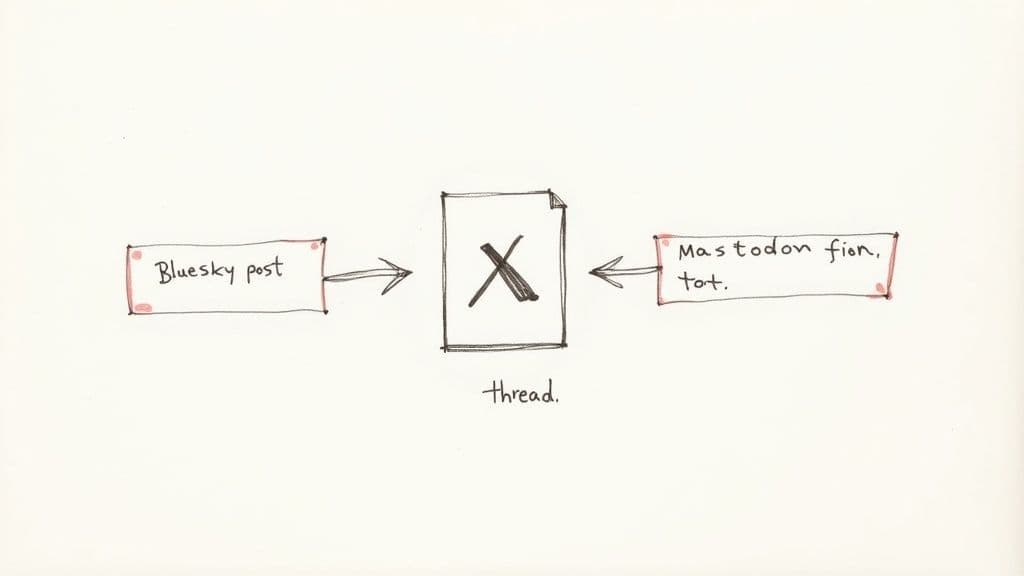
Let's be honest: the single biggest headache when you manage multiple social media accounts is the constant, nagging need for more content. That blank content calendar staring back at you can be completely paralyzing. You know each platform has its own vibe and needs something a little different to get noticed.
The answer isn't to work three times harder. It’s to get smarter. It's about adopting a "create once, publish everywhere" mindset, but with a critical twist. This isn't about mindlessly blasting the same exact message across every network. Real efficiency comes from intelligent repurposing—taking one solid idea and tailoring it to fit the unique culture of each platform.
Start With One Great Idea
Your best ideas deserve more than a single post. Instead of thinking tweet-by-tweet, let's zoom out. Start by developing one valuable "pillar" piece of content. This could be anything from a deep-dive analysis or a customer case study to a detailed how-to guide.
This core piece is now your wellspring. From here, all your platform-specific posts will flow. For example, a single in-depth article like "How AI is Changing the Game for Indie Creators" can easily be sliced and diced into dozens of smaller, bite-sized updates perfect for microblogging. Suddenly, one big creative push fuels an entire week's worth of content.
The goal is to stop reinventing the wheel for every single post. By starting with a strong core idea, you keep your message consistent and free up your brainpower to focus on adapting and engaging, which is where the real magic happens.
The Art of Adapting Your Content
Okay, you've got your pillar content. Now for the fun part. Each microblogging platform is its own little world with its own rules, audience expectations, and technical quirks. A winning strategy respects these differences.
Let’s stick with our "AI for Indie Creators" example to see what this looks like in the real world.
A Real-World Repurposing Workflow:
X (formerly Twitter): This is the perfect place for a detailed, multi-tweet thread. Your pillar content can be broken down into 5-7 tweets, each highlighting a key point. Start with a powerful hook, build your case, and end with a clear call-to-action—maybe a link to the full article or a question to get people talking. The tone here can be sharp, professional, and direct.
Bluesky: I've found Bluesky fosters a more conversational, niche community vibe. Instead of a long thread, pull out one killer statistic or a single provocative quote from your article. Build a short, punchy post around it to spark a conversation. Asking a direct question like, "What's the one AI tool you can't live without right now?" is a fantastic way to get engagement.
Mastodon: With its strong focus on community and accessibility, your Mastodon "toot" should be thoughtful. You could summarize your core idea into one well-written paragraph. Make sure to use relevant hashtags like
#AI,#IndieDev, or#CreatorEconomyso people can find you, and always add descriptive alt text to your images. It’s a small step that makes a huge difference.
Following this approach means you’re not just shouting into the void; you're actively participating in each community in a way that feels natural and authentic.
Let Your Tools Do the Heavy Lifting
Manually tailoring every post for each platform can still eat up a ton of time. This is where a modern social media dashboard becomes your best friend. Tools like MicroPoster are built for exactly this workflow. You can draft your main post and then tweak it for each network, all from the same screen.
Imagine writing your core message, then using an AI assistant to instantly suggest a more casual version for Bluesky or find the best hashtags for Mastodon. Even better, you can use a preview mode to see exactly how your content will look on each platform before it goes live. This is a lifesaver for catching weird formatting issues and making sure your brand always looks polished.
Your Quick-and-Dirty Repurposing Checklist
To keep things consistent, especially if you have a team, a simple checklist is invaluable. It removes the guesswork and makes sure everyone is on the same page.
Platform Adaptation Checklist:
- Tweak the Hook: Is that first sentence going to grab someone scrolling on this specific platform?
- Mind the Character Count: Have you trimmed it to fit X's 280 characters or Mastodon's default 500?
- Format for Skimming: Have you used line breaks to create a thread on X or used bullet points for clarity?
- Customize Your Hashtags: Are these hashtags actually used and relevant to the audience here?
- Refine the CTA: Is your call-to-action a fit? A direct link works well on X, but a simple question might be better for Bluesky.
- Add Alt Text: Did you write a clear description for every single image? No exceptions!
By making this workflow a habit, you turn a daunting task into a manageable—and highly effective—system. You'll pump out more great content, keep your brand voice steady, and save yourself a ton of time every week.
Mastering Your Scheduling and Automation Workflow
This is where the magic happens. Moving from the creative grind to smart execution is how you finally get your time back and manage multiple accounts without burning out. A solid scheduling and automation system transforms your process from a chaotic, daily scramble into a calm, proactive operation.
You'll go from frantically trying to figure out what to post today to being planned out for weeks. The aim isn't just to fill a calendar; it's to build a consistent rhythm for your audience while keeping enough flexibility to jump on trends. We’re letting technology handle the grunt work so we can focus on what matters: actual human connection.
Build Your Content Calendar (Your Strategic Command Center)
Think of your content calendar as more than just a schedule—it’s your strategic command center. A truly effective calendar doesn't just list posts. It gives you a bird's-eye view of your content mix, making sure you're hitting all your messaging pillars and not just posting the same type of thing over and over.
Get your big-ticket items—like campaign launches or major announcements—on the calendar at least two to four weeks ahead. But here's a pro tip: don't schedule every single slot. I always recommend leaving 20-30% of your calendar open. That empty space is your agility buffer. It’s what lets you react to breaking news, join a viral conversation, or share a spontaneous thought that keeps your feed feeling real.
The Game-Changing Power of Batching
Context-switching is the enemy of productivity. Jumping from writing a tweet, to designing a graphic, to scheduling the post creates mental friction that just drains your energy. The antidote is content batching: grouping similar tasks and knocking them out in dedicated, focused sessions.
Instead of the daily piecemeal approach, block out your time. For example:
- Monday Morning: Just write. Get all the copy, captions, and threads done for the entire week.
- Monday Afternoon: Visuals only. Create or find all your images, GIFs, and video clips.
- Tuesday Morning: Schedule everything in one go using your social media tool.
This simple shift from a daily grind to a weekly batch can literally give you hours of your life back. It helps you find your flow, which means you produce better work in less time. Best of all, you're never staring at a blank calendar wondering what to post.
How to Use Automation Without Sounding Like a Robot
Automation is an incredible ally, but it’s a tool that needs a thoughtful hand. The goal is to automate the tasks, not the conversations. A classic mistake is to "set it and forget it," which almost always leads to a robotic, disengaged presence that people can spot a mile away.
There's a real tension here. Recent reports show that while 61% of social media managers are using AI to kill repetitive tasks, 62% of consumers say they have lower trust in content that's fully AI-generated. This is exactly where a platform like MicroPoster shines, by helping you automate responsibly.
For instance, use a queue to automatically fill content gaps with your proven, evergreen posts. This keeps your accounts active even on your busiest days. Another great tactic is setting up recurring posts for timeless content, like a weekly tip or an FAQ. For a deeper dive, check out our guide on how to automate social media posts for more advanced strategies.
Finding Your Posting Sweet Spot
Posting when your audience is actually online is one of the lowest-hanging fruits for boosting engagement. Generic "best times to post" articles are fine for a starting point, but they are no substitute for your own data. Your audience is unique.
Start by experimenting. Post at different times across different days of the week and track what happens. Pay close attention to your engagement metrics—likes, replies, reshares—for at least a month. Most good social media tools, including MicroPoster, have analytics that will pinpoint your specific peak times for you.
You'll start to see patterns. Maybe your B2B followers on X are most active during weekday lunch hours. Or perhaps your creative community on Bluesky really comes alive on Saturday mornings. Use that data to create a custom posting schedule for each platform, and make a point to review and tweak it every quarter. This data-first approach ensures your best content always has the best shot at being seen.
Collaborate with Your Team Without Losing Control
Bringing more people into your social media workflow is a great sign—it means you're growing. But it also opens the door to a new kind of chaos. Suddenly, you're juggling more than just content; you're managing people, permissions, and approvals. The whole game changes. You need to empower your team without losing the reins on your brand's voice and security.
And let’s be honest, this isn't just about preventing a stray off-brand tweet. As your presence expands, so do the risks. With every new account, you're looking at increased exposure and governance headaches. Major platforms have user bases in the billions—as you can see in the latest social media user data from DataReportal—so a single mistake can blow up in a matter of hours. This is exactly why you can't afford to "wing it" with collaboration.
Establish Clear Roles and Permissions
Your first move is to define who does what. Not everyone on your team needs the master key to the kingdom. By creating clear roles, you immediately cut down on the risk of accidental posts, unauthorized DMs, and general confusion. It’s your front line of defense.
Think through the actual tasks your team handles and build roles around them. It could look something like this:
- Content Creator: This person is your idea engine. They can draft posts, pull in visuals, and write copy, but they can't hit publish. Everything they create gets saved as a draft for someone else to look over.
- Editor/Approver: This is typically a marketing lead or brand manager. Their job is to review, tweak, and approve the drafted content, making sure it’s on-point with your brand's voice and current strategy.
- Publisher/Scheduler: Once a post gets the green light, this person takes over. They have the permissions to schedule it for the perfect time or publish it immediately. Often, this is the same person as the Editor.
- Community Manager: This role is all about engagement. They can reply to comments and messages but might not have the ability to post new top-level content.
This is where a tool like MicroPoster really shines. Instead of passing around spreadsheets with passwords (a huge security no-no), you can invite team members directly and assign them one of these pre-defined roles. Everyone gets exactly the access they need to do their job—nothing more, nothing less.
Implement a Simple Approval Workflow
"Approval workflow" can sound intimidatingly corporate, but it doesn't have to be. It can be as simple as a two-step process: Draft → Approve. The entire point is to build a safety net. Getting a second set of eyes on every post before it goes live is the single best way to catch typos, awkward phrasing, and costly mistakes.
Imagine a junior team member drafts a thread for X based on a new blog post. Inside your social media tool, they submit it for review. The social media manager gets a ping, checks the draft, polishes the tone a bit, and clicks 'Approve.' Just like that, the post is ready and gets slotted into the publishing queue.
This isn't about micromanaging. It's about quality control. A solid approval process protects your brand and gives your team the confidence to create freely, knowing there’s a system in place to back them up.
This approach also gives you a clear audit trail. You can see who drafted what and who approved it, which is fantastic for accountability. When you want to manage multiple social media accounts as a team, that clarity becomes essential. If your team is heavily focused on X, our guide on how to manage multiple Twitter accounts dives even deeper into team-specific strategies.
By pairing defined roles with a simple approval process, you turn team collaboration from a potential headache into a real asset. Your team can operate faster and produce more content, all while you get the peace of mind that comes from knowing your brand is always presented professionally.
Your Multi-Account Management Action Plan
Okay, let's bring all these pieces together into a practical action plan. Think of this as your go-to checklist for keeping the entire system running smoothly, so you can manage your accounts on X, Bluesky, and Mastodon without missing a beat.
Content Creation and Planning
Everything starts with a solid foundation. You can't build a great content engine on a shaky base. That means taking a look at your content pillars and brand voice guide at least once a quarter. Things change, and your strategy needs to keep up.
Before you even think about writing a post, head straight to your central idea hub. Seriously, this one habit will save you from the frantic, last-minute scramble for content and ensures your messaging stays consistent everywhere.
- Start with a Core Idea: Always begin with one strong piece of pillar content. From there, you can break it down into smaller, platform-specific posts.
- Adapt, Don't Just Copy-Paste: This is where your repurposing rules are crucial. Tweak the tone, adjust the format, and use the right hashtags for each network. A post for X shouldn't look identical to a post for Mastodon.
- Use Your Asset Library: Stick to approved visuals from your central repository. It’s the simplest way to keep your brand looking sharp and consistent.
Scheduling and Collaboration
Once your content is drafted and tailored, the focus shifts to getting it out the door efficiently. A seamless workflow here is what buys back your time and acts as a safety net against embarrassing mistakes.
It’s also smart to stay current on general social media best practices, as they provide the grounding for any successful multi-account strategy.
A system is only as strong as its weakest link. Taking a few minutes to audit your scheduling and approval process regularly can stop a small oversight from becoming a major brand headache.
When you're working with a team, clarity is everything. This simple workflow is a great way to visualize how to keep things under control: define who does what, get a second pair of eyes on content, and manage access properly.
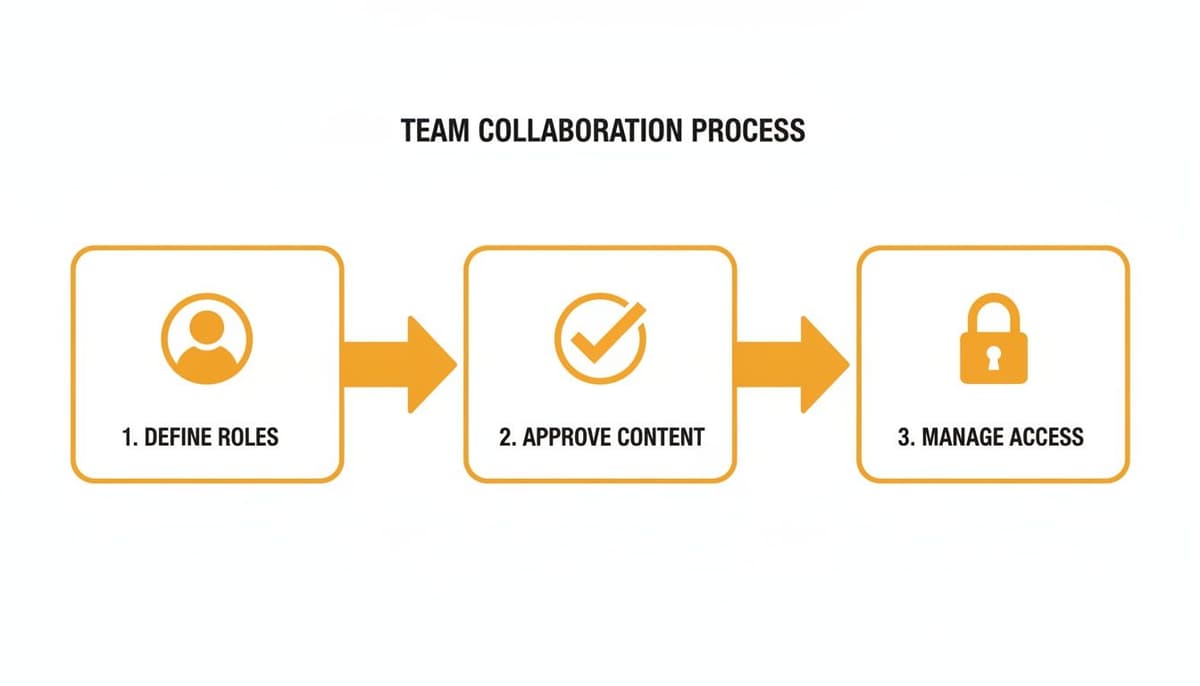
This three-step loop is your best defense against off-brand posts, typos, or internal confusion.
Your Final Checklist
Keep this list handy and run through it weekly. It'll keep you on track.
- Glance at the Calendar: Are there any gaps? Is there a good mix of content from your different pillars?
- Audit Team Roles: Do a quick check to make sure user permissions in a tool like MicroPoster are still correct. This is especially important if team members have changed roles.
- Check the Numbers: Spend 15 minutes reviewing last week’s post-performance. What worked? What didn't? Let that data inform what you create next.
- Schedule Engagement Time: Don't just post and ghost. Block out time in your calendar specifically for replying to comments and messages. It makes a huge difference.
Still Have Questions? Let's Clear Things Up.
Juggling different platforms always brings up a few tricky questions. If you're managing a handful of microblogging accounts, you've probably wondered about some of these yourself. Here are the answers I give most often to creators and brand managers.
How Can I Keep Each Platform's Voice Unique Without Tripling My Workload?
This is the big one, isn't it? The secret is to adapt, not to start from scratch every single time. You begin with one core message or idea, then you tweak its flavor for each network.
Think of it this way: you share a key industry insight. On X, that might become a concise, professional thread. Over on Bluesky, you could rephrase it as a more laid-back, conversational post that ends with a question to get people talking. For Mastodon, the focus shifts to community and accessibility, so you’d make sure to add detailed image descriptions and use relevant hashtags.
This is exactly where a tool like MicroPoster becomes your best friend. You can write your main post and then, right there in the same window, make those little platform-specific edits. It's a massive time-saver.
How Many Accounts Is Too Many?
Honestly, there's no magic number here. It all comes down to your team's bandwidth. It is so much better to be active and engaged on 3-4 key platforms where your audience actually lives than to be a ghost on eight different ones.
Your capacity grows when you have the right systems in place. Once you bring all your content creation and scheduling into one spot, a small team can easily handle five or more accounts with the same effort it used to take to manage two or three by hand.
The real goal is presence with purpose. Don't stretch yourself so thin that you can't even respond to comments. When it comes to building a real community, quality will always crush quantity.
Can I Just Copy and Paste My Hashtags Everywhere?
Please don't! This is a super common mistake, but it really hurts your reach because hashtag culture is completely different from one platform to the next.
- On X: The best strategy is usually a mix of broad, high-volume tags with a few smaller, niche ones to get discovered.
- On Bluesky: It's all about custom feeds created by the community. These are the new hashtags, and you need to know which ones your audience follows.
- On Mastodon: Hashtags are the primary way people find new content. Using them thoughtfully is crucial for joining conversations and being seen.
Take a few minutes to research what's trending in your niche on each platform. It's a small step that makes a huge difference.
Ready to finally get your microblogging under control and build a powerful, consistent presence everywhere? MicroPoster pulls your planning, creating, and scheduling into one simple dashboard. Start your free 7-day trial today and feel the chaos disappear.


