
manage multiple twitter accounts
How to Manage Multiple Twitter Accounts and Grow Your Presence
Master a proven workflow to manage multiple Twitter accounts efficiently. Learn setup, automation, security, and team collaboration to scale your presence.

If you've ever felt like your brand's main X (formerly Twitter) account is trying to be everything to everyone, you're not alone. Juggling multiple accounts might sound like a headache, but for many successful brands and creators, it's the secret to cutting through the noise.
This strategy is all about segmentation. You can tailor your messaging for different products, regions, or even specific customer needs, which helps you move beyond a generic, one-size-fits-all approach that rarely connects with anyone.
Why Managing Multiple X Accounts Is a Game-Changer
The core idea is simple: different audiences require different conversations. A single, monolithic account can’t possibly speak to every follower’s unique interests effectively.
Think about a global software company. Their main corporate handle is perfect for big announcements and industry-level commentary. But they can get so much more specific by also running @CompanyName_Support for troubleshooting and @CompanyName_Careers for hiring. This way, users follow the accounts that give them exactly what they need, without having to filter through irrelevant posts.
The same logic applies to agencies managing separate accounts for each client, each with its own distinct voice and audience.
Target Niche Communities to Boost Engagement
Breaking out your accounts allows you to get hyper-focused with your messaging. A fashion brand could have a profile for its US market and another for Japan, posting in the local language and referencing culturally relevant trends. A sporting goods company might split its audience into @Brand_Basketball and @Brand_Soccer, speaking directly to the unique passions of each fanbase.
And this strategy really works. Top brands using a multi-account approach have achieved a median engagement rate of 0.08%—a massive 433% higher than the platform-wide average of 0.015%. By zeroing in on specific communities, these brands build much stronger connections. You can find more data on how multi-account strategies impact X engagement in recent studies.
Of course, it’s not all smooth sailing. The biggest hurdle is often maintaining a consistent brand voice across all your profiles. There’s also the very real operational challenge of creating content, scheduling posts, and managing communities without burning out your team.
Key Takeaway: The goal of managing multiple X accounts isn't just to broadcast more—it's to create focused, relevant conversations that build stronger, more engaged communities around specific interests or needs.
Before you jump in, it's smart to weigh the pros and cons. This quick comparison table breaks down what you stand to gain versus the challenges you'll need to prepare for.
Core Benefits vs. Inherent Challenges of a Multi-Account Strategy
| Strategic Benefit | Potential Challenge to Overcome |
|---|---|
| Audience Segmentation: Deliver highly targeted content to specific demographics, interests, or regions. | Brand Consistency: Ensuring a unified brand voice and messaging across all profiles. |
| Enhanced Community Management: Dedicate accounts to specific functions like customer support or recruiting. | Resource Drain: Increased demand on time and resources for content creation and monitoring. |
| Increased Market Reach: Engage with global audiences in their native languages and cultural contexts. | Risk of Content Dilution: Spreading efforts too thin can weaken the impact of each account. |
Ultimately, a multi-account strategy is a powerful tool, but it requires a solid plan to manage the increased workload and maintain brand integrity.
Building a Secure Foundation for Your X Accounts
Before you even think about content calendars and engagement metrics, you need to lock down your accounts. I've seen too many people jump straight into posting, only to face a massive headache later when a security issue pops up. Getting the foundation right from the start is non-negotiable; it's your first line of defense and the only way to manage multiple accounts without constant worry.
It all starts with the basics: creating distinct, memorable handles and profiles. Each account needs its own clear purpose that speaks to a specific audience. Think about a tech company, for example. They might have @BrandName for official news, @BrandName_Support for helping customers, and maybe @BrandName_Culture for a behind-the-scenes look. Each one needs a unique bio, header image, and voice.
Nailing Down Unique and Secure Credentials
This is the part you absolutely cannot skip. I know it's tempting to reuse passwords, but that convenience is a huge vulnerability. If just one account is compromised, a hacker could potentially get into your entire network. It's just not worth the risk.
Every single account must have its own unique and complex password. A good password manager is your best friend here. It can generate and store incredibly strong, randomized passwords for you, so you don't have to remember a dozen different complex strings of characters. This one simple step drastically cuts down your risk.
On top of that, two-factor authentication (2FA) isn't optional—it's mandatory. 2FA adds that crucial second layer of security. Even if someone manages to steal a password, they can't log in without the code from your phone or authenticator app.
A Pro Tip From Experience: Always use an authenticator app like Google Authenticator or Authy for 2FA instead of SMS texts. SMS is vulnerable to "SIM-swapping" attacks, where a scammer tricks your cell provider into porting your number to their phone. Authenticator apps are a much safer bet for protecting your accounts.
Implementing Secure Team Access and Permissions
Stop sharing logins in spreadsheets or Slack messages. Seriously. As your team grows, you need a smart way to give people access without handing over the master keys to the kingdom. You need an audit trail—a clear record of who did what and when.
This is exactly why dedicated social media management tools are so valuable. A platform like MicroPoster is built for this. It lets you assign very specific, granular permissions to your team members. For instance, you can let a content creator draft and schedule posts without ever giving them access to direct messages or the ability to change the profile bio.
Here’s a practical way you could structure access for different roles:
- Content Creator: Can draft, schedule, and publish posts. That’s it. No peeking at DMs or touching account settings.
- Community Manager: Their job is to engage. They can reply to mentions, interact with followers, and handle DMs, but they can't change passwords or other core settings.
- Account Admin: This role has full access to everything, including security and team permissions. You should limit this to just one or two highly trusted people.
This strategy does more than just boost security; it also makes everyone's job clearer. It defines responsibilities and prevents both innocent mistakes and intentional sabotage. Below is a look at the familiar branding you're working hard to protect—a reminder of what's at stake.

Properly securing each account is how you ensure your brand's integrity stays solid across the entire platform.
By separating duties and restricting access based on roles, you build a secure framework that can grow with your business. It’s how you can confidently scale your X presence without constantly looking over your shoulder.
Streamlining Your Content Planning and Automation
Alright, with your accounts locked down and secure, the real work begins. Moving from setup to execution is where most people get bogged down. Managing a handful of X accounts isn't just about security; it's about building a content machine that runs smoothly without burning you or your team out. This is where we stop posting on a whim and start building a real system.
The heart of this system is a master content calendar. And no, I don't just mean a spreadsheet with tweet ideas. Think of it as your strategic roadmap. I’ve seen agencies map out an entire quarter, assigning specific monthly themes to each client's account. For example, a SaaS client might get "Productivity Tips" in January and "Customer Success Stories" in February. This high-level view keeps every account pushing toward the same big-picture goals.
From that calendar, you'll want to define your content pillars—the core topics each account will own. A tech startup I worked with had pillars like "Industry News," "Product Updates," and "Behind the Scenes," while a local restaurant’s might be "Daily Specials," "Meet the Staff," and "Community Events." It's simple, but it's the secret to staying on-brand.
Creating a Cohesive Multi-Account Content Strategy
Once you have those pillars, you can maintain a consistent voice for each brand while still tailoring the content to its specific audience. The tech startup’s "Industry News" posts are going to feel a lot different from the restaurant’s "Daily Specials" updates, and that's exactly the point.
This structured approach also helps you avoid the classic mistake of blasting the exact same post across all your profiles at once. Nothing screams "lazy marketing" louder. Instead, take one core piece of content—say, a new blog post—and create unique, tailored tweets for each account that drive traffic back to it.
Here’s how that might look in practice:
- Main Brand Account: A tweet announcing the new blog post with a broad, industry-focused hook.
- Support Account: A tweet that pulls out a specific problem-solving tip from the article.
- Founder’s Personal Account: A post sharing a personal anecdote or insight related to the blog's topic.
Before you can nail your content strategy, though, you need a secure foundation. This simple workflow shows how crucial that initial setup is.
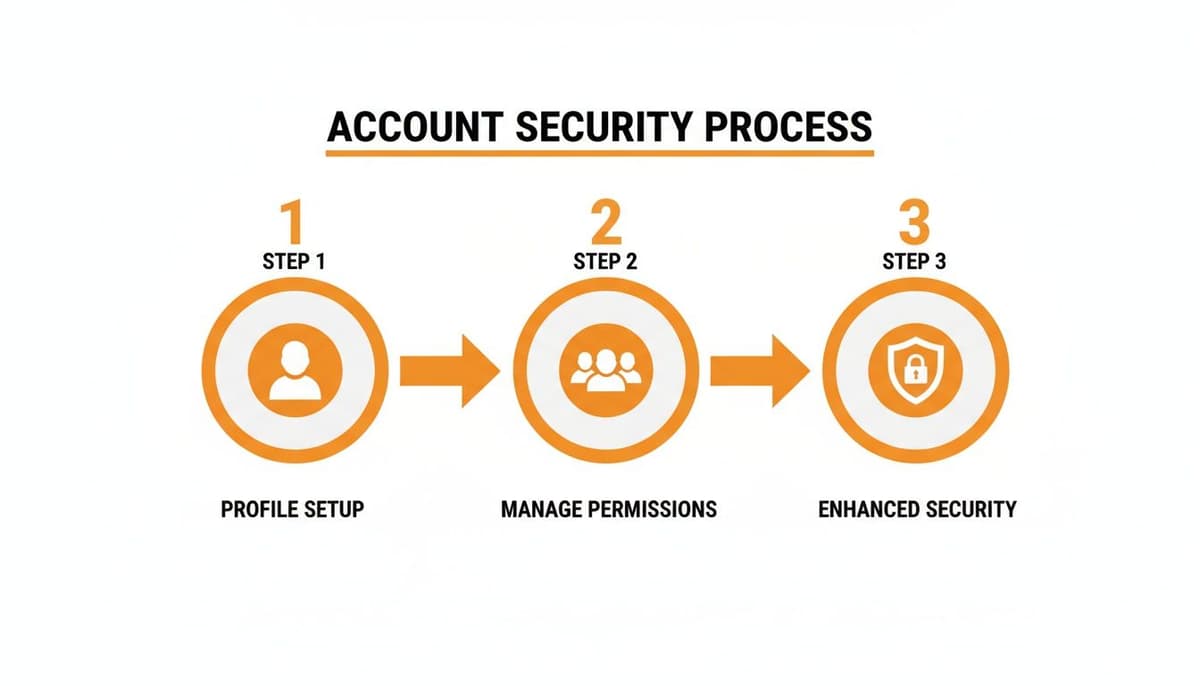
Getting this right—from distinct profiles to team permissions and extra security layers—is the bedrock of any successful multi-account operation.
Leveraging Automation for Maximum Efficiency
With a solid content plan on paper, automation becomes your best friend. Seriously, trying to post manually across several accounts every day is a fast track to burnout and sloppy mistakes. You need a tool to schedule content in advance, keeping your accounts active and engaging even when you're offline.
Key Insight: Smart automation isn't about setting and forgetting. It’s about handling the grunt work—the scheduling, the repetitive posts—so you can free up your time for what really matters: genuine, in-the-moment engagement with your audience.
This is exactly what modern social media tools like MicroPoster are designed for. You can bulk-schedule hundreds of tweets in one go, filling your content calendar for weeks or even months in a single afternoon. For agencies and social media managers juggling multiple brands, this isn't a luxury; it's a necessity. A big part of this is learning how to automate social media posts without sounding like a robot.
Another pro-level technique is to build an evergreen content queue. This is basically a library of your greatest hits—your best-performing, non-time-sensitive content—that your scheduling tool automatically recycles at intervals you set. It’s a brilliant way to ensure new followers see your best stuff and to keep your feeds active during slower content periods. For those who need more advanced workflows, leveraging the Twitter API can open up a whole new world of custom content and management solutions.
Manual vs. Automated Posting Across Multiple Accounts
Still on the fence about using a tool? The difference between manually juggling accounts and using an automation platform is night and day. Let’s break it down.
| Feature | Manual Posting | Automated Management Tool |
|---|---|---|
| Time Investment | High; requires daily, real-time effort for each account. | Low; schedule weeks of content in a single session. |
| Consistency | Prone to gaps, missed posts, and inconsistent timing. | Guaranteed consistent posting at optimal times. |
| Scalability | Difficult; becomes unmanageable with more than 2-3 accounts. | Easy; manage dozens of accounts from one dashboard. |
| Error Potential | High risk of posting to the wrong account or making typos. | Low; review and edit all posts in one place before they go live. |
| Content Recycling | Manual and tedious; requires finding and reposting old content. | Simple; evergreen queues automate the entire process. |
Ultimately, while manual posting gives you a sense of direct control, it's simply not a sustainable model for managing multiple accounts effectively. Automation gives you back your time and delivers far more reliable results.
From Strategy to Execution
The data from X itself tells a compelling story. A tiny fraction of power users drives almost all the conversation on the platform—a mere 10% of users produce 92% of all tweets. This group is dominated by brands and individuals who have mastered managing multiple accounts.
And here’s something interesting: the most effective of these brands often post less frequently, with some cutting post volume by 34.7%. They focus on quality over quantity, using their multi-account strategy to target niche communities with carefully coordinated, high-value content.
By bringing together a master calendar, clear content pillars, and smart automation, you create a powerful, efficient system. It’s this structure that turns the chaos of managing multiple accounts into a streamlined process that drives real results with far less manual effort.
Managing Engagement Without Losing Your Mind
Once your content is flowing, a new problem emerges: the constant buzz of notifications. If you're still manually logging in and out of different accounts just to check DMs, mentions, and replies, you're on a fast track to burnout. Important conversations will inevitably get lost in the shuffle. It's time to switch from a reactive scramble to a proactive strategy.
The answer is a unified social inbox. This isn't just a nice-to-have; it's a core feature of any serious social media management tool. Forget juggling a dozen separate notification streams. A unified inbox pulls every single interaction from all your connected profiles into one clean, consolidated dashboard. Think of it as the mission control for your entire community.
Taming the Notification Chaos
With everything streamlined into one feed, you can finally stop playing defense and start managing conversations with intent. This is where a smart workflow makes all the difference. You're no longer just replying—you're sorting, assigning, and archiving interactions with purpose.
Picture a social media manager for a retail brand. They’re juggling the main company account, a separate customer service handle, and the CEO's personal brand profile. A unified inbox lets them triage incoming messages like a pro:
- Customer Complaint: A frustrated mention on the main brand account is immediately assigned to the customer service specialist.
- Glowing Review: A positive reply to the CEO's latest post gets flagged and passed to the marketing team to be repurposed as social proof.
- Simple Question: A quick query about store hours is answered directly from the inbox in minutes, making the brand look responsive and helpful.
This kind of organized approach means no message ever gets missed and the right person handles each interaction. It transforms a chaotic mess of notifications into a clear, actionable to-do list for your team.
From Reactive Monitoring to Proactive Outreach
Real engagement isn't just about damage control or answering direct questions. The real growth happens when you jump into conversations that are relevant to your brand, even when you haven't been tagged. This is where you need to set up keyword and hashtag monitoring.
By tracking terms related to your industry, your competitors, or common customer pain points, you can uncover hidden opportunities to connect. For example, a B2B software company could monitor phrases like "looking for CRM recommendations" or "frustrated with my current software." Entering these conversations with genuinely helpful advice—not a pushy sales pitch—builds incredible goodwill and positions your brand as an expert.
This proactive approach is a massive growth lever. Brands that get this right often see 15-25% monthly follower growth. When you combine coordinated posting with proactive monitoring, you can generate 35% more daily interactions, which makes sense when you realize 75% of users have engaged with brands on the platform.
To make sure your efforts are actually working, you need to build out a winning social media engagement strategy that guides your team.
Creating a System for Sustainable Engagement
A sustainable workflow is key to preventing team burnout. This is exactly why tools like MicroPoster exist—to streamline this entire process and turn engagement from a daily chore into a strategic advantage. It’s not just about clearing your notifications; it's about building real relationships, but at scale.
We cover more tactics for this in our guide on how to increase Twitter engagement.
By combining a unified inbox for reactive management with smart keyword tracking for proactive outreach, you build a truly comprehensive system. This dual approach is how you effectively manage multiple Twitter accounts, ensuring you're not just on the platform, but actively building a community and driving conversations that actually matter.
Measuring Success with Unified Analytics
Let's be honest: you can't improve what you don't measure. After all the work of setting up and creating content, this is where the real strategy begins. The problem is, trying to track performance by hopping between individual X analytics tabs is a recipe for frustration. It's impossible to see the big picture that way.

The goal here is to get all your data into one consolidated view. You need a dashboard that tells a clear story about what’s working, what's falling flat, and where you should be putting your energy.
Identifying the Metrics That Actually Matter
When you’re juggling multiple accounts, vanity metrics can be seriously misleading. A huge follower jump on one account could easily distract you from cratering engagement on another. To get a real feel for performance, you have to track metrics that you can compare side-by-side.
These are the data points I always keep an eye on for every account in a portfolio:
- Follower Growth Rate: Don't just look at the raw number. Calculate the percentage of growth each month. This levels the playing field, so a small but fast-growing account can be fairly compared to a larger, more established one.
- Impression Volume: This is your reach. Simply, how many eyeballs saw your posts? Tracking this across all accounts shows you which profiles are casting the widest net.
- Engagement Rate: This is the holy grail. It’s the percentage of people who saw your post and actually did something—liked, replied, reposted, or clicked. A high engagement rate is the clearest sign that your content is hitting the mark, no matter the audience size.
- Top-Performing Content: Each week, pinpoint the single best post from each account. This is a goldmine for understanding what topics, tones, and formats are winning with each distinct audience.
This data-driven focus is more critical than ever, especially given the platform's volatility. X's daily active users have been on a rollercoaster, peaking at 259.4 million before seeing significant drops, including a 15.2% YoY dip at one point. In such an unpredictable environment, solid analytics are your only reliable guide. You can discover more insights about X's user statistics and their impact to see just how much things can change.
Creating a Consolidated Performance Report
The real magic happens when you pull all this data together. A unified report gives you that crucial bird's-eye view, turning a mess of numbers into something you can actually use. This is where a tool like MicroPoster becomes a lifesaver, generating these reports automatically and saving you from hours of spreadsheet hell.
Think of a monthly consolidated report as your strategic compass. It should put follower growth, impressions, and engagement rates for every single account on one screen. This lets you spot patterns and make comparisons in an instant.
Picture this: you manage the main brand account, a customer support channel, and the CEO's personal brand. Your unified report might show that while the main brand has the most followers, the CEO's account has a 2x higher engagement rate. That single insight is invaluable. It tells you the personal, authentic voice is connecting on a deeper level, giving you a clear signal to test that style on your main brand account.
Turning Insights into Action
This report isn't just a scorecard to glance at; it's a tool for making decisions. Every month, you and your team should sit down with the consolidated data and ask some tough questions.
- Which account is killing it on engagement, and what can we learn from it?
- Is there a content style that’s working on one account that we could adapt for another?
- Which account is lagging, and what’s our game plan to turn it around next month?
Making this a regular habit transforms analytics from a chore into the engine of your strategy. By consistently measuring, comparing, and adapting, you ensure your efforts are always focused on what delivers the biggest impact across your entire X portfolio.
Your Questions, Answered
Juggling several X accounts can feel like you're walking a tightrope, trying to balance platform rules with your own goals. Let's clear up some of the most common questions that pop up for anyone scaling their presence on the platform.
Is it Okay to Manage Multiple X Accounts?
Yes, absolutely. X (the platform we all still mostly call Twitter) is perfectly fine with you owning and managing multiple accounts. Their rules are really focused on stopping spam and manipulative behavior, not on preventing legitimate use cases.
The key is making sure each account has its own distinct purpose. For example, you might have separate accounts for different parts of your business, one for your personal brand and another for your professional one, or different profiles for marketing in various regions. As long as you aren't using one account to artificially boost the engagement of another, you're in the clear. A good management tool is your best bet for keeping everything organized and compliant.
What's the Best Tool for Juggling Multiple X Accounts?
Honestly, the "best" tool really comes down to your specific needs, the size of your team, and what your budget looks for. That said, the truly great platforms all have a few core features in common that separate the basic schedulers from real command centers.
When you're shopping around, here's what you should be looking for:
- A Unified Inbox: This is a game-changer. It pulls all DMs, replies, and mentions from every single account into one streamlined feed. No more tab-switching madness.
- Smart Content Scheduling: You need more than just a basic scheduler. Look for things like bulk uploads, content queues, and smart suggestions for the best times to post.
- Team Collaboration Features: If you're not a one-person show, the ability to set specific roles and permissions (like publisher, editor, or analyst) is crucial for security and smooth workflows.
- Consolidated Analytics: You need to see the big picture. A good tool will let you pull reports that compare performance across all your accounts in a single dashboard.
Big names like Sprout Social and Hootsuite are popular in the enterprise space. But for creators and agencies who want a more focused experience, MicroPoster offers a suite built from the ground up for planning content and tracking performance on microblogging platforms. Whatever you choose, make sure it offers secure login management so you never have to hand out passwords.
How Do I Keep My Accounts from Getting Suspended?
This is the big one, isn't it? Thankfully, the answer is pretty straightforward. The golden rule to avoid getting flagged for platform manipulation is to never have your accounts interact with each other.
That means no using Account B to like, retweet, or reply to a post from Account A just to make it look more popular. That's a huge red flag for X's algorithms and the fastest way to get into trouble.
Also, try to avoid blasting the exact same content across all your accounts at the exact same time. It looks robotic and screams spam. Instead, take a moment to tweak the message for each account's unique audience, or at the very least, stagger the post times.
My Pro Tip: When you schedule posts, use your management tool to set slightly different send times—even just a few minutes apart. If you can, tweak the copy for each profile. This small step signals to the platform that there's a real person with a thoughtful strategy behind the curtain, not just a spam bot.
Can I Use the Same Phone Number for All My X Accounts?
You sure can. X's current policy lets you link a single phone number to up to 10 different accounts. This is super helpful for security verification and makes the setup process much smoother.
When you add your number to a new account, X will just send a quick confirmation. It's a simple way to get two-factor authentication (2FA) set up across your entire account portfolio using a device you already trust.
But here's a word of caution: if your phone number ever gets compromised (think SIM-swapping attacks), every account linked to it becomes vulnerable. This is why having strong, unique passwords for every single account is still your most important line of defense.
Ready to manage your accounts without all the chaos? MicroPoster gives you a unified content studio, advanced scheduling, and powerful automation tools built specifically for creators and brands on X. Stop juggling a dozen browser tabs and start building your audience the smart way. Start your free 7-day trial of MicroPoster today.


