content calendar management
Content Calendar Management: A Founder's Automation
Master content calendar management with our founder's automation framework. Optimize your strategy & streamline operations for 2026 success.
You're probably doing some version of this right now. A post idea hits while you're shipping product, replying to customers, or fixing something that broke. You jot it in Notes, forget where you saved it, publish two rushed posts three days later, then disappear for a week because the work behind the content work is what eats your time.
That's what content chaos looks like on a small team. It isn't a lack of ideas. It's a lack of management. The problem usually isn't creativity. The problem is that publishing depends on memory, mood, and whatever feels urgent that day.
Good content calendar management fixes that. Not by turning your brand into a robot, but by giving your content a system that survives busy weeks, product launches, and context switching.
Beyond the Spreadsheet Why Your Content Needs a System
A spreadsheet can hold dates. It can't run an operation.
Founders usually start with a simple sheet because it's fast. That works for a while. Then the cracks show up. Drafts live in one place, assets in another, ideas in a chat thread, approvals in DMs, and publishing happens only when someone remembers to do it.
That's why a content calendar should be treated as your content operating system, not just a posting schedule. It's the place where strategy, production, distribution, and review connect. If those pieces stay separate, content becomes reactive in the worst way. You're always catching up and rarely building momentum.
The payoff for getting this right is real. Brands that maintain a documented content calendar experience a 40% higher engagement rate on social media platforms compared to those that operate without one, and 78% of businesses report their content calendars are now integrated with AI tools according to these 2026 content calendar statistics.
What a system changes
When a team moves from ad hoc posting to actual content calendar management, three things usually improve fast:
- Clarity: Everyone knows what's publishing, where it's going, and what it's supposed to do.
- Consistency: Content stops disappearing during busy weeks.
- Reuse: One idea can turn into multiple assets instead of dying as a single post.
Practical rule: If your content process depends on remembering what to post next, you don't have a system yet.
A proper system also lowers decision fatigue. You stop asking, “What should we post today?” and start asking better questions. “Which pillar are we underweight on?” “What format is easiest to ship this week?” “Which posts deserve repurposing?”
Why founders resist this
A lot of small teams avoid structure because they think structure kills spontaneity. In practice, the opposite is true. When the basics are planned, you get more room for timely posts, better writing, and fewer last-minute scrambles.
The founder mindset often creates another problem. You're acting as strategist, writer, editor, designer, reviewer, and publisher, but none of those roles are defined. So work piles up in your head. A system gets that work out of your head and into a repeatable flow.
Here's the shift that matters. Stop thinking of a calendar as a list of future obligations. Start thinking of it as the mechanism that keeps your voice active when your attention is somewhere else.
Designing Your Content's Operating System
You wouldn't build a house by dragging furniture onto an empty lot. Content works the same way. Before you fill a calendar, you need a blueprint.
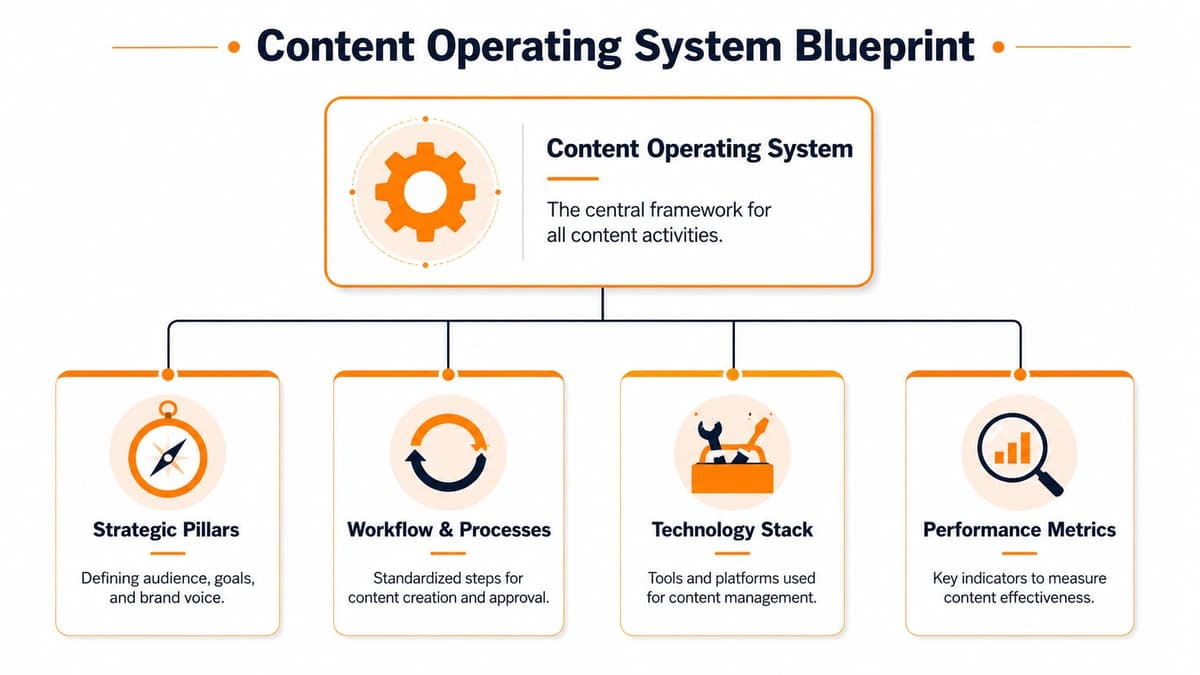
Teams that treat content calendar management as a strategic layer tend to perform differently from teams that only track dates. There's a strong correlation between calendar adoption and marketing success: 69% of businesses with a successful content marketing approach use content calendars, and 64% of the most successful companies have a documented content strategy, compared to only 14% of the least successful marketers, according to Best Case Leads' breakdown of content calendar strategy.
Start with four operating pillars
A workable content system needs four parts. If one is missing, the calendar turns into a graveyard of half-finished ideas.
Strategic pillars
Pick a small set of recurring themes tied to your business. For a SaaS founder, that might be product education, customer problems, founder POV, and social proof. For a creator, it could be tutorials, opinions, behind the scenes, and offers.
Each pillar should answer a clear business question. Are you trying to build trust, explain a category, generate demos, or retain attention between launches? If a pillar doesn't support a business outcome, it doesn't belong in the system.
Workflow and process
Most small teams often struggle at this stage. They know what they want to say, but not how a post moves from idea to published asset.
Use simple stages such as:
- Idea captured
- Drafted
- Reviewed
- Scheduled
- Published
- Measured
That's enough for most founder-led teams. More stages usually create drag unless you have multiple contributors.
A clean workflow beats a clever one. If your statuses need explaining every week, they're too complicated.
Technology stack
Your tools should reduce handoffs, not create them. A spreadsheet can still work if it's your single source of truth. But once assets, approvals, and distribution get messy, you need something with better structure.
If you collect research from many places, AI bookmark manager citations is a useful reference for organizing sources in a way that makes future content easier to retrieve and verify.
Performance metrics
Don't attach metrics as an afterthought. Decide now what counts as a win. For some teams, it's replies and saves. For others, it's clicks, signups, or qualified conversations.
Define roles, even if you work alone
Solo founders still need role separation. You may be one person, but the work improves when you switch hats on purpose.
- Strategist mode: chooses themes, goals, and channels
- Creator mode: writes and records without editing mid-flow
- Editor mode: tightens hooks, removes fluff, checks clarity
- Publisher mode: schedules, formats, and confirms delivery
- Analyst mode: reviews what earned attention and what stalled
That separation sounds small, but it prevents one of the most common failures in content calendar management. Doing every function at once.
Building Your Master Content Calendar Template
A useful calendar doesn't just tell you when something goes live. It tells you what the content is, why it exists, where the asset lives, and what's blocking it.
That's why the best template is boring in the right way. It's clear, centralized, and hard to misread. Good content calendar management depends on that kind of plainness because consistency comes from repeatable structure, not clever formatting.
Research cited by 5day.io's content calendar management guide notes that businesses that post consistently across platforms see a 35% higher engagement rate compared to those that don't. A strong template makes that consistency possible because it removes guesswork from the publishing routine.
Use one master table
Here's a simple version that works for founders and small teams.
| Post Date | Platform | Content Pillar | Headline/Hook | Content Body | Visual Asset (Link) | CTA | Status (Draft, Scheduled, Published) |
|---|---|---|---|---|---|---|---|
This isn't fancy. That's the point.
What each column actually does
Post Date
This is the execution anchor. Without it, everything feels important and nothing ships. Keep one planned date, not a date range.
Platform
Write the destination clearly. X, LinkedIn, Threads, Bluesky, newsletter, blog, or TikTok. Don't use a vague label like “social” because each platform has a different publishing shape.
Content Pillar
This keeps your output balanced over time. If all your posts fall under product updates, your audience starts hearing one note. The pillar field helps you spot gaps before the month is over.
Headline or Hook
This is the scannable promise of the post. For short-form content, it might be the first line. For long-form, it could be the working title. A weak hook usually signals a weak angle.
Content Body
Store the actual draft or link to the draft. Don't make people hunt through docs, notes apps, and chat threads. The calendar should point directly to the current version.
Visual Asset link
Every asset needs a home. Put the design file, image folder, thumbnail, or video draft here. Missing assets are one of the most common reasons posts slip.
CTA
A post without a CTA often becomes content for content's sake. The CTA doesn't always need to sell. It can ask for a reply, direct readers to a feature, invite a signup, or push to a waitlist.
Status
Use only a few statuses. The more labels you create, the less useful they become. “Draft,” “Scheduled,” and “Published” cover most needs. If you need an extra checkpoint, add “Review” and stop there.
Your calendar should answer three questions in under ten seconds. What is this, where is it going, and what needs to happen next?
Keep the template centralized
One calendar. One owner. One version people trust.
If you keep your content plan in multiple docs, you'll spend more time reconciling versions than publishing. Many teams then outgrow basic sheets and start looking at stronger workflows. For a practical comparison of calendar structures and planning workflows, Raven SEO's content planning guide is a useful companion.
The template isn't the strategy. It's the container that keeps the strategy usable every day.
Balancing Planned Content with Reactive Moments
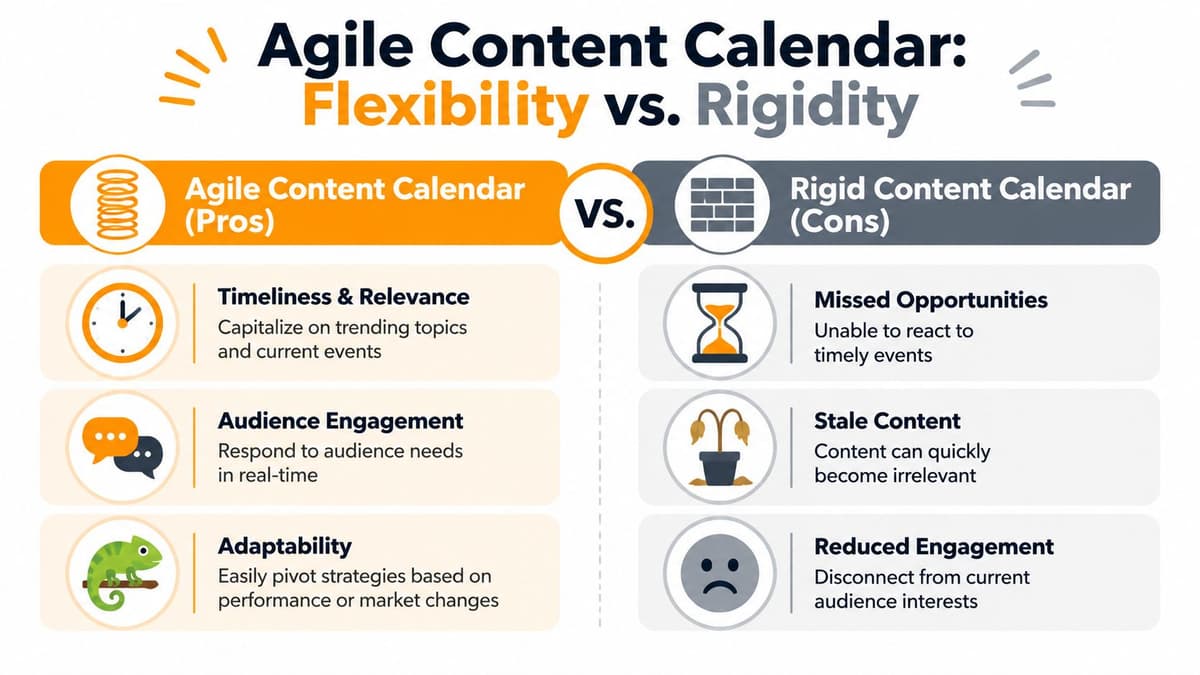
A packed calendar looks organized. It often performs like a rigid machine.
One of the biggest mistakes in content calendar management is filling every slot in advance. That feels disciplined, but it leaves no room for what your audience cares about this week. Markets move, product conversations change, and sometimes a small industry moment gives you a much stronger angle than the polished post you planned two weeks ago.
Leave intentional space
To stay agile, experts advise deliberately leaving 15% to 20% of the team's total content creation capacity unallocated so you can respond to real-time topics instead of treating the calendar like a fixed contract, as explained in Zerys' advice on content calendar flexibility.
That open capacity is your reactive slot. It's not a blank because you forgot to plan. It's a reserved lane for relevance.
What belongs in a reactive slot
Not every trending topic deserves your attention. Reactive content works when it's close enough to your audience's actual concerns.
Use these slots for:
- Product-adjacent news: changes in your category, platform updates, policy shifts
- Audience questions: recurring objections, support themes, onboarding friction
- Live moments: launch days, feature rollouts, customer wins, event commentary
- Unexpected traction: a post starts getting replies and deserves a fast follow-up
What doesn't work
Reactive posting turns messy when teams mistake speed for usefulness.
- Chasing every trend: If the topic has no connection to your offer or audience, it weakens your positioning.
- Breaking the workflow: Urgent content still needs a minimal review pass, especially if it includes claims, screenshots, or comparisons.
- Stealing from core publishing: If every reactive post pushes out planned evergreen work, your calendar becomes unstable.
Leave room for spontaneity on purpose. Unplanned content works best when the space for it was planned in advance.
A simple weekly split
A practical pattern for small teams looks like this:
| Slot type | Use |
|---|---|
| Planned slots | Evergreen posts, campaign posts, product education |
| Reactive slots | Timely posts, replies to live industry moments, follow-ups to audience conversations |
That balance keeps your brand current without making the whole operation depend on real-time energy. Strategic spontaneity is still strategy.
Automating Distribution and Cross-Platform Adaptation
Teams don't typically lose time in ideation. They lose it after the draft is done.
You write one strong post, then the manual adaptation starts. One version needs to become a thread. Another needs shorter lines. Mentions need remapping. Images need resizing. A link preview works on one platform and looks awkward on another. Such manual demands frequently cause content calendar management to collapse into repetitive admin.

The bottleneck is larger than generally acknowledged. While 80% of marketers use AI for ideation, under 30% deploy it for real-time content adaptation, which leaves teams manually reformatting posts for cross-platform distribution, according to this discussion of the adaptation gap in content workflows.
Scheduling is not the same as adaptation
A lot of tools help you queue posts. Fewer help you make each version usable on the destination platform.
That difference matters. A scheduled copy-paste workflow still creates friction:
- Format mismatch: one post length doesn't fit everywhere
- Handle mismatch: tagged accounts differ across networks
- Media mismatch: visual dimensions and native upload behavior change
- Tone mismatch: the same wording can feel native on one platform and stiff on another
Good automation should reduce that friction without removing control.
What intelligent automation should handle
The next layer of content calendar management isn't just “publish later.” It's “prepare this for where it's going.”
Look for automation that can:
- Split long posts into threads when a network needs a sequenced format
- Remap mentions and handles so references still work across platforms
- Resize media for native uploads instead of forcing one asset everywhere
- Preserve approval steps so human review still happens before publishing
- Mirror from a source account so one primary publishing habit feeds multiple destinations
One option in this category is MicroPoster, which mirrors posts to networks such as X, Threads, Bluesky, and Mastodon, while adapting items like threading, mentions, media sizing, and timing. If your current workflow still involves rewriting the same post for each network by hand, its guide to automated content distribution shows the operational model clearly.
Keep a human approval gate
Automation works best when it removes formatting labor, not judgment.
Use a simple approval rule:
- Draft the source post.
- Let the system generate platform-specific adaptations.
- Review anything tied to compliance, pricing, screenshots, or sensitive claims.
- Schedule or auto-publish only after that check.
That setup is especially useful for founders who don't have a social team but still want quality control.
A short demo makes this idea easier to see in practice:
Write once, then distribute with intent
This is the shift many small teams need. Don't build a workflow around duplicate effort. Build it around a source-of-truth post and a managed adaptation layer.
The expensive part of social distribution isn't posting. It's all the tiny formatting decisions that happen before posting.
Once you remove that manual drag, your calendar becomes more than a planning tool. It becomes a reliable publishing engine.
Using Analytics to Make Your Next Calendar Better
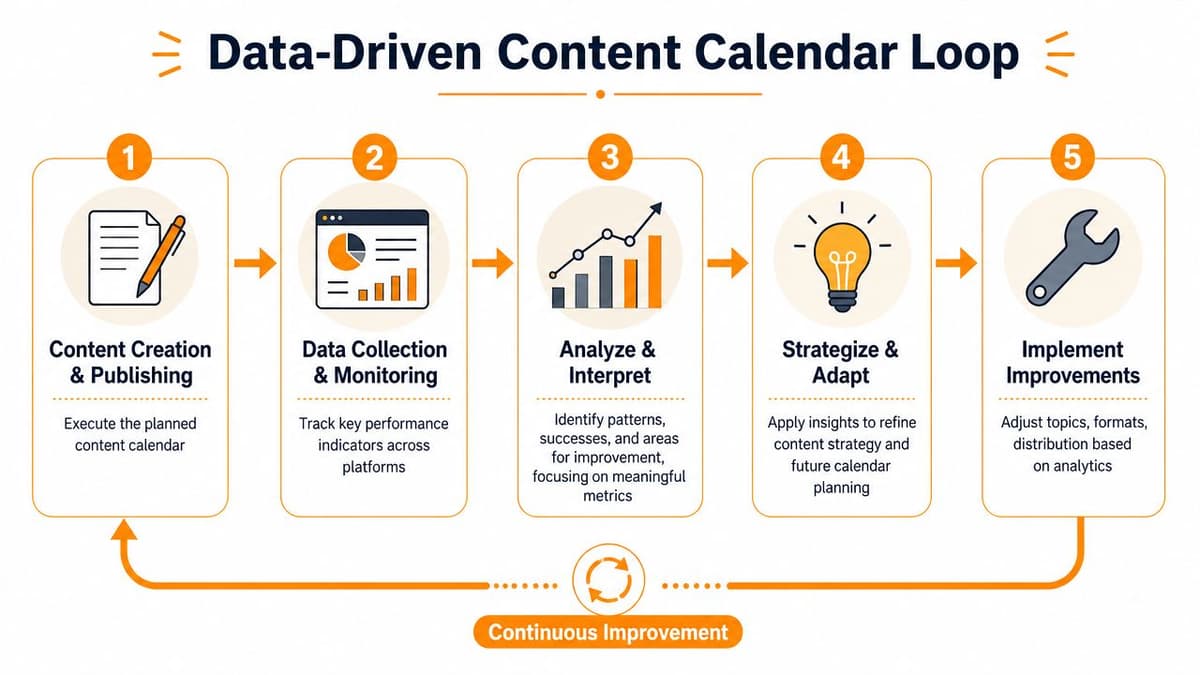
A content calendar shouldn't end at “published.” If it does, you're just organizing output. The fundamental value comes when the calendar starts teaching you what to repeat, what to stop, and what to reshape.
That review process doesn't need a huge reporting stack. It needs a simple loop. Plan the content, publish it, measure what happened, and use that to make the next calendar sharper.
Review the calendar, not just the posts
A lot of teams look at isolated winners and losers. That helps, but it misses patterns. The better move is to review your calendar as a system.
Ask questions like:
- Which content pillars got the strongest response?
- Which hooks consistently earned clicks or replies?
- Which CTAs led to action instead of passive engagement?
- Which platforms needed too much manual effort for too little return?
- Which reactive posts outperformed planned ones?
Keep the metrics practical
For founder-led teams, useful signals usually fall into a few buckets:
- Engagement quality: replies, saves, shares, meaningful comments
- Traffic intent: clicks to product pages, docs, signup pages
- Conversion behavior: demo requests, trials, email signups
- Operational efficiency: time to publish, approval delays, adaptation overhead
If short-form video is part of your mix, channel-specific scheduling details matter too. Tokify's scheduling advice is a good reference for thinking about timing and publishing workflow on TikTok without overcomplicating your stack.
Run a lightweight monthly audit
You don't need a giant dashboard review. A monthly audit is enough for most small teams.
| Review area | What to check |
|---|---|
| Top content | Which posts drove the strongest response or action |
| Weak content | Which topics or formats consistently stalled |
| Workflow issues | Where drafts, assets, or approvals got stuck |
| Platform fit | Which channels felt native and which felt forced |
Then turn those observations into calendar changes. If a pillar underperforms repeatedly, reduce it. If a CTA format keeps working, standardize it. If one platform creates too much formatting work, automate more of it or publish there less often.
For ROI thinking, use a framework that ties activity back to business outcomes. MicroPoster's article on how to measure social media ROI is useful for framing that connection in plain terms.
The calendar gets better when each publishing cycle leaves behind evidence, not just content.
That's the long-term advantage of disciplined content calendar management. You stop guessing from scratch every month. The system compounds.
If you want a simpler way to run this without turning cross-platform posting into manual busywork, MicroPoster is worth trying. It's built for founders and small teams who already create content and want distribution, adaptation, scheduling, and a visual calendar in one workflow. There's a 7-day trial, so you can test whether “write once, grow everywhere” fits how your team functions.