
12 Twitter growth tools You Should Know
Discover the top 12 twitter growth tools strategies and tips. Complete guide with actionable insights.

Growing your audience on X (formerly Twitter) requires more than just great content; it demands a strategic approach powered by the right technology. The platform's fast-paced, real-time nature means that consistency, engagement, and data-driven decisions are non-negotiable for anyone serious about expansion. This is where Twitter growth tools become essential, transforming a time-consuming manual process into a streamlined, effective strategy. These platforms help you schedule content, analyze performance, engage with your community, and discover new followers, all while saving you valuable time.
This guide is designed to be your definitive resource for navigating the complex market of X management software. We've moved beyond generic marketing copy to provide a comprehensive, hands-on analysis of the top tools available today. Whether you're an independent creator, a small business owner, or a social media manager handling multiple client accounts, this list will help you pinpoint the exact solution for your specific needs and budget. We'll explore everything from powerful AI-driven content creation and scheduling to deep analytics and community management.
Before diving into specific platforms, it's crucial to understand the foundational tactics that make these tools effective. For instance, a core component of organic growth is visibility, which often starts with identifying trending hashtags to join relevant conversations and expand your reach. Once you have a grasp on the fundamentals, the tools listed below will amplify your efforts significantly. Each entry includes direct links, screenshots, clear pricing breakdowns, and practical use cases to help you make an informed decision and start accelerating your growth immediately.
1. MicroPoster
Best For: Streamlining content creation and scheduling across multiple text-first social platforms.
MicroPoster stands out as a premier choice among Twitter growth tools by focusing intently on the art of microblogging. It's not a generic, all-in-one social media dashboard; instead, it’s a purpose-built suite designed for creators, brands, and managers who prioritize text-based platforms like X, Bluesky, and Mastodon. Its core philosophy revolves around publishing smarter and faster, without sacrificing the quality and nuance required for genuine audience engagement.
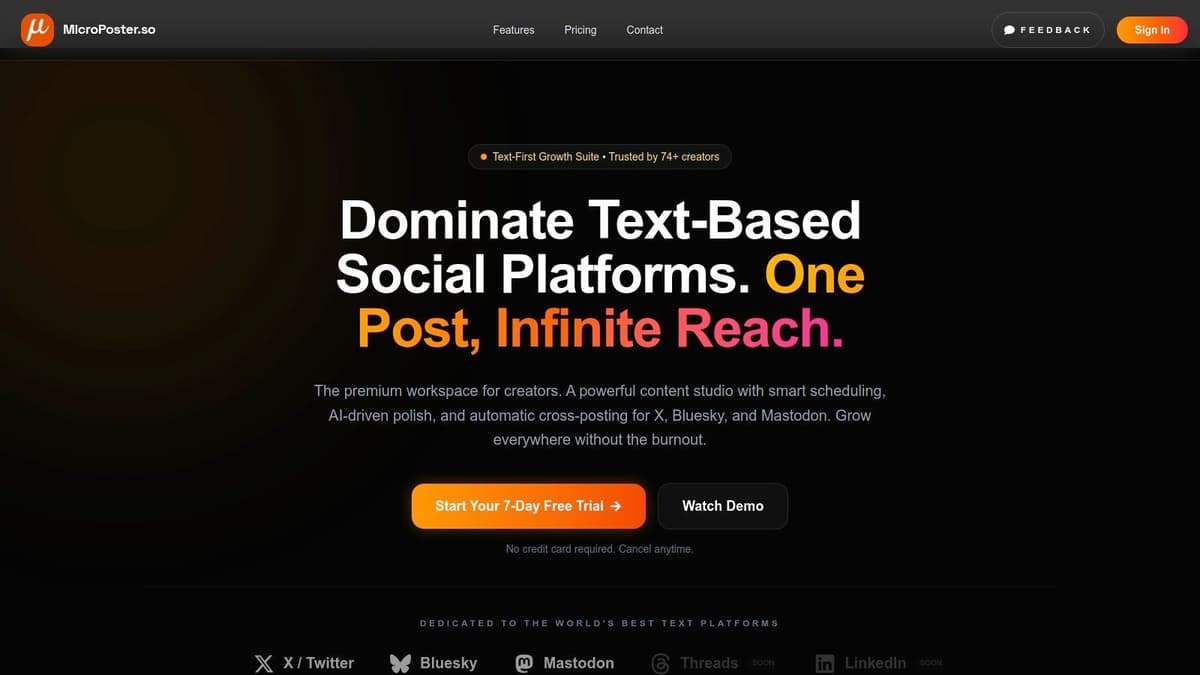
The platform’s strength lies in its unified content studio, which combines an advanced editor with intelligent AI assistants. This isn’t just about scheduling; it’s about crafting better content. The editor provides real-time readability and virality scores, helping you refine your message for maximum impact. The AI tools go beyond simple grammar checks, offering suggestions to sharpen your tone, improve hooks, generate relevant hashtags, and craft compelling calls to action (CTAs). This focus on content quality is a key differentiator, positioning MicroPoster as a tool for organic growth rather than just automation.
Key Features and Use Cases
- Unified Content Studio: Write a post once and let MicroPoster automatically reformat it for the specific character limits and conventions of X, Bluesky, and Mastodon. This eliminates tedious manual adjustments.
- AI-Powered Enhancements: Use the built-in AI to polish your drafts. A practical workflow involves writing your core message, then using the AI to test different hooks or find the perfect hashtags, saving significant creative time.
- Smart Scheduling & Automation: The visual calendar and personalized "best time to post" insights help optimize your publishing schedule. You can also set up auto-publishing queues to maintain a consistent presence without constant manual intervention.
- Cross-Platform Mirroring: With a single click, you can mirror a post across all connected accounts. This is ideal for agencies or individuals managing multiple brand presences simultaneously.
Pricing and Access
MicroPoster offers a straightforward and accessible pricing model, including a 7-day free trial that doesn’t require a credit card.
- Creator Plan: $12/month. Includes unlimited drafts, scheduling, templates, AI tools, and 200 cross-copy actions per month.
- Pro Plan: $29/month. Includes everything in Creator plus unlimited cross-copying and priority support.
- Annual Discount: Subscribing annually reduces the monthly cost by approximately 17%.
Pros & Cons
| Pros | Cons |
|---|---|
| Purpose-built for microblogging with tailored features like virality scores and an advanced text editor. | Limited platform support currently, with Threads and LinkedIn listed as "coming soon." |
| Seamless cross-platform workflow saves significant time by auto-reformatting and mirroring posts. | Smaller user base (cited at 74+ creators), indicating it's a newer product in the market. |
| Affordable and transparent pricing with a friction-free trial makes it easy to test its value. | Creator plan has limits on cross-copy actions (200/month), which may affect high-volume users. |
| Focus on organic growth and content quality rather than vanity metrics. | AI suggestions are excellent starting points but still benefit from human review and refinement for best results. |
Website: https://microposter.so
2. Tweet Hunter
Tweet Hunter is an all-in-one growth suite designed specifically for creators who want to build and monetize their audience on X. Its core strength lies in its comprehensive approach, combining content creation, scheduling, and engagement into a single, powerful workflow. The platform is particularly effective for overcoming writer's block and consistently generating high-quality content.
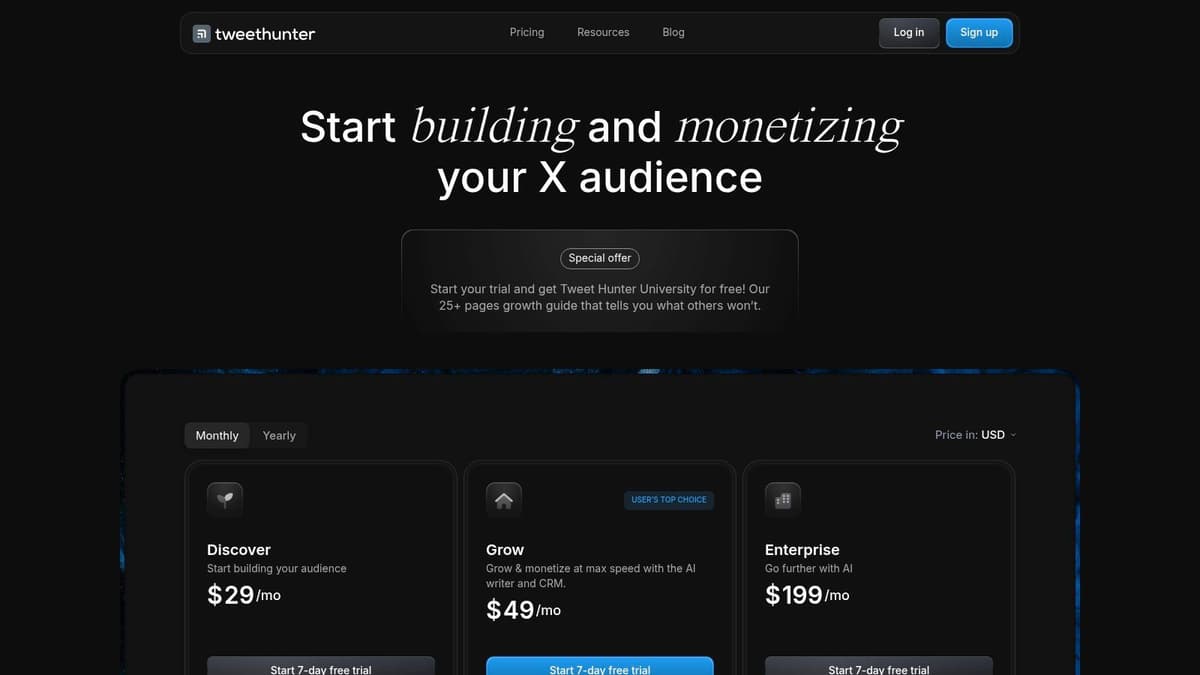
Unlike generic schedulers, Tweet Hunter provides an AI assistant and a massive, searchable library of over two million viral tweets. This inspiration engine allows you to analyze what works in any niche and quickly adapt successful formats. Its intelligent scheduling features let you create evergreen content queues, schedule complex threads, and automatically retweet your best-performing posts to maximize their lifespan. For those focused on monetization, the "auto-plug" feature automatically adds a promotional tweet below your posts once they gain traction, driving traffic without manual intervention.
Core Features & Use Case
- AI Writing & Inspiration: Use the AI to generate hooks, rewrite drafts, or find ideas from the viral tweet library. Best for: Creators needing a constant stream of fresh, engaging content ideas.
- Intelligent Scheduling: Build queues for evergreen content and schedule threads with ease. Best for: Saving time and maintaining a consistent posting schedule.
- Engagement CRM: Create lists of high-priority users to focus your engagement efforts. Best for: Nurturing relationships with key followers and industry leaders.
- Automation: Set up auto-DMs and auto-plugs for lead generation and promotion.
Pricing: Tweet Hunter operates on a premium model, starting with a 7-day free trial. Paid plans begin at $49/month (billed annually), with higher tiers offering more accounts and advanced features.
Website: https://tweethunter.io/
Our Take: While the interface can feel busy initially, Tweet Hunter is one of the most robust twitter growth tools available for serious creators. Its automations are thoughtfully designed to increase engagement, and you can learn a lot about how to use these features by exploring different strategies to increase your X engagement. It's a significant investment, but the return in time saved and audience growth can be substantial.
3. Hypefury
Hypefury is a veteran X-focused scheduling tool celebrated for its powerful automations designed to help creators monetize their audience. It excels at turning viral content into tangible business results, such as email sign-ups or product sales. The platform is built around a philosophy of "write once, publish everywhere," offering seamless cross-posting to platforms like LinkedIn and Instagram.
What sets Hypefury apart is its specific focus on monetization workflows. Features like "auto-plugs" allow you to automatically add a promotional tweet beneath any post that hits a certain engagement threshold. This ensures your calls-to-action are only attached to your most successful content, maximizing visibility without feeling spammy. It also integrates directly with platforms like Gumroad, making it a favorite among digital product creators.
Core Features & Use Case
- Monetization Automations: Set up auto-plugs for sales links and auto-DMs for lead magnets. Best for: Creators selling digital products or building an email list.
- Intelligent Scheduling & Queues: Create content categories and evergreen queues to maintain a consistent presence. Best for: Busy founders and creators who need to batch their content creation.
- Engagement Builder: Monitor specific keywords or users to find relevant conversations to join. Best for: Building authority and connecting with potential customers or collaborators.
- Cross-Platform Posting: Automatically adapt and post your X content to other platforms like LinkedIn. Best for: Maximizing content reach with minimal extra effort.
Pricing: Hypefury offers a 7-day free trial. Paid plans start at $19/month (billed annually), with higher tiers unlocking more accounts and advanced automations.
Website: https://hypefury.com/features-pricing-test/?utm_source=openai
Our Take: Hypefury is one of the most effective twitter growth tools for creators laser-focused on monetization. While its automations require careful setup to avoid fatiguing your audience, the direct link to sales funnels is invaluable. The interface is clean and straightforward, making it less intimidating than more complex all-in-one suites.
4. Typefully
Typefully is a minimalist editor and scheduler built for writers who value a clean, distraction-free creative process. It champions a "writing-first" approach, making it one of the best tools for crafting thoughtful threads and high-quality posts for X and other text-based platforms like LinkedIn and Mastodon. Its interface is designed to get out of your way, allowing you to focus purely on content creation.
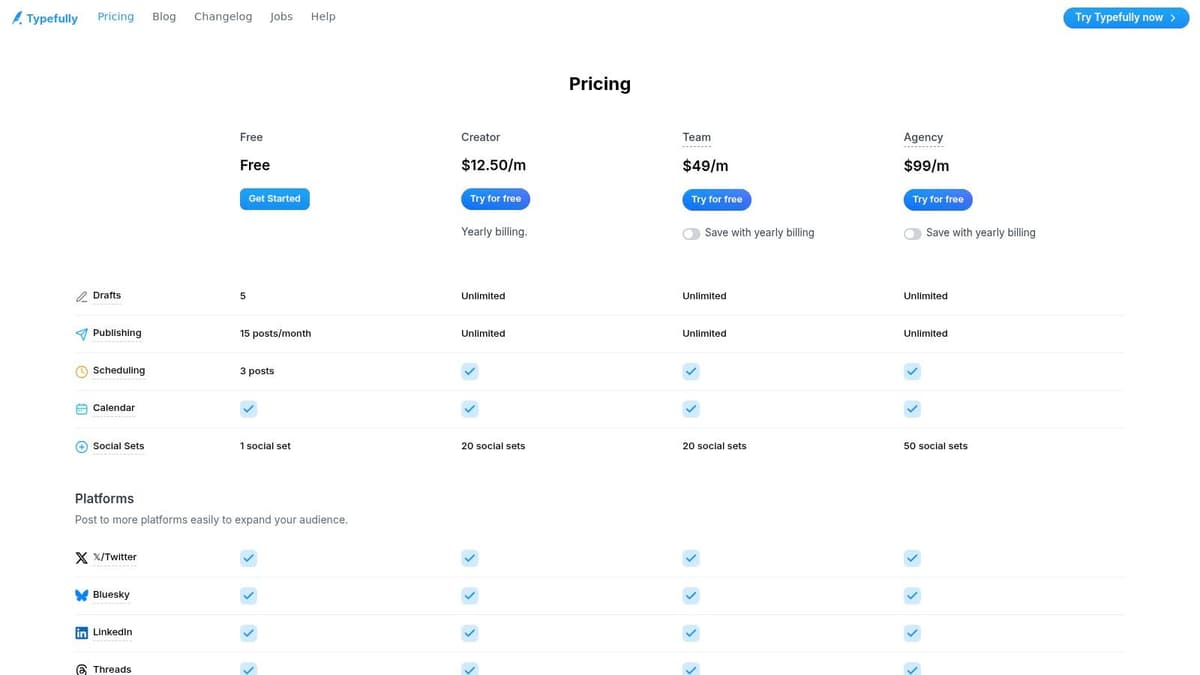
Unlike bloated, all-in-one suites, Typefully excels in its simplicity and speed. The thread builder is exceptionally fluid, with live previews and automatic numbering that make structuring complex ideas effortless. While it doesn't offer the deep CRM or engagement automation of its larger competitors, it provides powerful AI assistance for drafting, rewriting, and generating ideas. This deliberate focus makes it a superior choice for creators who prioritize writing quality and a streamlined workflow over having every feature imaginable.
Core Features & Use Case
- Distraction-Free Editor: A clean, focused interface for writing single posts and complex threads. Best for: Writers and thought leaders who need to concentrate on content quality.
- AI-Powered Writing Assists: Get AI-generated drafts, ideas, and rewrites directly within the editor. Best for: Overcoming writer's block and refining your messaging.
- Multi-Platform Scheduling: Schedule and cross-post content to X, LinkedIn, Threads, and more from one place. Best for: Creators building an audience across multiple text-first platforms.
- Collaboration & Analytics: Share drafts with team members and track key performance metrics. Best for: Small teams and agencies managing brand accounts.
Pricing: Typefully offers a free plan with basic scheduling. Paid plans start at $12/month (billed annually), with higher tiers unlocking advanced analytics, team collaboration, and more social accounts.
Website: https://typefully.com/
Our Take: Typefully is the antidote to overwhelming social media dashboards. Its commitment to a beautiful writing experience makes it one of the most pleasant twitter growth tools to use daily. It's intentionally less "all-in-one" than others, which is its greatest strength for users who just want to write, schedule, and analyze without clutter.
5. Buffer
Buffer is one of the most established and user-friendly social media management platforms, offering a streamlined solution for planning and publishing content on X and other networks. Its core strength is its simplicity and reliability, making it an excellent choice for individuals, small businesses, and teams who need a straightforward scheduler without an overwhelming number of advanced features. The platform excels at cross-platform management, allowing you to easily repurpose content for multiple social profiles.
Unlike hyper-specialized X tools, Buffer's value lies in its multi-platform support and intuitive interface. You can schedule posts and threads for X, then quickly adapt them for LinkedIn, Mastodon, or Threads. Its AI Assistant helps generate ideas, rewrite content, and break down longer posts into a thread format. The platform also includes basic analytics and a unified inbox for managing engagement, providing a solid foundation for a growing social media presence.
Core Features & Use Case
- Multi-Platform Scheduling: Plan and publish posts across X, Instagram, Facebook, LinkedIn, Mastodon, and more from one dashboard. Best for: Marketers managing a presence on multiple social channels.
- AI Assistant: Generate post ideas, rephrase content, and expand on thoughts directly within the composer. Best for: Overcoming writer's block and refining your messaging quickly.
- Simple Analytics: Track key metrics like reach, engagement, and top-performing posts with clean, easy-to-understand reports. Best for: Users who need fundamental performance insights without deep-dive analytics.
- Engagement Tools: Reply to comments and mentions from a unified social inbox. Best for: Streamlining community management and response times.
Pricing: Buffer offers a generous free plan that includes up to three channels. Paid plans start at $6/month per channel, with tiered pricing for teams and agencies that require more channels and advanced features.
Website: https://buffer.com/
Our Take: Buffer is a fantastic starting point and a reliable workhorse for social media management. While it lacks some of the aggressive X-specific automations found in other twitter growth tools, its clean UI and dependable scheduling make it a top choice for those prioritizing simplicity and cross-platform consistency. It's perfect for users who want to "set and forget" their content calendar.
6. Hootsuite
Hootsuite is one of the original social media management platforms, offering a comprehensive suite for businesses and agencies that need to manage X alongside other social networks. Its strength lies in its unified dashboard, which centralizes publishing, monitoring, and analytics, making it ideal for teams that require collaboration, approval workflows, and multi-channel oversight from a single, mature tool.

Unlike creator-focused tools, Hootsuite is built for organizational scale. Its "Streams" feature allows users to monitor keywords, lists, and mentions in customizable columns, providing a real-time pulse on conversations. The platform also includes AI-powered tools like OwlyWriter AI and a 'Best Time to Publish' feature to optimize content strategy. For teams, its robust permission and approval systems ensure brand consistency and control over what gets posted.
Core Features & Use Case
- Unified Inbox & Streams: Manage mentions, DMs, and monitor keywords for multiple X accounts from one dashboard. Best for: Agencies and social media teams managing several client or brand accounts.
- Advanced Scheduling & AI: Use the content calendar, AI writer, and optimal posting time suggestions to plan content. Best for: Businesses needing a structured and collaborative content workflow.
- Team Permissions & Approvals: Assign roles and create approval workflows to maintain brand safety and quality control. Best for: Larger organizations with multi-step content review processes.
- Multi-Channel Management: Schedule and analyze content not just for X, but for Instagram, Facebook, LinkedIn, and more.
Pricing: Hootsuite offers a 30-day free trial. Paid plans start at $99/month for the Professional tier, with higher-priced plans for teams and businesses needing more users and advanced features.
Website: https://www.hootsuite.com/twitter?utm_source=openai
Our Take: Hootsuite is less of a dedicated X growth hack tool and more of a comprehensive command center for social media operations. While its pricing may be steep for solo creators, it's one of the best twitter growth tools for businesses that need to integrate X into a broader, multi-platform strategy with a focus on team collaboration and brand management.
7. Sprout Social
Sprout Social is an enterprise-grade social media management suite that provides robust support for X. It's designed for businesses and agencies that require sophisticated publishing, analytics, and social listening tools. The platform excels at providing deep, actionable insights and creating streamlined workflows for large teams that need to collaborate effectively and maintain brand governance.
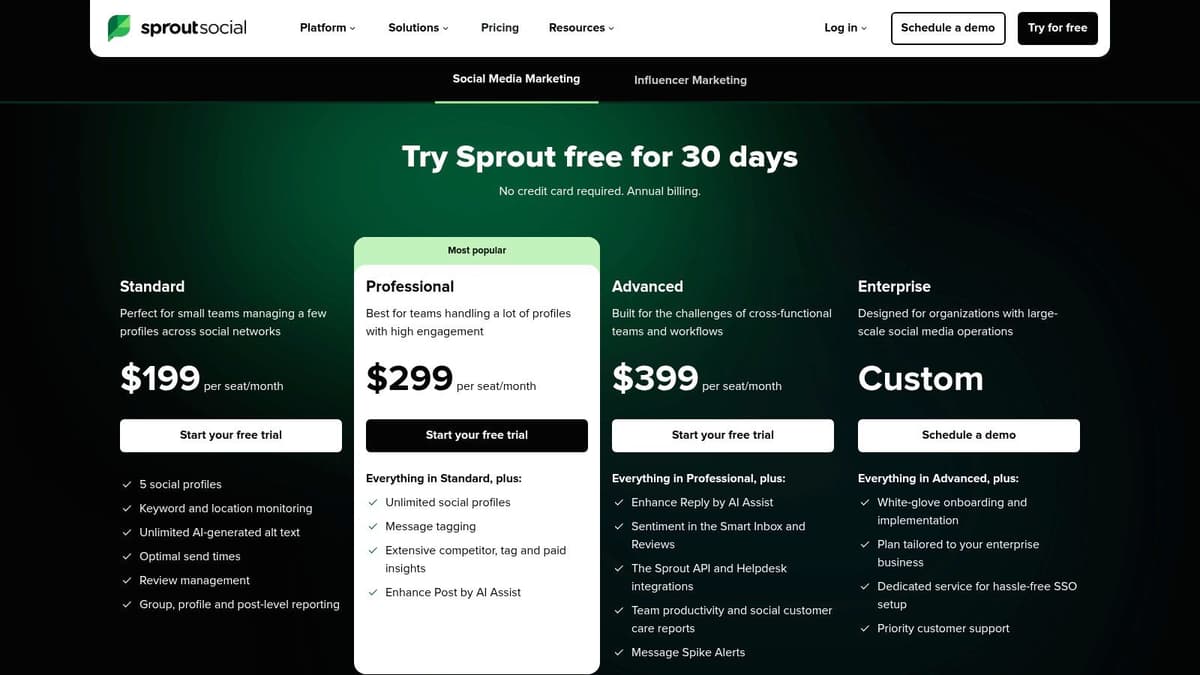
Unlike tools focused solely on individual creators, Sprout Social's strength is its scalability and comprehensive reporting. Its "Smart Inbox" unifies all incoming messages and mentions from X into a single stream, where teams can use custom tags and workflows to assign tasks and ensure prompt responses. The platform’s analytics extend beyond basic metrics, offering detailed competitor insights, sentiment analysis, and presentation-ready reports perfect for stakeholders and clients. While many features are platform-agnostic, its X integration is powerful for brand monitoring and customer care.
Core Features & Use Case
- Advanced Reporting & Analytics: Generate detailed competitor and performance reports to track trends. Best for: Agencies and marketing teams needing to prove ROI to clients or leadership.
- Smart Inbox & Engagement: Manage all X interactions with team-based workflows, tagging, and assignment features. Best for: Customer service and community management teams handling high volumes of mentions.
- Publishing & Scheduling: Plan, draft, and schedule content with a shared calendar and asset library. Best for: Organizations needing approval workflows and brand consistency across multiple accounts.
- Social Listening (Add-on): Track brand mentions, industry keywords, and sentiment across the wider social web. Best for: Brands conducting market research and managing their reputation.
Pricing: Sprout Social offers a 30-day free trial. Paid plans start at $249 per user/month, with higher tiers and optional add-ons for listening and advocacy increasing the cost.
Website: https://sproutsocial.com/pricing/
Our Take: Sprout Social is a premium choice among twitter growth tools, best suited for established businesses and agencies. The per-user pricing model makes it expensive for smaller teams or solo creators. However, for organizations that need powerful reporting, team collaboration, and strict governance, its feature set and polished user experience justify the investment.
8. SocialPilot
SocialPilot is a comprehensive and cost-effective social media management tool designed for agencies, small businesses, and marketing professionals managing multiple accounts. While not exclusively an X platform, its robust support for X, combined with its affordability, makes it a powerful contender. Its core advantage lies in its scalability, offering features like bulk scheduling, client management, and detailed analytics without the enterprise-level price tag of its competitors.
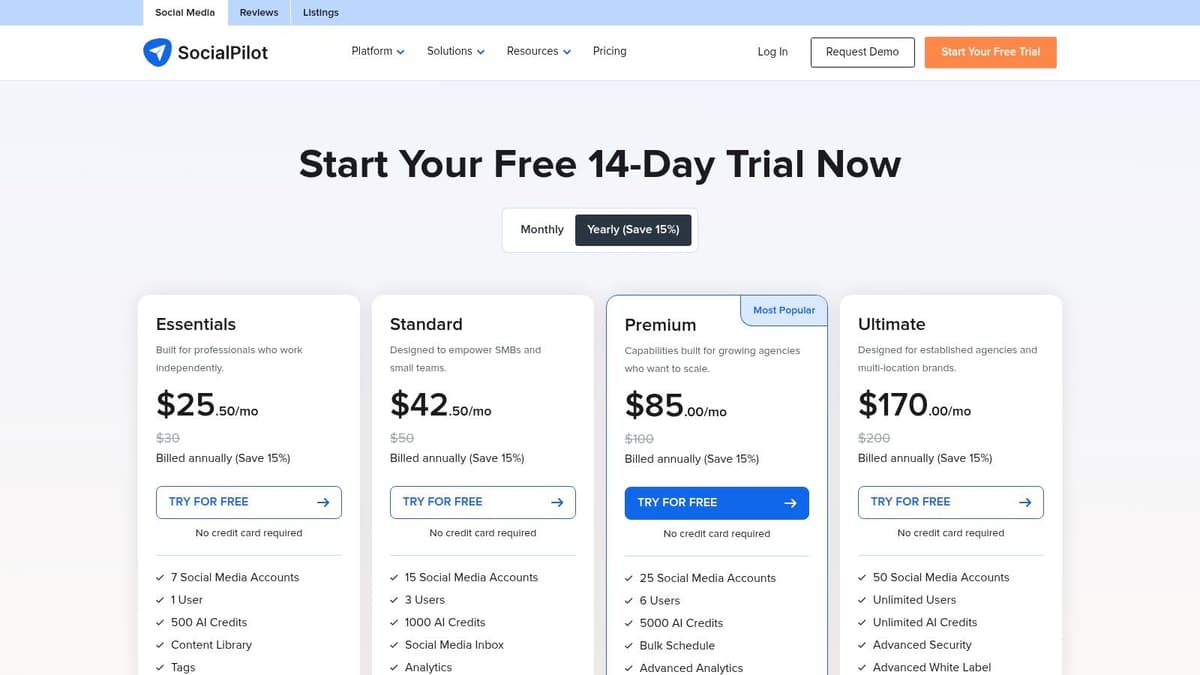
Unlike hyper-specialized X tools, SocialPilot provides a unified dashboard to manage your entire social presence. For X specifically, users can schedule hundreds of posts at once using CSV uploads, manage conversations through a central social inbox, and collaborate with team members or clients using approval workflows. This makes it ideal for teams that need to maintain a consistent content calendar across multiple X profiles efficiently and affordably. The platform's white-label reporting is a standout feature for agencies needing to provide branded analytics to clients.
Core Features & Use Case
- Bulk Scheduling: Upload a CSV file to schedule up to 500 tweets in one go. Best for: Agencies and marketers planning extensive content calendars in advance.
- Team & Client Management: Assign roles, manage permissions, and create approval workflows for content. Best for: Collaborative teams and agencies managing client accounts.
- Unified Social Inbox: Manage all X comments, mentions, and messages from a single stream. Best for: Streamlining engagement and ensuring timely responses.
- Analytics & White-Label Reports: Generate detailed, customizable performance reports for clients. Best for: Demonstrating ROI and campaign success to stakeholders.
Pricing: SocialPilot offers a 14-day free trial. Paid plans start at $25.50/month (billed annually) for the Professional plan, with higher tiers offering more accounts and advanced agency features.
Website: https://www.socialpilot.co/plans?utm_source=openai
Our Take: SocialPilot is one of the best value twitter growth tools for agencies and businesses managing multiple social profiles. While its interface is more functional than flashy, its bulk scheduling and client approval workflows are exceptionally practical and time-saving. It’s an excellent choice for users who need a reliable, all-in-one scheduler without the high cost of enterprise solutions.
9. Publer
Publer is a versatile social media scheduler that offers surprisingly deep functionality for X, making it an excellent choice for users managing multiple platforms who don't want to sacrifice advanced X features. It supports the full range of X post types, including long-form posts, complex threads, polls, and scheduled retweets, placing it on par with more specialized tools. The platform is particularly strong for those who need a central hub for all their social media efforts without compromising on X-specific capabilities.
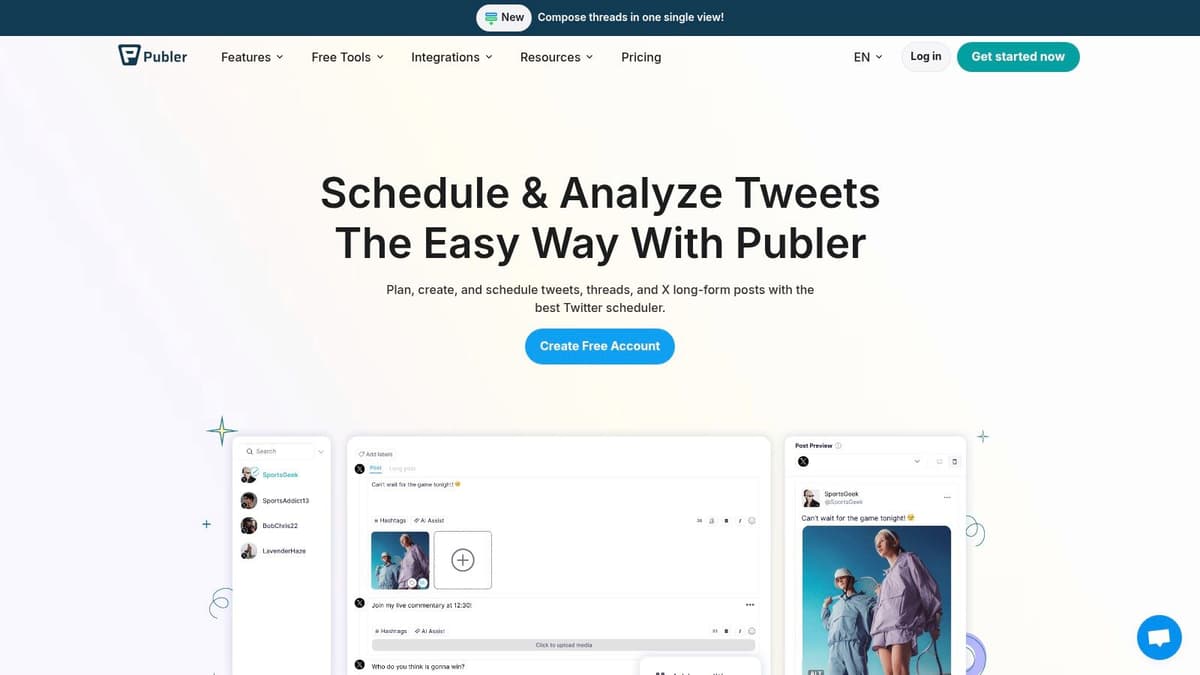
Unlike many all-in-one schedulers that offer basic X integration, Publer dives deeper. It allows you to schedule threads up to 26 tweets long and even supports long-form posts up to 25,000 characters. Its AI assistant, hashtag suggestions, and competitor analysis tools provide a solid foundation for content strategy. The flexible pricing model is a significant advantage, allowing you to pay per social account and team member, making it scalable for freelancers, small businesses, and agencies alike.
Core Features & Use Case
- Advanced X Scheduling: Schedule long posts, threads, polls, retweets, and quote tweets. Best for: Power users who need comprehensive scheduling options within a multi-platform tool.
- AI Content Assist: Generate post ideas, get hashtag suggestions, and refine your copy. Best for: Quickly creating content and optimizing it for discovery.
- Competitor Analysis: Track and analyze competitor accounts to inform your own strategy. Best for: Staying ahead of trends and understanding what works in your niche.
- Flexible Pricing: Scale your plan based on the number of social accounts and team members. Best for: Users and teams who need a cost-effective, customized solution.
Pricing: Publer offers a free plan, but X/Twitter integration is not included. Paid plans start at $12/month (billed annually) for the Professional tier, which includes 3 social accounts.
Website: https://publer.com/integrations/twitter-x?utm_source=openai
Our Take: Publer is a fantastic choice for those who want one of the most flexible twitter growth tools that also manages other social networks effectively. While the X connection can occasionally be quirky and is excluded from the free plan, its feature depth for X is impressive for a multi-platform scheduler. The granular pricing makes it accessible and scalable for growing teams.
10. SocialDog
SocialDog is a comprehensive X management tool trusted by creators and businesses for its deep analytics and follow/follower management capabilities. It shines in its ability to connect user acquisition directly to specific actions, providing clear insights into what drives growth. The platform combines scheduling, monitoring, and analysis into a unified dashboard, making it a strong contender for those who want to track their ROI on X meticulously.
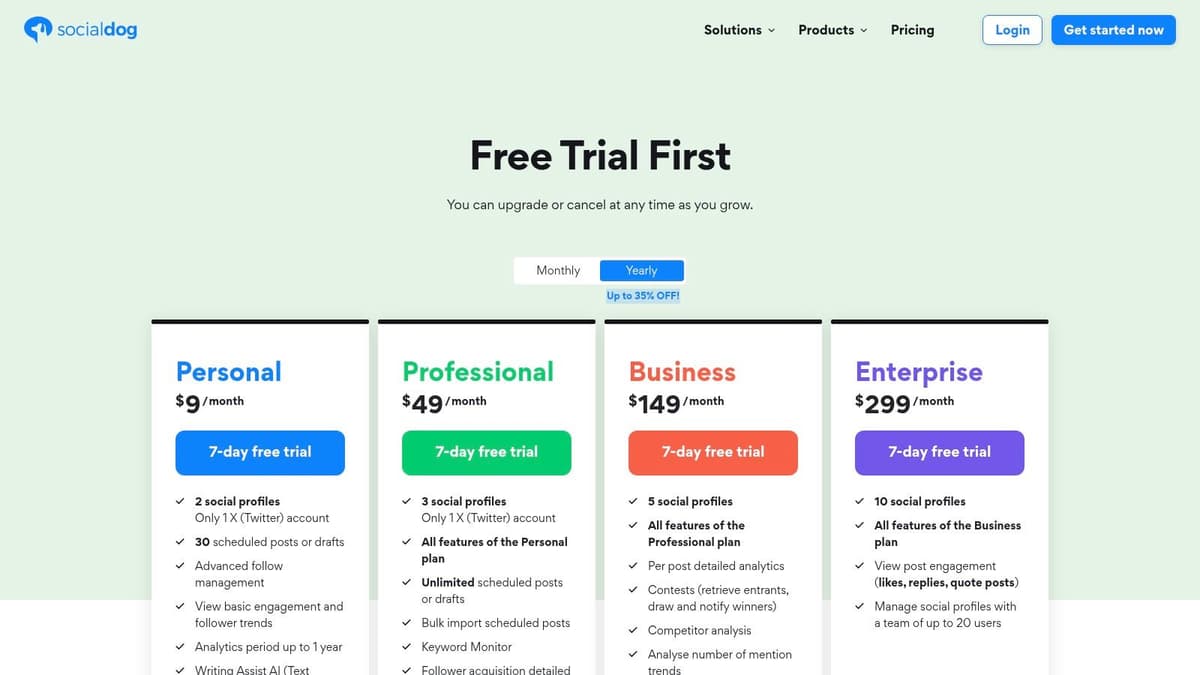
Unlike many competitors, SocialDog offers granular follower acquisition analytics, allowing you to see exactly when and why you gained or lost followers. This feature, combined with its robust keyword monitoring and mentions inbox, helps users refine their content strategy based on direct audience feedback and engagement trends. The tool is particularly useful for running campaigns, with features like contest management and bulk scheduling for coordinated content pushes.
Core Features & Use Case
- Acquisition Analytics: Track follower growth and connect it to specific tweets or times. Best for: Understanding which content strategies are most effective for audience building.
- Keyword Monitoring: Set up alerts for specific keywords to join relevant conversations. Best for: Brand monitoring and identifying engagement opportunities.
- Follower Management: Analyze your follower demographics and manage follow/unfollow activities. Best for: Curating a relevant and engaged audience.
- Advanced Scheduling: Includes thread posting, bulk scheduling from CSV, and repost queues.
Pricing: SocialDog offers a free plan with basic features. Paid plans start at $49/month, with higher tiers like Business ($149/month) unlocking advanced analytics, team features, and more accounts.
Website: https://social-dog.net/en/pricing/
Our Take: SocialDog is an excellent analytics-first platform for users who are serious about tracking their growth metrics. While some of its most powerful features are gated behind higher-tier plans, its detailed acquisition data provides a level of insight that few other twitter growth tools offer. It's ideal for data-driven marketers and businesses that need to justify their social media efforts with concrete numbers.
11. Followerwonk (by Fedica)
Followerwonk is a classic and highly-focused analytics tool that excels at audience discovery and optimization on X. Now part of the Fedica suite, its primary strength is helping you dig deep into who your followers are, find new influential accounts to connect with, and understand the best times to post for maximum reach. It moves beyond vanity metrics to provide actionable data on follower locations, activity patterns, and social authority.
Unlike broader suites that bundle analytics as one of many features, Followerwonk’s core function is dedicated audience research. You can search bios across all of X to find people interested in specific topics, compare your follower base against competitors to identify audience overlap, and track follower gains or losses over time. This granular insight is critical for tailoring your content strategy to the people you actually want to reach.
Core Features & Use Case
- Search Twitter Bios: Find users by keywords in their bios to discover potential followers or influencers. Best for: Targeted outreach and building a relevant audience from scratch.
- Compare Users: Analyze and compare the follower graphs of any three accounts. Best for: Competitor analysis and identifying key influencers in your niche.
- Analyze Followers: Segment your own followers by location, bio keywords, activity, and more. Best for: Understanding your current audience to create more resonant content.
- Track Followers: Monitor your follower gains and losses over time to see what's working. Best for: Measuring the impact of your growth campaigns and content experiments.
Pricing: Followerwonk offers a limited free plan for basic analysis. Paid plans, which are part of Fedica’s offerings, start at $12/month and unlock more comprehensive search and analytics capabilities.
Website: https://fedica.com/signup/followerwonkplans
Our Take: While the interface can feel a bit dated, Followerwonk remains one of the most powerful and accessible twitter growth tools for pure audience intelligence. Its deep-dive analytics help you refine your strategies for gaining Twitter followers by focusing on quality over quantity. If you want to master the data behind your audience, you should explore these types of Twitter account analytics to inform your strategy.
12. BlackMagic
BlackMagic is a unique analytics and productivity layer that integrates directly into the X interface through a browser extension. Instead of operating as a separate dashboard, it enhances your real-time experience on the platform, providing a sidebar packed with powerful metrics, a personal CRM, and engagement insights. It’s designed for the power user who wants immediate feedback and deeper context without ever leaving their feed.
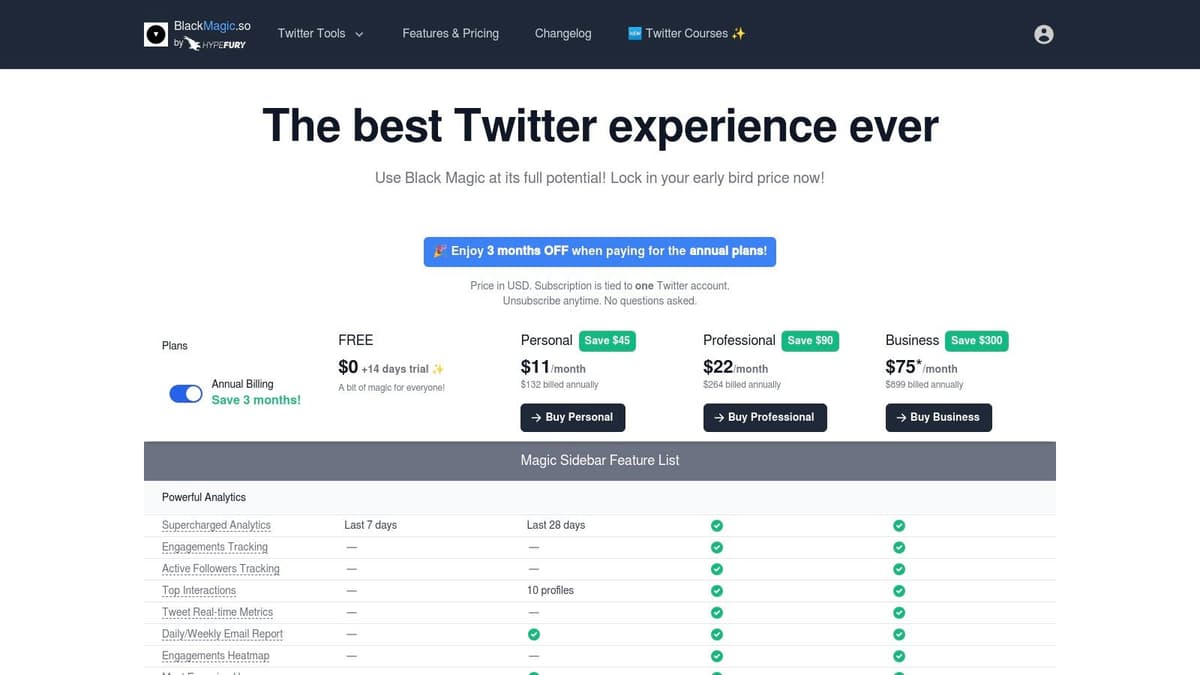
Unlike standalone analytics platforms, BlackMagic focuses on improving your daily workflow. As you browse, it displays your tweet performance, profile growth, and even engagement heatmaps in real-time. The sidebar acts as your mission control, allowing you to track key interactions, leave private notes on user profiles, and monitor your progress toward audience goals. This instant feedback loop is its key differentiator, helping you understand what resonates with your audience as it happens.
Core Features & Use Case
- Live Analytics Sidebar: See real-time tweet stats, engagement ratios, and follower growth directly on X. Best for: Creators who want instant performance feedback to iterate on their content strategy quickly.
- Personal CRM: Add notes, tags, and track past interactions with followers from their profile. Best for: Building and nurturing relationships with key community members and industry contacts.
- Engagement Tracking: Identify your most engaged followers and track top interactions. Best for: Focusing engagement efforts on the people who matter most to your growth.
- Public Dashboards: Create a shareable, public dashboard to showcase your profile metrics and milestones.
Pricing: BlackMagic offers a free plan with basic analytics. Paid plans start at $12/month, unlocking advanced features like the CRM, real-time metrics, and more detailed analytics.
Website: https://dev.blackmagic.so/pricing
Our Take: BlackMagic excels by bringing analytics into your native workflow, making it one of the most intuitive twitter growth tools for daily use. The sidebar is a brilliant way to get fast insights without context switching. While it isn't a scheduler, its strength lies in providing the immediate data needed to make smarter content and engagement decisions on the fly.
Top 12 Twitter Growth Tools Comparison
| Product | Core Features | UX & Quality | Price & Value | Target Audience | Unique Selling Points |
|---|---|---|---|---|---|
| 🏆 MicroPoster | ✨ Advanced editor, AI enhancers, readability & virality scores; write-once auto-reformat, mirror & auto-publish | ★★★★☆ — modern calendar, studio & growth workspace | 💰 Creator $12/mo · Pro $29/mo · 7-day free trial · annual ~17% off | 👥 Creators, small brands, social managers, agencies | ✨ Purpose-built for text-first platforms; seamless cross-post + AI polish; organic-growth focus |
| Tweet Hunter | ✨ 2M+ viral tweet library, AI writer, thread & evergreen scheduling, X CRM lists | ★★★★ — growth-focused, fast feature cadence | 💰 Best value at paid tiers; free trial only | 👥 X-focused creators & consultants | ✨ Massive idea library + CRM-driven engagement |
| Hypefury | Thread scheduling, auto-DMs, engagement builder, autoplugs | ★★★★ — creator-centric automations | 💰 Clear plans; 7-day trial | 👥 Solo creators, solopreneurs, small teams | ✨ Monetization-friendly automations (Gumroad ties, lead capture) |
| Typefully | Clean thread editor, AI drafts/rewrites, cross-posting, API/Zapier | ★★★★☆ — distraction-free, fast writing UX | 💰 Affordable entry tiers | 👥 Writers, thread-focused creators | ✨ Editor-first with robust thread previews & numbering |
| Buffer | Schedule posts/threads, AI assistant, cross-posting, community inbox | ★★★★ — intuitive UI, generous free plan | 💰 Free plan available; add-per-channel pricing | 👥 Small teams, solo operators | ✨ Reliable, easy-to-use scheduler with broad platform support |
| Hootsuite | Publishing, streams, listening basics, analytics, team roles & approvals | ★★★★ — mature, full-featured but heavier | 💰 Higher-priced (SMB/agency budgets) | 👥 SMBs, agencies, teams | ✨ Enterprise-grade collaboration, training & ecosystem |
| Sprout Social | Advanced reporting, Smart Inbox, AI Assist, listening & advocacy addons | ★★★★ — powerful reporting & governance | 💰 Expensive per-seat; add-ons cost extra | 👥 Mid-enterprise & agency teams | ✨ Best-in-class reports and stakeholder-ready analytics |
| SocialPilot | Bulk scheduling, client approvals, white-label reports, team collaboration | ★★★☆ — utilitarian UI, strong scale | 💰 Budget-friendly; scales to 50+ accounts | 👥 Pros, SMBs, agencies with many accounts | ✨ White-label & bulk scheduling at a value price |
| Publer | Long-posts (25k), up to 26-tweet threads, polls, AI assist, mobile apps | ★★★★ — deep X feature set for power users | 💰 Flexible per-account/team pricing | 👥 X power users, teams, marketers | ✨ Long-post & thread depth, granular per-account pricing |
| SocialDog | Thread posting, bulk scheduling, keyword monitors, acquisition analytics | ★★★★ — deep X-centric analytics | 💰 Tiered plans from individual → enterprise | 👥 Creators & businesses (strong JP/US presence) | ✨ Acquisition analytics, contest tools & follower insights |
| Followerwonk (Fedica) | Bio search, follower analysis, best-time insights, account comparisons | ★★★☆ — effective audience research; dated UI | 💰 Lightweight, affordable; part of Fedica plans | 👥 Analysts, strategists, growth teams | ✨ One of the best tools for follower discovery & benchmarking |
| BlackMagic | Real-time tweet metrics, heatmaps, personal CRM, engagement tools (sidebar) | ★★★★ — instant in-context analytics | 💰 Single X account per subscription | 👥 Daily X power-users & creators | ✨ Real-time heatmaps + personal CRM inside the X interface |
Final Thoughts
Navigating the landscape of Twitter growth tools can feel like an overwhelming task. We've explored a dozen powerful platforms, from comprehensive social media suites like Sprout Social and Hootsuite to hyper-focused growth engines like Tweet Hunter and Hypefury. Each tool offers a unique approach to conquering the complex algorithm of X and building a meaningful audience.
The journey from a handful of followers to a thriving community isn't about finding a single "magic bullet" application. Instead, it’s about strategically assembling a toolkit that aligns perfectly with your specific goals, workflow, and budget. The right combination of tools can transform your X presence from a time-consuming chore into a streamlined, high-impact growth channel.
Key Takeaways: From Tools to Strategy
As you move forward, remember that the software is only one part of the equation. A successful growth strategy is built on a foundation of clear goals and consistent action. Reflect on these core principles we've discussed:
- There is no one-size-fits-all solution. A solo creator’s ideal tool, like Typefully, is vastly different from what a large agency managing multiple clients would need from a platform like SocialPilot.
- Analytics are your North Star. Tools like BlackMagic and Followerwonk are not just for vanity metrics. Use the data they provide to understand what resonates with your audience, refine your content pillars, and double down on what works.
- Consistency is the engine of growth. Schedulers like Buffer, Publer, or our own MicroPoster are crucial. They ensure your voice is heard even when you’re not actively online, maintaining momentum and engagement.
- Automation should serve, not replace, authenticity. AI-powered content generation and auto-retweet features are powerful time-savers, but they must be guided by your unique voice and genuine interaction. The best Twitter growth tools augment your efforts, they don't erase your personality.
How to Choose Your Perfect Toolkit
Feeling stuck? Here’s a simple framework to guide your decision-making process. Ask yourself these three critical questions:
- What is my primary goal? Are you focused on raw follower growth (consider Tweet Hunter), deep community engagement (look at BlackMagic), or efficient multi-account management (Hootsuite or Sprout Social might fit)? Define your main objective first.
- What is my budget? Be realistic. There are incredible free and low-cost options available. Don't overextend your finances for features you won't use. Start small and upgrade as your needs and revenue grow.
- What is my biggest bottleneck? Is it a lack of content ideas? An AI-assisted tool could be the answer. Is it a lack of time to post consistently? A robust scheduler is non-negotiable. Pinpoint your biggest pain point and find the tool that solves it best.
Ultimately, the most effective Twitter growth tools are the ones you will actually use consistently. Start with a free trial, integrate one new tool into your workflow, and measure its impact over a month. By taking a thoughtful, strategic approach, you can build a powerful, efficient system that not only grows your follower count but also fosters a genuine, engaged community around your brand or voice. The path to X mastery begins with the right tools and a clear strategy.
Ready to build your content engine with a tool designed for clarity and consistency? MicroPoster provides a clean, focused environment for drafting, scheduling, and managing your posts across X and other microblogging platforms. Start your free trial today and experience a smarter way to grow at MicroPoster.


