
social media marketing for small business
Social Media Marketing for Small Business Growth Guide
Master social media marketing for small business with proven tactics for audience research, content creation, community engagement, and performance tracking.

Organic social media marketing gives small businesses a chance to shine without stretching the ad budget. It’s about crafting authentic posts and sparking genuine conversations that build trust and boost engagement.
Why Organic Social Media Marketing Matters
When big players hesitate, smaller brands can pivot on a dime—answering questions, joining trends, and keeping followers hooked.
Imagine a hometown bakery that sharpened its online voice, answered comments within hours, and doubled Instagram engagement in just four weeks.
These advantages drive real growth:
- Authentic Community Building by replying directly to followers
- Cost-Efficient Scheduling using free analytics tools
- Platform-Specific Strategies without any ad spend
Yet, a few missteps can stop momentum cold. Posting at random or ignoring DMs makes your audience feel invisible.
A recent study shows 96% of small businesses now rely on social media as a cornerstone of their marketing. Dive into the full research on small business social media use here on cropink.com.
Tools To Simplify Publishing
Free scheduling apps like Buffer or Later let you batch-create posts and keep an eye on performance.
Analytics dashboards highlight which content sparks comments, shares, or saves. Then you simply tweak your calendar to focus on what works.
Focusing on authentic engagement can double your reach without extra spend.
True community building starts with listening. Reply to DMs, reshare user content, and watch loyalty grow.
A neighborhood café ran weekly Instagram story polls and saw a 40% jump in repeat visits.
That feed snapshot shows how quick responses and on-brand visuals lift engagement significantly.
Different platforms have different rhythms. Twitter moves fast, Instagram is all about visual storytelling, LinkedIn drives B2B conversations, and TikTok can launch brand moments overnight. Setting clear, realistic goals for each channel keeps you focused.
Avoid Common Pitfalls
Skipping replies sends a loud message: “We don’t care.” Inconsistent branding creates confusion. And pouring all your energy into one platform leaves others untapped.
Keep an eye on spikes in comments or DMs. When they happen, adjust your response process right away.
Quick Tips To Stay Consistent:
- Map out a simple posting calendar
- Block 15 minutes each day for replies
- Use free analytics to track what’s trending
These small steps stop scattershot efforts and build steady momentum.
Set Clear Platform Goals
Pick one key metric per channel—maybe follower growth on Instagram or story replies on Snapchat.
Log those numbers in a straightforward spreadsheet or a free dashboard. Then review progress monthly and pivot if something isn’t hitting the mark.
This cycle of setting targets, measuring results, and refining keeps your strategy sharp.
By embracing organic social media marketing, small businesses can level the playing field, connect with real fans, and grow sustainably—one authentic interaction at a time. Start applying these tactics today and watch your community flourish.
Research Your Audience And Choose Platforms
Before you post anything, imagine who you’re talking to. Sketch out your ideal customer’s age, location, interests and where they hang out online. This clarity helps every decision you make.
Dig into data with tools like Facebook Audience Insights and Google Forms surveys. Ask followers about their favorite content, note engagement patterns and jot everything into a simple spreadsheet. A specialty tea shop, for example, ran a Stories poll, then matched votes to purchase records—revealing that most buyers loved behind-the-scenes clips.
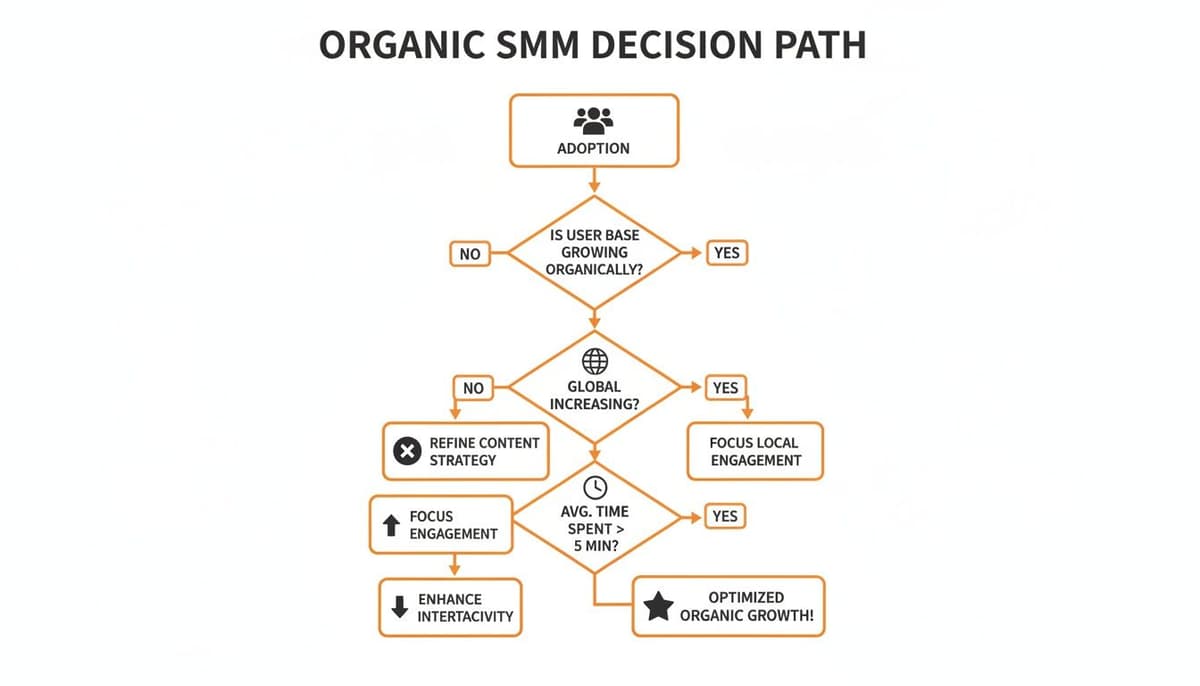
That decision tree highlights each network’s reach, user base size and average time spent. Spot the platforms where your audience is most active, and you’ve already cut your options in half.
Platform Comparison By Engagement And Audience
Here’s a side-by-side look at engagement rates, demographics and top formats. Use it to zero in on the networks that fit your brand voice and goals.
| Platform | Engagement Rate | Primary Demographic | Best Content Type |
|---|---|---|---|
| 6.50% | Professionals (25–45) | Articles, B2B Updates | |
| 5.07% | Adults (25–54) | Community Posts, Live Videos | |
| TikTok | 4.86% | Gen Z (16–24) | Short Videos, Challenges |
| Instagram Stories | ~15% | Millennials (18–34) | Stories, Reels |
Use this snapshot to choose one or two platforms to test first. Track performance weekly and watch how those engagement numbers shift.
Tips For Choosing Platforms
• Match your audience’s age bracket and hobbies to each network’s core users.
• Review your content style—does it pair best with short videos, articles or live streams?
• Focus where people spend the most time to boost your visibility and interactions.
58% of consumers discover new brands on social media, outpacing search engines and TV ads. If you zero in on the right channels, every post lands where it counts.
Prioritize your primary customer segment where they already spend the most time online to ensure each post lands with impact.
By weaving together surveys, analytics and visual tools, you’ll know exactly which networks deserve your energy.
Free Tools For Audience Insights
Content decisions get easier when you tap into no-cost resources:
• Facebook Audience Insights for demographic breakdowns and interest overlaps
• Google Forms to embed quick polls in your feed or Stories
• Twitter Polls via Twitter to gauge opinions in real time
These tools deliver raw data you can turn into detailed persona profiles. A tea shop uncovered that 60% of buyers share unboxing videos—so they launched a weekly “Tea Reveal” series, instantly upping their view counts.
Analyzing Hashtag Performance
Tracking hashtags shines a light on niche conversations that click with your crowd:
• Explore trending tags in TikTok’s Creative Center or a free alternative.
• Log impressions, top posts and engagement rates in your spreadsheet.
• Look for tags that gain traction month over month and add them to your roster.
One small retailer saw TikTok views triple after weaving in #TeaTok and #LooseLeafLove. Adapt constantly—what works today might fade next season.
Final Platform Selection Matrix
Turn your research into a clear shortlist by scoring each platform:
• Rate adoption, engagement and content fit on a 1–5 scale.
• Tally the scores to reveal your top two or three channels.
• Revisit this matrix every quarter to catch shifts in user behavior.
This exercise transforms a jumble of insights into a smart, focused game plan. Test, refine and repeat—and you’ll lock in the platforms that drive real growth.
Craft Engaging Content Using Proven Templates
Templates save you hours each week and keep your voice consistent. Mix short videos, carousels, and microblogs to spark fresh interest on every scroll.
I once worked with a fitness coach who followed a simple video script outline—and saw signups climb by 25% in under a month.
Here are three frameworks I reach for first:
- Short-Form Video Scripts: Hook viewers in two seconds, outline a problem, then deliver your solution.
- Carousel Cheat Sheets: Break a process into 4–6 slides so people can swipe through step by step.
- Conversational Microblog Threads: Weave mini-stories, drop in questions, and invite replies.
Templates That Convert
A great hook is your first (and often only) shot to grab attention. Try opening with a question or a startling stat. Then:
- Keep sentences short—three or four words whenever possible.
- Bold out your core point so it pops in a busy feed.
- Stick with branded colors for instant recognition.
Below is a sample weekly calendar built in MicroPoster’s Studio. Fill in your formats to maintain a balanced mix.
That layout blends videos, carousels, threads, and Stories across each weekday.
Content Types And Use Cases
Different messages call for different formats. Here’s a quick reference to align your goals, examples, and platforms. Popular destinations include Instagram for Reels, Facebook or LinkedIn for carousels, X or Mastodon for threads, and TikTok for user clips.
| Content Type | Purpose | Example | Optimal Platform |
|---|---|---|---|
| Short-Form Video Reels | Showcase product use | Fitness coach demo workout | Instagram Reels |
| Carousel Slideshows | Educate step-by-step | Recipe breakdown for café owner | Facebook & LinkedIn |
| Microblog Threads | Tell a story in detail | Boutique behind-the-scenes series | X & Mastodon |
| Stories Format | Real-time updates | Day-in-the-life salon tour | Instagram Stories |
| User-Generated Content | Build trust through social proof | Customer unboxing posts | TikTok & Instagram |
Use this breakdown to match your daily theme with the format that serves it best.
Weekly Content Framework
Here’s a simple rhythm that keeps your audience coming back:
- Monday: Microblog thread for storytelling and feedback.
- Wednesday: Video reel to demonstrate a tip or tutorial.
- Friday: Carousel post that unpacks a how-to.
- Weekend: Stories sequence for in-the-moment updates.
• Swap in product launches, promotions, or seasonal visuals as needed.
• Keep an eye on trending topics and adjust your calendar on the fly.
Copywriting And Design Tips
“A catchy hook in the first two lines can boost post saves by over 30%, ” says a social media strategist.
- Aim for hooks under 10 words that promise a clear benefit.
- Stick to a consistent font hierarchy and your brand’s color palette.
- Use icons or emojis to guide the eye and reinforce your tone.
- Drop in customer quotes or quick polls to spark two-way engagement.
Advanced Visual Strategies
- Short animations or GIFs can lift click-through rates by 15% when used sparingly.
- Simple charts or infographics help B2B posts stand out on LinkedIn.
- Try a month-long “behind-the-scenes” Stories series to humanize your brand voice.
Authenticity drives trust more than polished ads in an organic feed.
Customizable Weekly Plan Template
Here’s a week you can tweak to fit your brand and goals:
- Monday: Microblog Thread for story and feedback (end with a question)
- Tuesday: User-Generated Post for community bonding (share a customer tag)
- Wednesday: Video Reel for demo or motivation (use a trending sound)
- Thursday: Infographic to showcase data (highlight 73% stat)
- Friday: Carousel Post to guide step by step (include a strong CTA)
- Saturday: Stories Sequence for real-time updates (use location stickers)
- Sunday: Recap Thread of highlights and reflections (pin for easy access)
Swap in promotions, holiday themes, or seasonal launches wherever they fit best.
Practical Examples From Experience
A boutique owner rolled out four carousel posts in two weeks and doubled their saves. A neighborhood café launched a “Monday Mood” Reel series for six weeks and saw 15% more followers. You can adapt these tactics by matching each template to your audience’s interests.
Key Takeaways You Need To Know
- Use proven templates to speed up your process and maintain consistency
- Mix content formats so you satisfy different platform algorithms
- Plan around core themes and events for a cohesive feed
- Automate formatting with MicroPoster’s editor to scale text-first networks
With clear templates and a flexible weekly plan, small businesses can grow engagement without boosting ad spend. Start applying these frameworks today to build stronger connections and steady organic growth.
Set Up Scheduling And Automation Tools
Keeping your feed active is essential for growth. A steady stream of posts not only keeps followers engaged but also frees you from daily manual work, giving you more time to talk with your audience.
Take a neighborhood hair salon that plugged in an RSS feed to share new blog posts automatically. Their team slashed prep work by over half while making sure fresh links show up every day.
Of course, tilt too far toward automation and your posts risk sounding mechanical. A mix of scheduled content and spontaneous updates keeps your brand voice lively.
- Buffer’s free plan covers 3 social profiles and basic queue scheduling.
- Hootsuite’s Pro tier adds bulk uploads, team approvals, and in-depth analytics.
- MicroPoster focuses on text-first automation for X, Bluesky, and Mastodon with smart AI tweaks.
Choosing Your Scheduling Platform
Your choice boils down to how often you post and who’s on your team. If you’re sending out dozens of updates weekly, a tool that handles bulk uploads will save you hours. Smaller outfits often find free plans cover basic needs—upgrade only when you need advanced reports or approval workflows.
Here’s a look at a sample scheduling dashboard from a popular tool.
That view shows post status, publishing windows, and even engagement forecasts. You can spot dry spots in your calendar and fill them before they become a problem.
“Batch scheduling freed up nine hours a month, letting us respond faster,” says one salon owner.
Batching Content For Efficiency
Drafting posts in one go cuts down on context switching. Block out a couple of hours to write captions, pick images, and load everything into your scheduler.
This approach can boost your output by up to 40% while keeping your tone consistent across posts.
- Choose your weekly posting slots and jot them into your calendar.
- Collect all visuals, links, and notes in a shared folder.
- Write captions, add hashtags, and assign publish dates in your tool.
- Review your queue each week and tweak based on what’s performing best.
Preserving Authentic Brand Voice
Automation should free you up—not make your feed sound like a robot. Leave notes in your scheduler to remind yourself of tone guidelines.
Set up keyword alerts so you can jump on trending topics in real time. For example, tag “winter sale” to trigger a flash offer the moment chatter spikes.
Avoid broadcasting the same copy on every network. Tailor length and style to each audience.
- Write captions that feel like your real conversations.
- Scan scheduled drafts for jargon or stiff phrasing.
- Add a signature flourish—an emoji or catchphrase—to every post.
You might be interested in our guide on automating posts with best practices in social media marketing for small business Learn more about scheduling automation.
Following this routine saves you time and keeps engagement authentic. Nail your settings now so scheduling becomes your secret weapon.
Monitoring And Adjusting Your Schedule
Once your posts are queued, track performance by time slot. If certain windows underperform, shift them earlier or later.
- Engagement rate by posting time for each platform
- Click-through rates on auto-shared links
- Follower growth tied to new publishing slots
Small tweaks can raise engagement by 15%, turning simple scheduling into a dynamic growth tool.
Ready to start? Dive into free tiers and trial plans today. Your calendar will keep your brand top of mind and leave you free to focus on real connections.
Boost Growth And Engagement With Proven Tactics
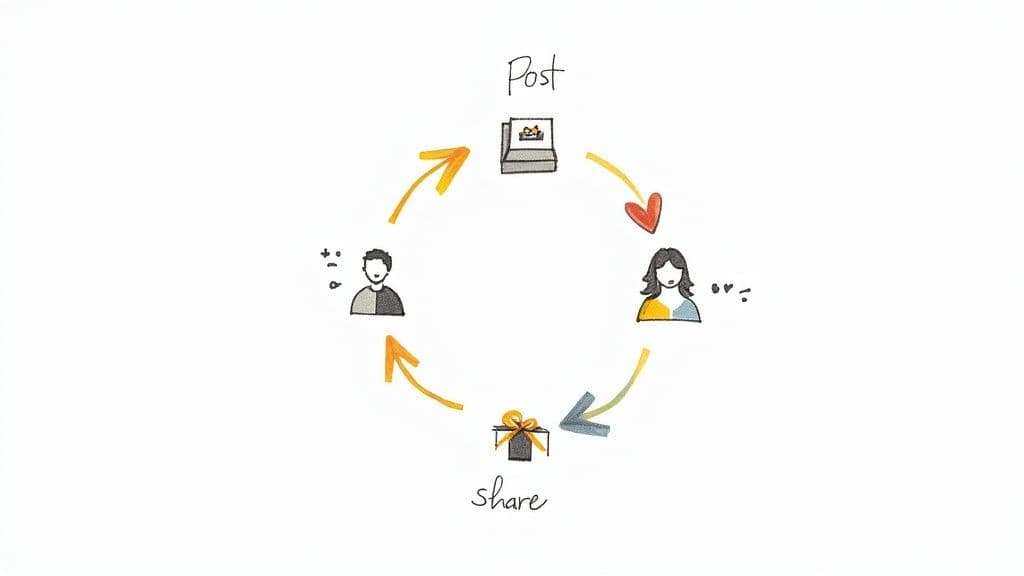
Real conversations drive organic engagement. When a neighborhood café asked followers to pick their favorite latte art, comments shot up by 200% in just a few days. That kind of genuine back-and-forth turns casual scrollers into active participants because they feel heard.
- Community Polls spark direct feedback and opinions.
- Hashtag Challenges motivate user-generated posts around a shared theme.
- Micro-Giveaways reward simple actions like comments or shares.
- Story Prompts encourage short replies and organic resharing.
Community Engagement Loops
Engagement loops start with a prompt and follow up fast. After posting behind-the-scenes latte art photos, one café made it a point to reply to every comment within an hour. The result? A steady stream of new replies, lifting visibility across the board.
Quick responses can raise comment counts by over 120% in under a week.
Effective Hashtag Techniques
Smart hashtag use puts your content in front of the right eyes. A local coffee shop blended #MorningBrew with #SipAndSmile and saw new followers climb by 18% over two weeks. The trick is mixing broad tags with more specific ones to reach varied audiences.
- Research trending tags in your niche with free tools.
- Track each hashtag’s performance weekly in a simple spreadsheet.
- Use a blend of 3 broad and 2 niche tags per post.
Micro Giveaway Frameworks
Tiny prizes can drive huge engagement when entry rules stay straightforward. For a “Latte Love” giveaway, one café asked followers to tag two friends and share a branded image—comments tripled overnight.
- Entry Steps
- Like the post
- Tag two friends
- Follow the account
Keep entries organized in a spreadsheet, pick winners fairly, and announce them in Stories. Then use personalized direct messages to build rapport with each winner.
Influencer Collaboration Scripts
Teaming up with local micro-influencers exposes you to enthusiastic communities. One boutique sent this message:
“Love your aesthetic! Would you like to try our latest product and share your thoughts?”
They landed three partnerships and saw a 45% jump in story mentions.
True partnerships feel genuine—not transactional.
Turning Commenters Into Advocates
When you acknowledge people publicly, they become champions for your brand. Tag a commenter in a follow-up post and thank them by name. Soon, followers start creating their own posts and referring friends.
- Thank top commenters by name in posts.
- Share standout responses each week.
- Offer exclusive discounts to your most active fans.
A niche boutique revived 70% of dormant followers with personalized story polls about favorite products. A follow-up DM with a mini discount sparked repeat visits.
Key Takeaways
- Fast, two-way loops spark comment growth.
- A balanced hashtag mix broadens reach.
- Micro giveaways reward engagement simply.
- Personal outreach turns followers into advocates.
Small, consistent actions compound into lasting growth. Track performance, refine your approach, and focus on what resonates most with your audience.
Start Your Engagement Strategy
Download our free engagement checklist to keep your tactics organized. Integrate MicroPoster’s automation features for polls, tagging, and scheduling. Ready to dive in? Head to MicroPoster and start growing your micro communities today.
| Tactic | Impact |
|---|---|
| Community Polls | +150% comments |
| Hashtag Rotation | +20% reach |
| Micro Giveaways | +35% shares |
- Review results weekly
- Double down on top performers
- Retire tactics that underperform
Iterate constantly to keep engagement fresh and responsive. Let the conversation begin!
Measure Success And Streamline Budget Workflow
Getting a grip on social media performance starts with the right metrics. Align each number you track with your broader revenue goals so every data point tells part of the story.
It’s easy to grab these insights from native analytics or a free third-party dashboard in just a few minutes.
- Reach shows how many unique users saw your posts over a given period.
- Engagement Rate calculates likes, comments, shares, and saves relative to your audience size.
- Click-Through Rate tracks how many people tapped your links or CTAs.
- Conversion Rate ties those clicks back to specific actions, like sign-ups or sales.
How To Gather Key Metrics
First, log into each platform’s analytics or connect them to a unified dashboard that pulls in all channels.
Next, pick a consistent date range—say the first to the last day of each month—for apples-to-apples comparisons.
Then export or screenshot the key tables and drop them into your reporting template.
“Reviewing metrics regularly turned our social data into actionable insights,” says a yoga studio manager.
Using A Monthly Report Template
A straightforward spreadsheet lays out every KPI side by side so trends jump off the page. Here’s how one community yoga studio structures theirs:
| Metric | January | February | March |
|---|---|---|---|
| Reach | 15,200 | 18,450 | 20,300 |
| Engagement Rate | 4.2% | 4.8% | 5.1% |
| Click-through | 340 | 410 | 475 |
| Conversions | 25 | 30 | 37 |
They scan for organic standouts—posts that outperform the average by 30%. Then a small slice of revenue, usually 3%, gets redirected into ad tests to see if paid promotion can push those winners further.
Social media ad budgets are ballooning, hitting $276.7 billion globally in 2025 and projected to climb to $406 billion by 2029, with 83% mobile-driven by 2030. On average, small businesses dedicate 2–5% of revenue (roughly $500–$10k monthly) to social ads, resulting in a cost-per-click between $0.63 and $5.58. Learn more about these findings.
To run your own quick ad experiment:
- First, spot the top organic performers in your monthly report.
- Next, set aside a small budget (around 3% of your revenue).
- Then run the test for 48–72 hours to gather clear data.
- After that, measure CPC and conversion rates to see what’s working.
- Finally, tweak your budget or targeting and repeat the process.
Streamlining Your Budget Workflow
Start by calculating your total revenue for the month, then multiply by your chosen ad-test percentage. Block that sum out in a dedicated budget line.
Schedule regular planning sessions—monthly or biweekly—to review whether any organic posts deserve a paid boost. Use an approval workflow that flags high-performers automatically.
- Calculate monthly revenue.
- Multiply by your ad allocation percentage.
- Create calendar reminders for your budget review.
- Implement an approval system for posts hitting performance thresholds.
- Check out our comments analysis tool for qualitative feedback on content performance.
Automate KPI alerts to ping you when key metrics hit your targets. Pair those notifications with quick review meetings to keep tactics nimble.
Consistent measurement and disciplined budgeting keep your social strategy agile and cost effective.
By turning social data into a monthly rhythm—charting KPIs, testing small ad spends, and reallocating funds—you’ll banish guesswork. Over time, you’ll see exactly when organic content peaks and know the perfect moment to amplify it with paid support.
Frequently Asked Questions
Choosing the right social network comes down to matching your style with the platform’s vibe. Think about who you’re talking to—and how they like to consume content.
- Instagram thrives on visual storytelling. Reels alone generate 3x more engagement than static posts.
- TikTok captures younger crowds with bite-sized videos and viral challenges.
- X and Mastodon reward quick, text-first updates and real-time conversations.
Finding your posting rhythm can feel like a guessing game. Aim for three to five quality posts each week on your main channels. That steady pace helps build trust—and keeps the algorithm on your side.
Steady posting schedules can raise engagement rates by 25%.
When it comes to measuring organic ROI, simplicity wins. Track:
- Reach and engagement rate
- Click-throughs tied to sign-ups or purchases
A straightforward spreadsheet linking those numbers back to real business outcomes turns vague metrics into clear wins.
Troubleshooting Engagement Plateaus
If likes and comments start to flatline, switch things up. Polls or micro-giveaways can shake off the dust. Consider what one coffee shop did: they launched a weekly latte-art contest on Instagram Stories and saw a 50% jump in comments.
Also, tweak your timing. Posting just an hour earlier or later sometimes makes the difference between “seen” and “scrolled past.”
Quick Fixes To Reignite Community
- Hold a mini-giveaway with simple entry rules, like tagging two friends
- Reshare user-generated content to inspire more contributions
- Rotate targeted hashtags every week to avoid stagnation
These small changes often spark fresh conversations within days.
Handling Sudden Reach Drops
Algorithm shifts can feel like a punch to the gut. Start by auditing your last five posts:
- Compare formats and refresh underperformers
- Experiment with new peak-hour slots
- Directly engage top followers in comments or DMs
Ready to simplify your microblogging workflow? Try MicroPoster for text-first automation, AI-powered hooks, and seamless cross-platform publishing. Sign up now at MicroPoster.


