
best cross-posting tool
10 Best Cross-Posting Tools for Founders & Creators (2026)
Looking for the best cross-posting tool? We compare 10 top options like Buffer, Later, and MicroPoster to save you time and grow your audience in 2026.

You wrote the post. It's sharp on X. It reads well on LinkedIn. Then the grind starts. You trim it for Threads, rewrite the opening for Bluesky, fix broken mentions, and realize the image crop that looked fine in one app looks off in another.
That's why people start looking for the best cross-posting tool. It's not laziness. It's fatigue. Manual reposting burns time on the least valuable part of publishing.
The good tools don't just spray the same text everywhere. They help you keep momentum without making your posts look copied, awkward, or technically broken on each network. The bad ones save a few clicks up front and cost you quality later.
I've tested this category from both sides. Heavy social suites for teams, and lighter automation tools that act more like a background distribution layer. If you're a founder, creator, or small team, that distinction matters. Some tools want you to live inside a dashboard. Others let you keep posting where you already work and handle the mirroring for you.
That's where this guide is focused. Not just on features, but on how each tool adapts content across platforms, where each one fits, and where cross-posting can hurt more than help.
1. Key Criteria for Choosing Your Cross-Posting Tool
The first mistake buyers make is comparing tools by platform count alone. Platform coverage matters, but it's not the thing that determines whether your output feels native.
A 2026 guide on cross-platform posting made the important point clearly: the best tools adapt posts for each network by changing character counts, hashtags, image dimensions, and formatting, rather than indiscriminately duplicating the same post everywhere. That adaptation layer is what separates a useful workflow from lazy syndication (cross-platform posting guide).

What actually matters
- Native adaptation: Does the tool split threads, resize media, and adjust formatting so each post fits the destination?
- Workflow fit: Does it support how you already publish, or force you into a new dashboard-heavy habit?
- Low-friction setup: In software generally, adoption dies when tools feel hard to learn. In the broader BI and analytics market, only about 25% of employees actively use those tools on average, with barriers including lack of proper training, quality data, budget, and ease of use. That's a good reminder that the best cross-posting tool isn't the one with the longest feature list. It's the one your team will keep using (BI adoption infographic).
- Security and clarity: OAuth logins, obvious permissions, transparent pricing, and a trial you can test with real posts.
Practical rule: If a tool saves time publishing but adds cleanup work after the fact, it isn't automation. It's deferred manual labor.
If you want a deeper breakdown of what makes cross-posting work in practice, MicroPoster's own guide on social cross-posting workflows is a solid companion read.
2. MicroPoster
MicroPoster is part of a newer class of cross-posting tools. It's less of a traditional scheduler and more of an automation layer that watches a source account and mirrors posts out to your other networks.
That distinction matters. If you already write natively on X, for example, you don't have to open another dashboard every time you post. MicroPoster can detect the new post and push it to Threads, Bluesky, and Mastodon with platform-aware adjustments.
Why it feels different
Where bigger schedulers optimize for centralized planning, MicroPoster optimizes for distribution after the fact. It handles the ugly parts that usually force manual cleanup: splitting long updates into threads, remapping mentions, resizing media, and making sure links and previews behave properly per platform.
That makes it unusually good for founders and creators who already have a “post here first, mirror everywhere else” habit.
It also stays lightweight. OAuth login means you're not handing over passwords, setup is fast, and the interface doesn't feel like agency software disguised as a creator product. Built-in AI tools for tone changes, summaries, expansions, timing help, and comment analysis are useful because they sit inside an automation workflow instead of becoming another thing to manage.
Best fit
MicroPoster is strongest for:
- Founders and indie builders: You publish product updates from one main account and want the rest handled automatically.
- Writers and creators: You care about reach but don't want to format the same idea four times.
- Small teams: You need automation more than deep enterprise reporting.
There's also a practical pricing advantage. The product offers a 7-day free trial, which makes it easy to test with your own real posts before committing. If your biggest pain is context switching, that trial is worth using because you'll know quickly whether the workflow clicks.
One caveat. MicroPoster is built around automation-first reposting, not full enterprise social management. If your team needs big approval chains, complex stakeholder routing, or deep customer care workflows, you'll probably want a heavier suite.
Still, for people who want a leaner tool that feels like autopilot, it's one of the most interesting options on this list.
3. Buffer
Buffer is still one of the easiest tools to recommend when someone wants a clean scheduler and doesn't want to fight the software.
Its biggest strength is simplicity. You can queue posts quickly, customize by platform, and keep a lightweight content calendar without the bloat that often shows up in enterprise tools. For a solo creator or small startup team, that matters more than flashy features.
Where Buffer wins
A 2026 roundup listed Buffer as supporting 11 channels, with a free plan capped at 3 channels and 10 posts per channel. The same comparison is useful because it shows how Buffer sits in the market: broad coverage, low-friction entry, and a structure that works well if you're still proving your workflow (2026 cross-posting tools roundup).
Buffer is especially good if you want to post across major networks, including newer ones, but still prefer to manually tune copy inside one composer.
Trade-offs
- Best for: creators, early-stage teams, and anyone who wants a low-stress scheduler.
- Less ideal for: people who want deep automatic adaptation instead of manual per-platform edits.
Buffer is great when you want a calm dashboard. It's less great when you want the system to think for you.
If your posting volume is moderate and you don't mind making platform edits yourself, Buffer is still one of the safest picks. Website: Buffer pricing
4. Hootsuite
Hootsuite is the classic answer when a team says, “We need one place for everything.” Scheduling, inboxes, ads, team controls, governance, and optional listening all live under one roof.
That's useful if social is a cross-functional operation, not just a publishing task. Marketing, support, and management teams can all work from the same system. For large organizations, that centralization can matter more than elegance.
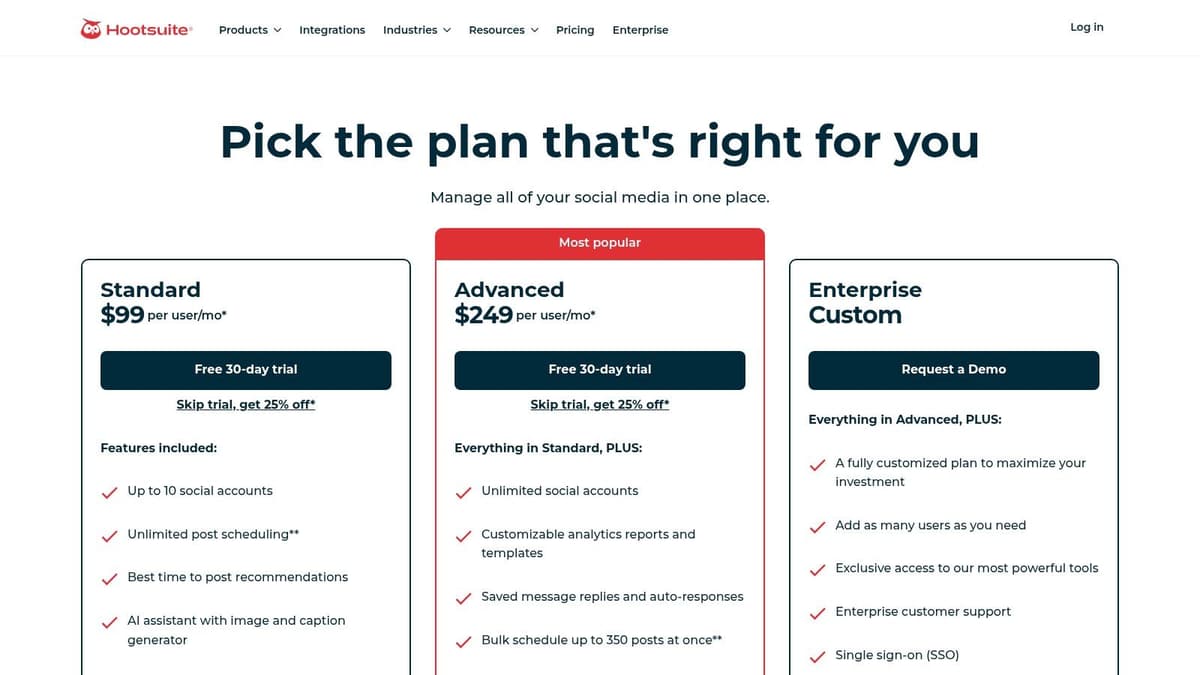
Where Hootsuite makes sense
A 2026 market comparison noted that Hootsuite starts at about $99/month. That price point immediately tells you what category it's in. This isn't the lean founder tool. It's the established suite for teams that need controls, not just convenience.
The real trade-off
Hootsuite usually makes sense when publishing is only one piece of the problem. If you also need permissions, inbox routing, service workflows, and executive reporting, the heft is justified.
If all you really need is efficient cross-posting, it can feel expensive and heavier than necessary.
- Strong fit: larger teams, brands with approval and governance needs.
- Weak fit: solo creators, indie founders, and anyone who values speed over process.
Website: Hootsuite plans
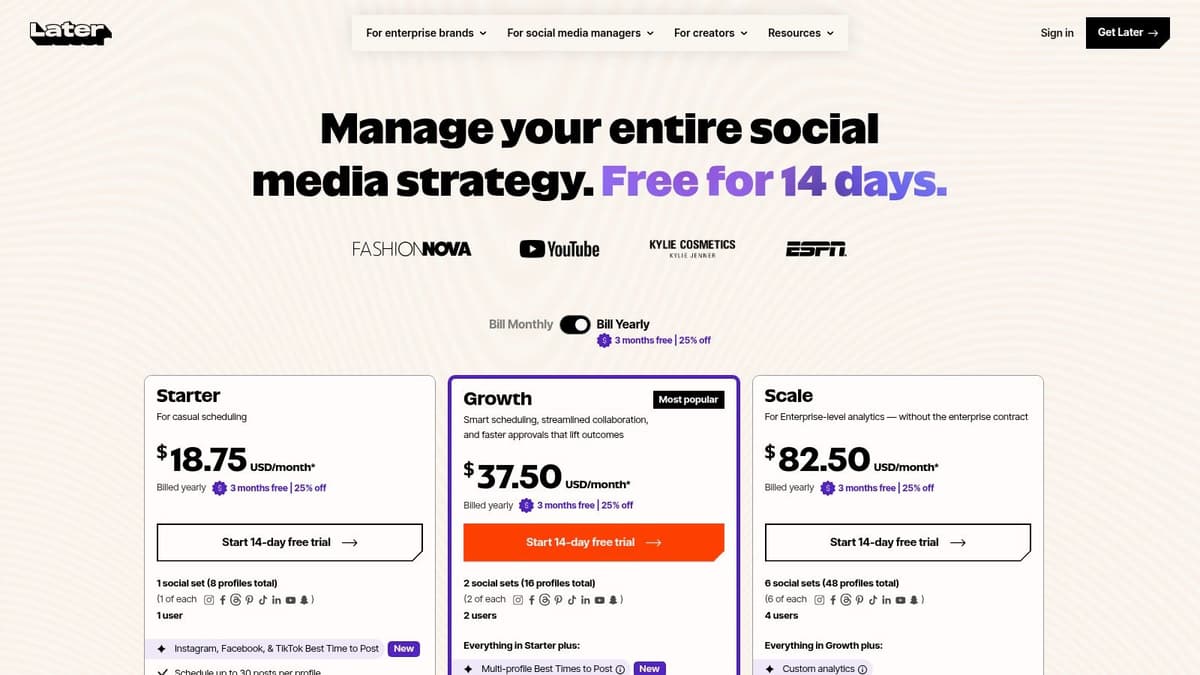
5. Later
Later still feels most natural for visual-first teams. If your social workflow starts with images, short-form video, and feed planning, it's one of the smoother experiences in the category.
That's why fashion brands, ecommerce teams, and creator businesses often like it. The visual calendar is intuitive, and the product has long been strongest where post layout and media planning matter more than text-heavy publishing.

Best use case
Later works well when Instagram and TikTok are close to the center of your strategy, and when your team wants a planner that keeps media organized.
It's less compelling if your core motion is text-led publishing across X, LinkedIn, Threads, and Bluesky, where copy adaptation matters more than grid aesthetics.
What to watch
- Good for: creators, ecommerce brands, and visual campaign planning.
- Less good for: founder-led thought leadership or text-heavy B2B publishing.
I'd choose Later when the visual workflow is the product. I wouldn't choose it just because it also cross-posts.
Website: Later pricing
6. Publer
Publer is one of the better value picks if your team batches content and wants flexibility without enterprise pricing.
It's especially strong when your workflow looks like this: write a lot, upload in bulk, recycle evergreen posts, and keep multiple profiles active without rebuilding your schedule from scratch every week.

Why Publer stays popular
Publer's strength isn't that it feels glamorous. It's that it's practical. Bulk upload, recycling, and modular pricing solve real operational problems for small teams.
If you manage many profiles and want transparent build-your-own pricing, Publer tends to be easier to justify than seat-based tools.
The catch
The interface can feel busy once you scale up the number of connected accounts. That's the trade-off with flexible tools. You get more control, but less of the minimalist calm that products like Buffer offer.
For batch publishing, Publer often saves more time in one monthly planning session than prettier tools save over a week.
It's a strong option for recurring content libraries, agency-lite workflows, and teams that want utility over polish. If video is central to your strategy across multiple accounts, RenderIO's guide to making video unique across accounts is a useful companion read.
Website: Publer
7. SocialBee
SocialBee is one of the better picks for always-on publishing. If your content strategy relies on categories, queues, and evergreen recycling, it does that job well.
Some teams don't need a complex composer. They need a machine that keeps the feed alive. That's where SocialBee earns its spot.
Best fit
SocialBee works best for small businesses, freelancers, and agencies running repeatable posting systems. You can sort content into categories, recycle what still works, and maintain a steady cadence without constant intervention.
Where it falls short
If your team wants deep social listening, more advanced analytics, or heavy reporting, SocialBee won't be the strongest option. It's a publishing machine first.
- Choose it if: consistency is your main problem.
- Skip it if: reporting and monitoring are your main problem.
Website: SocialBee pricing
8. Metricool
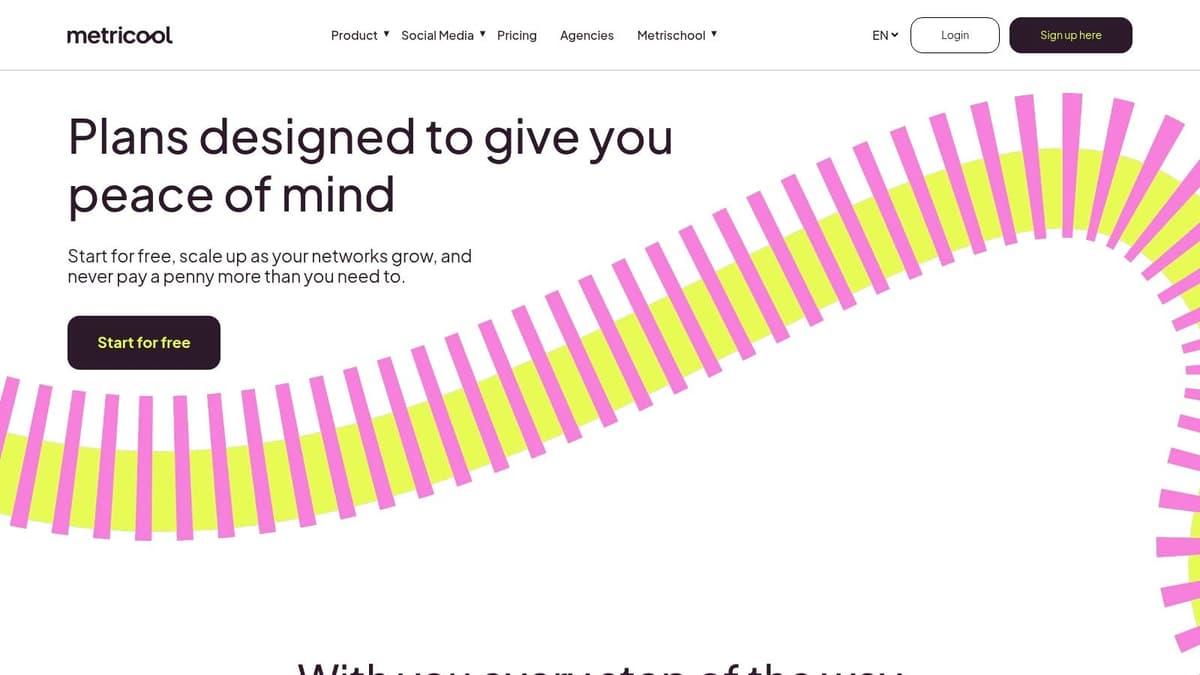
Metricool is the tool I'd look at first if reporting matters almost as much as publishing.
A lot of cross-posting tools treat analytics as a bonus tab. Metricool treats them as part of the reason to buy. That changes the type of team it attracts. Agencies, consultants, and multi-brand operators usually appreciate that more than solo creators do.

Why it stands out
Metricool gives you a better view of performance and competitor context than many lightweight schedulers. If you need to justify social work to clients or stakeholders, that matters.
Practical trade-off
The publishing side is good, but the adaptation side often feels less central than it does in more automation-focused tools. So the question becomes simple: do you need a scheduler with analytics, or an adaptation engine with scheduling?
If the answer is analytics first, Metricool deserves a hard look.
Website: Metricool pricing
9. Loomly
Loomly is built for teams that can't publish casually. If posts need review, stakeholder signoff, and clean role separation, Loomly handles that better than most creator-oriented tools.
That's a real need in larger startups, nonprofits, and brand teams with compliance or reputation concerns. A tool that feels “slower” to a founder can feel “safer” to a team with multiple approvers.
Best use case
Loomly is strong when collaboration is the bottleneck. Custom roles, permissions, approvals, and integration into team communication tools make it more about process than raw posting speed.
Drawback
For solo creators or very small teams, Loomly can feel like too much ceremony. You end up paying for workflow structure you don't need.
If three people need to touch a post before it goes live, Loomly makes sense. If one person writes and publishes, it probably doesn't.
Website: Loomly pricing
10. Sprout Social
Sprout Social is the premium end of the category. It's the tool teams choose when social publishing, engagement, reporting, and customer care all need to live together.
It's not hard to see why bigger organizations buy it. The reporting is polished, the inbox and care workflows are strong, and the product has the feel of enterprise software that's been built for demanding teams.
Price tells the story
The same 2026 roundup that compared cross-posting tools noted Sprout Social's Essentials tier at $79. In that same comparison, the market spanned from free entry tiers to much more expensive software, with coverage ranging from 8 to 12+ networks depending on the tool. That's the right context for Sprout. It's not trying to be the cheapest way to repost content. It's selling a more complete operating system for social teams.
Who should buy it
- Best for: mature teams, service-heavy brands, and organizations that value support and reporting depth.
- Not best for: founders who mainly want content mirrored across networks with minimal effort.
Website: Sprout Social
11. Sendible
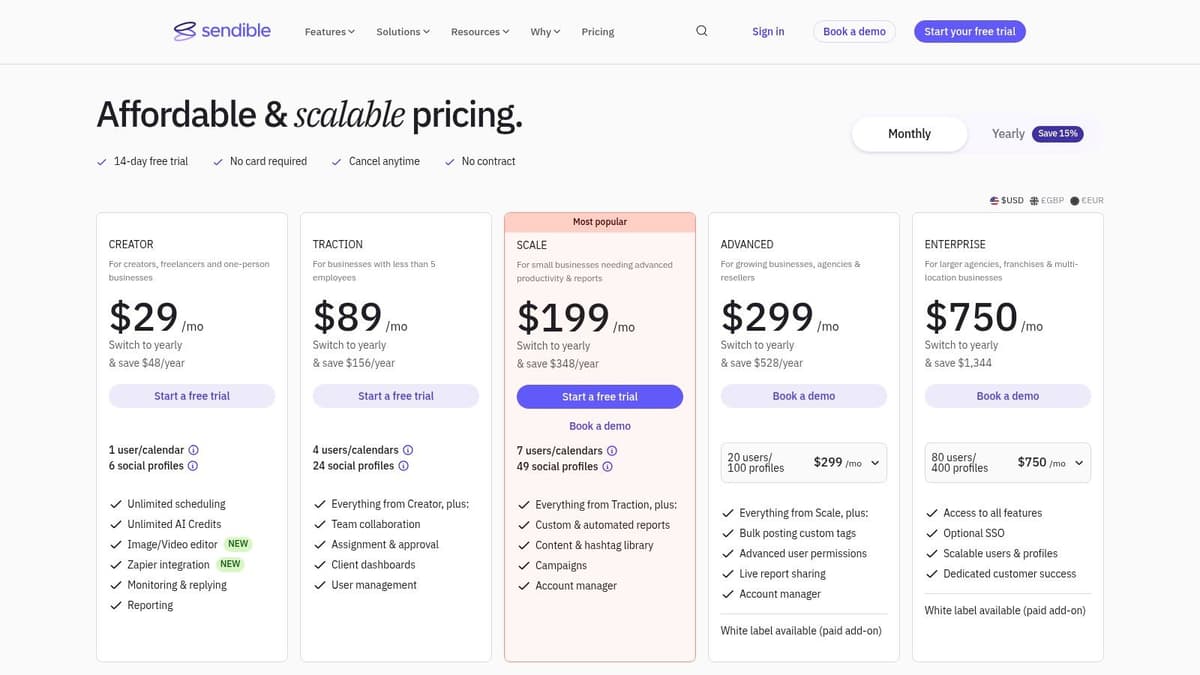
Sendible sits in a useful middle ground for agencies and service teams. It offers cross-posting, reporting, approvals, and client collaboration without always pushing you into full enterprise pricing territory.
That makes it appealing when you manage many client profiles and need a practical system more than a prestige platform.
Why agencies like it
Sendible is designed around multi-calendar management, client approvals, and reporting. Those are the pressure points that show up in agency work long before you need the complexity of tools like Sprout or Hootsuite.
What to verify
Plan limits and naming can change over time, so agencies should always confirm current caps before scaling a roster inside the product. That's not a knock on Sendible specifically. It's just good buying discipline in this category.
Website: Sendible pricing
12. Your 5-Step Cross-Posting Tool Buying Checklist
Teams often don't choose the wrong tool because the product is bad. They choose the wrong tool because they buy for feature breadth instead of workflow fit.
A major gap in “best cross-posting tool” coverage is that most articles focus on how many networks a tool supports, but skip the more important question of whether posts preserve native formatting and behavior across platforms. That gap matters even more now that publishing often includes video uploads, platform-specific captions, and network-specific presentation (cross-posting quality gap analysis).
The five checks that matter
- Define your source of truth: Are you scheduling from one dashboard, or posting natively and mirroring outward?
- Pick your must-have networks: Don't buy for theoretical channels. Buy for the ones you'll use.
- Find your biggest time drain: Thread splitting, media resizing, approvals, inbox work, analytics, or evergreen recycling.
- Decide how much manual editing you'll tolerate: Some teams want total control. Others want the machine to handle most of it.
- Test with real posts: Trials matter most when you use your own content.
There's one more contrarian point buyers often ignore. Sometimes cross-posting is the wrong default. Recent cross-listing guidance in adjacent markets highlighted a practical reality: real-world workflow constraints, mobile-first conditions, and manual exceptions can make pure automation less effective than a hybrid model. In plain terms, not everything should be mirrored everywhere (hybrid workflow perspective).
If you're sorting through that exact decision, MicroPoster's article on native posting vs social media management tools is worth reading because it frames the workflow question more clearly than most generic roundups do.
Top 12 Cross-Posting Tools Comparison
| Tool | Key features ✨ | UX / Quality ★ | Price / Value 💰 | Target audience 👥 | Notes |
|---|---|---|---|---|---|
| Key Criteria for Choosing Your Cross-Posting Tool | Native adaptation, automation rules, security, workflow fit | ★★★★★ (guide) | 💰 N/A, evaluation checklist | 👥 Buyers & evaluators | Quick checklist to separate good vs great tools |
| 🏆 MicroPoster | Auto-native posting (threads, media resize, handle mapping), 24/7 automations, AI tools, OAuth | ★★★★☆ | 💰 Creator $12/mo · Pro $29/mo · Agency $89/mo · 7‑day trial | 👥 Founders, creators, small teams | 🏆 Recommended, native-first, low-touch distribution; ~30m sync & monthly quotas |
| Buffer | Broad cross-posting, threaded posts, community inbox, AI repurposing | ★★★★☆ | 💰 Free tier (3 ch) · affordable tiers | 👥 Creators, freelancers, SMBs | Clean UX; good all-rounder for newer networks |
| Hootsuite | Scheduling, ads boosting, listening, team workflows | ★★★☆☆ | 💰 Higher enterprise pricing | 👥 Large teams, enterprises | Mature, full toolkit; pricier for SMBs |
| Later | Visual planner, social sets, IG/TikTok strengths, AI captions | ★★★★☆ | 💰 Tiered; AI credits capped | 👥 Visual creators, brands, influencers | Strong IG/TikTok UX; visual-first calendar |
| Publer | Modular per-account pricing, bulk upload, evergreen recycling | ★★★☆☆ | 💰 Very low entry cost · generous free tier | 👥 Cost-sensitive teams, many profiles | Flexible build‑your‑own pricing model |
| SocialBee | Category queues, content recycling, approvals, AI copilot | ★★★☆☆ | 💰 Approachable starter plans | 👥 SMBs, agencies, solo creators | Excellent for evergreen, always‑on feeds |
| Metricool | Analytics-first, competitor tracking, ads integration | ★★★★☆ | 💰 Competitive per‑brand value | 👥 Multi‑brand teams, reporting-focused users | Strong reporting at lower price points |
| Loomly | Approvals, roles/permissions, unlimited calendars, media library | ★★★★☆ | 💰 Moderate→high tiers | 👥 Teams needing approvals & governance | Collaboration-forward with export & integrations |
| Sprout Social | Publishing, unified inbox, care workflows, listening | ★★★★★ | 💰 High / seat-based pricing | 👥 Enterprises, CX & social care teams | Premium reporting, enterprise reliability |
| Sendible | Agency features, client approvals, custom reporting, white‑label | ★★★★☆ | 💰 Agency‑oriented pricing · scalable | 👥 Agencies managing many clients | White‑label & client collaboration focused |
| Your 5‑Step Cross-Posting Tool Buying Checklist | Define workflow, list networks, set budget, pick automations, trial | ★★★★★ (how‑to) | 💰 N/A, action checklist | 👥 Buyers ready to test tools | Practical step-by-step for selecting & trialing tools |
The Right Tool Is the One You Actually Use
The best cross-posting tool isn't the one with the biggest feature grid. It's the one that matches how you already work and removes enough friction that you keep using it every week.
That sounds obvious, but teams often still buy backward. They compare network counts, skim screenshots, and assume more software means a better outcome. In practice, the opposite often happens. The heavier the tool, the more setup, maintenance, and internal coordination it can demand. If your workflow is simple, that extra complexity becomes drag.
For founders and creators, the usual pain isn't a lack of features. It's context switching. You write one strong post, then lose momentum while adapting it for every platform manually. That's why lighter automation-first tools are becoming more interesting. They don't ask you to become a full-time social media operator. They help you publish once and stay visible elsewhere with less effort.
That doesn't mean the heavy suites are wrong. Buffer is still one of the most approachable all-around options if you want a clean scheduler. Hootsuite and Sprout Social still make sense when approvals, reporting, support workflows, and governance are part of the job. Metricool is a smart choice when analytics matter. Publer and SocialBee are useful when batching and recycling are central. Loomly and Sendible make more sense when multiple people need to review work before it goes live.
But if your real goal is autopilot, not administration, then the newer category deserves serious attention. MicroPoster is a good example of that shift. Instead of making you rebuild your publishing habit inside another dashboard, it can sit behind your existing workflow and handle mirroring, thread formatting, media adaptation, and cross-network distribution in the background.
That model won't fit everyone. Some teams need a command center. Others need a relay system. Knowing which camp you're in saves more time than any feature comparison ever will.
The easiest way to choose is still the simplest one. Run a real trial with your own posts. Publish the kind of content you make. Watch what breaks, what adapts cleanly, and which product you want to keep open after the first week.
If you're curious about the automation-first route, MicroPoster's 7-day trial makes that test easy. You'll know quickly whether a lightweight cross-posting layer fits your workflow better than another all-in-one dashboard.
If you already post on X, Threads, Bluesky, or Mastodon and you're tired of manually reworking the same content, MicroPoster is worth trying. It's built for the simple version of the problem most founders and creators have: write once, let the system adapt and distribute it, and stop wasting energy on repetitive reposting. The 7-day trial gives you enough time to test it with your real workflow, not a fake demo.


