
MicroPoster guide
8 Buffer Alternatives in 2026: Free Plans & Paid Options
Looking for a Buffer alternative? Compare eight tools by free-plan limits, pricing, supported networks, and scheduling vs. automatic crossposting.

Which Buffer alternative fits your workflow?
The right Buffer alternative depends on the job: Metricool for free analytics-led use, Publer for free scheduling without X, SocialBee for evergreen recycling, Planable for approvals, Later for visual planning, Hootsuite for integrated social operations, Postiz for self-hosting, and MicroPoster for crossposting posts published in a native social app.
Start with your required networks, then compare access limits and total cost. These eight options solve different problems, so the numbering below is navigation, not a best-to-worst ranking.
Pricing snapshot: October 2026. USD; billing terms vary; taxes may apply.
| Tool | Strongest fit | Ongoing free plan or trial | Starting paid price and included unit | Main constraint |
|---|---|---|---|---|
| MicroPoster | Native-post crossposting | 7-day trial | Creator: $12/month, billed monthly; 4 accounts | Four supported networks; checks are not instant |
| Metricool | Analytics-led scheduling | Ongoing Free plan | Starter: $25/month, billed monthly; up to 5 brands | X costs $10/month extra per connected X account on paid plans |
| Publer | Lightweight scheduling | Ongoing Free plan; paid trials | Professional: from $5/month, billed monthly; 1 account, 1 user | Price scales with accounts and additional members |
| SocialBee | Evergreen content library | 14-day trial | Bootstrap: $29/month, billed monthly; 5 profiles | Library setup; approvals require a higher tier |
| Later | Visual calendar | 14-day trial | Starter: $18.75/month equivalent, billed yearly; 1 social set | One profile per network in a set; monthly profile caps |
| Planable | Client feedback and sign-off | 50 created posts total; no time limit or reset | Basic: from $33/workspace/month, annual billing; 4 pages | Workspace charges and add-ons; required approvals need Pro |
| Hootsuite | Publishing, care and listening | 14-day trial | Standard: $99/user/month, billed annually; 10 social accounts | Per-user cost; approvals need Advanced |
| Postiz | Open-source control | Cloud: 7-day trial; self-hosted software is free | Cloud Standard: $29/month, billed monthly; 5 channels | Self-hosting requires infrastructure and provider setup |
These starting prices are not equal-scope packages or a cheapest-tool ranking. A Metricool brand groups one profile per network; a Later social set also contains one of each supported network. Count duplicate profiles, workspaces, users and add-ons before comparing totals.
Buffer remains a useful baseline. Its Free plan supports three channels and 10 queued posts per channel at a time. Slots become reusable after publishing. Paid plans already include advanced analytics and community features, while Team adds approvals and unlimited team members. A replacement should solve a specific missing step, not merely offer a longer feature list.
Choose the workflow before comparing features
Central scheduling starts in a shared composer. Draft a post, customize it for each destination, then queue or schedule it. Depending on the tool and plan, teammates can review it before publication. This fits campaigns, fixed publishing times and coordinated teams.
Native-post crossposting starts in the social app itself. Publish on the source account, then an automation checks for new content and sends supported copies to selected destination accounts. This fits spontaneous updates when the repeated work happens after writing: copying the same idea to other networks.
Publishing to several networks from a composer is not the same as monitoring an already-published native post. Postiz's one-click crossposting, for example, describes the first mechanism. MicroPoster's source-account automations describe the second.
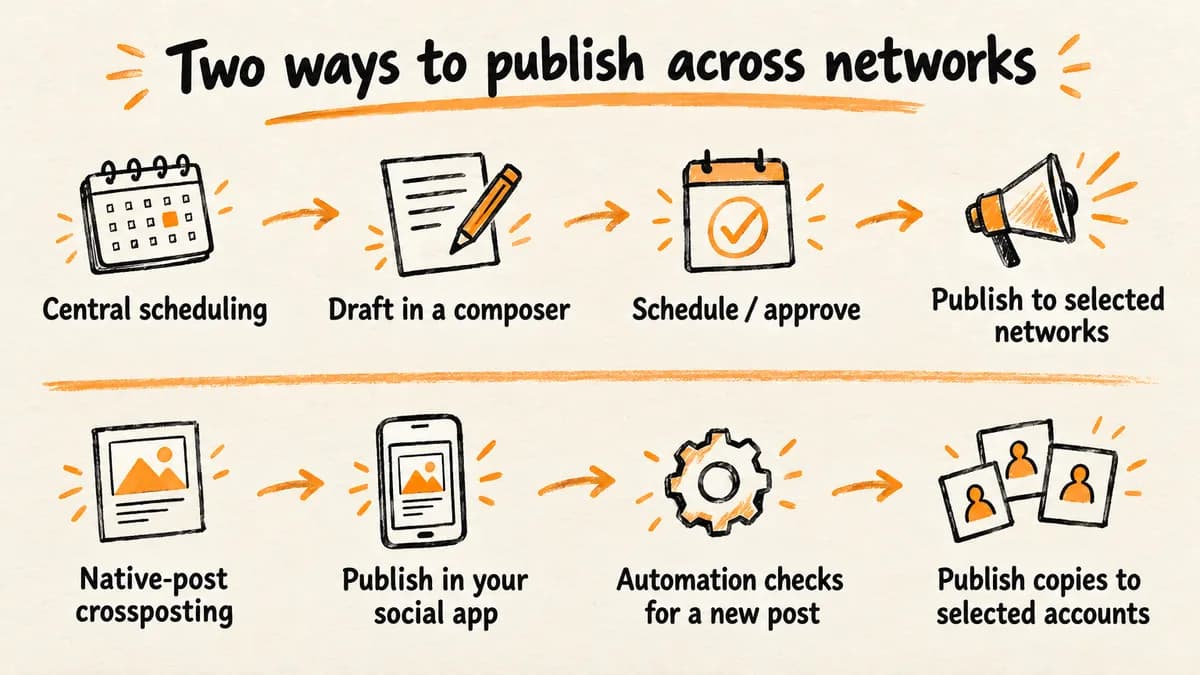
These are workflow choices, not rigid product categories. MicroPoster also offers drafts and scheduling. The useful question is where your next post should begin, and whether anyone needs to approve it before it goes live. Neither workflow is inherently more authentic or better for engagement.
1. MicroPoster: for automatic crossposting after native publishing
Best fit: Founders and writers who already publish natively and want copies on their other connected accounts.
What it does: MicroPoster connects X, Threads, Bluesky and Mastodon. Connect one source–destination pair, activate its directional automation, publish in the source app, and inspect the destination. Additional pairs need separate automations within your plan limits.
Text can adapt to destination limits, and longer content can split into native threads. Images, videos, links and threads still depend on destination formats and limits. Optional drafts, scheduling, AI Co-Writer and native Auto Repost support other publishing tasks; native reposting is not the same as republishing an evergreen library.
The automatic crossposting controls let you keep an individual post local with #nocrosspost or #keephere on the source post or a reply in its thread. Each copy has separate replies and reactions. Editing the original does not update copies already published.
Price and free access: All prices below are USD, billed monthly. You can compare MicroPoster plans by account count, routes and volume.
| Plan | Monthly price | Accounts | Automations | Automatic crossposts/month | Check interval |
|---|---|---|---|---|---|
| Creator | $12/month, monthly billing | 4 | 3 | 200 | 30 minutes |
| Pro | $29/month, monthly billing | 8 | 10 | 1,500 | 10 minutes |
| Power | $59/month, monthly billing | 12 | 50 | 5,000 | 10 minutes |
The seven-day trial uses Creator limits and requires no card. It is not a forever-free plan.
Trade-off: Check frequency is not a guaranteed delivery deadline. Processing, platform availability, account access and remaining allowances affect publication. Exhausting the monthly crosspost allowance pauses automatic crossposting.
MicroPoster is not a fit for Instagram, Facebook, TikTok or LinkedIn destinations, or for a coordinated inbox, listening and approval suite. Look to Later for visual planning, Planable for sign-off or Hootsuite for integrated operations. If native posting is your starting point, test one account pair before expanding.
2. Metricool: for scheduling with analytics and a free plan
Best fit: Creators and small businesses that want to measure performance alongside publishing.
What it does: Metricool combines scheduling, analytics and competitor analysis, with reporting on paid plans. Its publishing coverage includes Instagram, Facebook, Threads, Bluesky, TikTok, Pinterest, YouTube, Google Business Profile and LinkedIn. LinkedIn requires paid access; X requires an add-on on a paid plan.
A brand groups one profile from each supported network, not an arbitrary bundle of accounts. Two Instagram profiles, for example, change how many brands you need.
Price and free access: The ongoing Free plan includes one brand, 20 scheduled posts per month, 30 days of analytics and five competitor profiles. LinkedIn and X are excluded. The 20-post allowance is monthly, not a queue cap and not a per-network allowance.
Metricool Starter starts at $25/month, billed monthly, for up to five brands. Each connected X account adds $10/month. Advanced adds team/client management, roles and approvals; those are not Starter or Free inclusions.
Trade-off: Free is useful for modest publishing volume, but its monthly cap and missing LinkedIn/X access can rule it out. Buffer Free may be a better match if you need those networks or regularly refill a publishing queue. For reporting-led buyers, compare the actual metrics available on each required network.
3. Publer: for lightweight free scheduling without X
Best fit: Solo users who need a small, reusable scheduling queue and do not need X on a free plan.
What it does: Publer Free includes per-network customization, post previews, predefined posting schedules, photo editing and Canva integration. That makes it worth considering among apps like Buffer when straightforward preparation and scheduling are the main tasks.
Price and free access: The ongoing Free plan includes one user, one workspace and up to three supported social accounts, excluding X. Each account can hold 10 scheduled posts at a time. It also includes 25 saved drafts, but only 24 hours of published-post history.
Publer's paid plans start at $5/month, billed monthly, for Professional with one account and one user. It adds X, unlimited scheduling/drafts, bulk scheduling, RSS automations and paid team expansion. Its trial lasts seven days.
Business starts at $10/month, billed monthly, for one account/user, with a 14-day trial. It adds analytics, reports, recycling/recurring posts and advanced team approvals. Total cost scales with selected accounts and additional members.
Trade-off: The paid entry price is not a three-account package. X requires payment, as do richer analytics and recycling. Confirm your other required accounts and formats before choosing a plan; the free queue alone does not establish that the whole workflow fits.
4. SocialBee: for evergreen queues and content recycling
Best fit: Businesses with a reusable library of tips, articles or offers that should circulate on a planned cadence.
What it does: SocialBee organizes content into categories, recycles evergreen posts, supports variations and lets posts expire after a date or number of shares. The work starts with building a library and choosing category schedules, rather than watching a native source account.
Its direct-posting network roster includes X, Threads, Bluesky, Instagram, Facebook, LinkedIn, Pinterest, TikTok, YouTube and Google Business Profile. Profile types and content formats still matter. Mastodon uses mobile-assisted Universal Posting, not an equivalent direct integration.
Price and free access: SocialBee Bootstrap costs $29/month, billed monthly, including five profiles, one workspace, one user and 10 content categories. Approvals begin at Accelerate; internal content-review notes begin at Pro.
The 14-day no-card Pro trial is not an ongoing free plan. Posting stops if it expires without an upgrade, even though your library and settings remain stored.
Trade-off: Category queues help when repeat publication is the job. They also create library-maintenance work: review dated offers, choose variations and set expiration rules. That may be unnecessary if most content consists of spontaneous updates rather than material worth publishing again.
5. Later: for visual planning and Instagram-led publishing
Best fit: Creators and marketers whose calendar starts with photos, videos and Instagram content.
What it does: Later provides a visual planner, media storage/editing and Instagram planning features. This is a planned publishing workflow, not background monitoring of posts created elsewhere. Automatic versus notification-based publishing depends on the network, account and content type.
Price and free access: Later Starter is $18.75/month equivalent, billed yearly. It includes one user, one social set and 30 scheduled posts per profile per month. The current public offer is a 14-day trial, not a recurring free publishing allowance.
A social set includes one profile each for Instagram, Facebook, Threads, Pinterest, TikTok, LinkedIn, YouTube and Snapchat. It is not eight freely interchangeable profiles. The current roster does not include X, Bluesky or Mastodon.
Growth adds internal/external collaboration and approvals, plus a social inbox. Those are not Starter inclusions.
Trade-off: The set structure matters if you manage two accounts on the same network. So do the per-profile monthly limits: a headline total of eight profiles does not remove those caps. Starter also does not allow extra social sets or users, so a second brand can change the plan you need.
6. Planable: for client feedback and approval workflows
Best fit: Teams and small agencies whose bottleneck is getting clear feedback and sign-off.
What it does: Planable brings comments, annotations, suggested edits and approval workflows into shared workspaces. Scheduling covers Facebook, Instagram, LinkedIn, X, YouTube, TikTok, Pinterest, Google Business Profile and Threads. Universal content planning also covers non-social work, but does not add publishing integrations.
Price and free access: Planable Basic starts at $33/workspace/month on annual billing, with unlimited users, four social pages and 60 created posts per workspace per month. It offers None and Optional approval modes, not enforced sign-off.
Pro is $49/workspace/month on annual billing, with 10 pages, 150 created posts per workspace per month and Required approvals. Multi-level approvals require Enterprise.
The initial 50 created posts are a total trial allowance, with no time limit, no card and no monthly reset. X publishing is unavailable during that trial. Paid Basic limits X publishing to one tweet per 24 hours.
Trade-off: Unlimited users do not mean unlimited client workspaces. Costs grow with workspaces, and analytics/social inbox are extra-cost add-ons on self-serve plans. Their network coverage is narrower than scheduling. Choose the approval tier first: Optional feedback on Basic will not prevent publication without approval.
7. Hootsuite: for publishing, customer care, and listening together
Best fit: Organizations that need publishing, conversations, analytics and listening connected in one management suite.
What it does: Hootsuite combines calendar work with an inbox, performance reporting and listening. Perch is its planning/publishing component, not a separate alternative in this list. Publishing destinations include Instagram, Facebook, X, LinkedIn, TikTok, YouTube, Pinterest, Threads and Bluesky.
Do not assume inbox, listening and reporting coverage matches publishing on every network. WhatsApp messaging, Reddit listening and the Google Business Profile third-party app are also different kinds of integration.
Price and free access: Hootsuite Standard costs $99/user/month, billed annually, with 10 social accounts. Professional costs $199/user/month, billed annually, adding unlimited social accounts and more automation/reporting. Advanced costs $399/user/month, billed annually, adding content approvals and coordinated team/customer-care workflows.
The 14-day trial requires no card and does not automatically charge you without choosing a paid plan. There is no ongoing free management tier afterward.
Trade-off: Per-user billing and higher-tier collaboration gates make this a different investment from a solo scheduler. Confirm that the linked operations justify the seat cost. During evaluation, daily-post limits apply and bulk scheduling is unavailable in the trial, so the trial cannot fully demonstrate a bulk-upload workflow.
8. Postiz: for open-source control and self-hosting
Best fit: Technically capable buyers who want source-code control or API/agent-oriented publishing workflows.
What it does: Postiz offers a central composer/calendar, multi-channel publishing, recurring posts, API/webhooks and agent integrations. Its crossposting means publishing from the tool to multiple destinations, not automatic monitoring of native posts.
Supported platforms include X, Threads, Bluesky, Mastodon, Instagram, Facebook, LinkedIn, TikTok, YouTube, Pinterest and Reddit. Provider support does not mean every format or analytics metric is available.
Price and free access: Postiz Cloud Standard costs $29/month, billed monthly, for five channels, with a seven-day trial. Team adds more channels and team access. “Start for $0” means trial access, not a permanent free managed service.
The self-hosted AGPL-3.0 edition is free software. Hosting, storage, maintenance, backups, security patches and platform developer-app setup/approvals remain your responsibility. Optional AI provider usage can add costs too.
The self-host installation overview recommends Docker Compose, which brings up Postiz with Postgres, Redis and Temporal. Most platforms require registered developer apps and keys; deployment is only one part of getting ready to publish.
Trade-off: Customization can justify the operational work, but avoiding a hosted subscription is not the same as avoiding costs. For a nontechnical solo user, maintenance and app approvals may outweigh the savings. Hosted agent features may also arrive before corresponding self-hosted releases, so compare the edition you intend to run.
Free Buffer alternatives: recurring plans are not trials
Metricool and Publer have recurring free hosted plans among these alternatives. Postiz self-hosted is free software, not free managed hosting. MicroPoster is a paid product with a trial.
For anyone comparing free Buffer alternatives, the important difference is queue capacity versus a monthly allowance.
| Tool | Recurring free access | Publishing limit | Important exclusion |
|---|---|---|---|
| Buffer | 3 channels | 10 queued posts/channel at a time | Queue capacity, not a monthly post total |
| Publer | 3 supported accounts | 10 queued posts/account at a time | X excluded |
| Metricool | 1 brand | 20 scheduled posts/month total | LinkedIn and X excluded |
Buffer and Publer queue slots become available again after posts publish. Metricool's monthly allowance does not refill each time a scheduled post goes live.
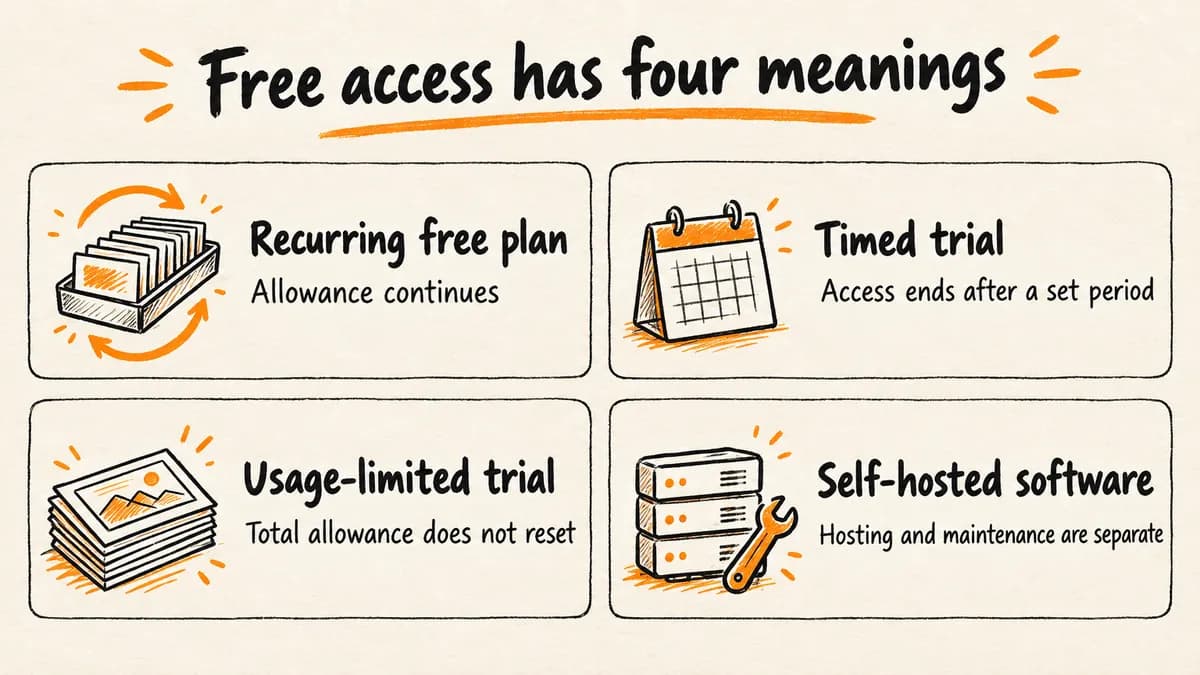
“Free” can describe four different commitments:
- Recurring free plan: An allowance continues without requiring a paid upgrade, subject to its limits.
- Timed trial: Access ends after a set period. MicroPoster and Postiz Cloud offer seven days; SocialBee, Later and Hootsuite offer 14 days.
- Usage-limited trial: Planable's 50 total created posts have no time limit, but do not reset. It is not 50 free posts every month.
- Self-hosted software: Postiz can be run without a software subscription, but hosting and maintenance remain separate responsibilities and potential costs.
For free X scheduling, Buffer Free may be preferable to Publer or Metricool Free. For free LinkedIn publishing, Metricool Free is not a fit. Keeping a working free setup can be a better decision than switching.
Buffer alternative FAQs
Is there a free version of Buffer?
Yes. Buffer Free supports three channels and 10 queued posts per channel at a time. Once a post publishes, its slot becomes reusable. This is not a monthly total-post allowance. Buffer also offers a separate 14-day trial of its paid plans, so free-plan access and paid-trial access are different offers.
Which is better, Buffer or Postiz?
Buffer fits managed scheduling without running infrastructure. Postiz fits open-source customization or API/agent-oriented workflows. Buffer also has API access and automation integrations, so automation is not exclusive to Postiz. Postiz Cloud is paid; self-hosting changes who handles deployment, maintenance and provider apps, not merely the subscription price.
Which alternatives support TikTok, Instagram, and LinkedIn?
Metricool, SocialBee, Later, Planable, Hootsuite and Postiz all list support for these networks. Metricool's LinkedIn access requires a paid plan. Confirm your account types, content formats and whether publishing is automatic or notification-assisted before switching. MicroPoster does not target these destinations; its crossposting workflow covers a narrower set of networks.
Which option works for X, Threads, Bluesky, and Mastodon?
MicroPoster covers all four for native-post crossposting. Buffer and Postiz cover them for central scheduling, which is a different workflow. SocialBee lists Mastodon through mobile-assisted Universal Posting, not an equivalent direct integration. Choose based on where you create the original post and whether you need planned publication, rather than assuming the mechanisms are interchangeable.
Is Hootsuite free?
Hootsuite currently offers a 14-day trial, not a recurring free management plan. No credit card is required to start, and the trial does not automatically charge you. Continuing afterward requires selecting a paid plan and entering payment details. Trial accounts also have daily-post limits and cannot use bulk scheduling.
Test the replacement against your next real post
Before committing to an alternative to Buffer:
- List every required account and user, including second profiles on the same network.
- Confirm the tier supports your usual formats and approval needs.
- Test a text/link post, then your normal media or thread content.
- Inspect destination output, publishing history and any reports you need.
- Check monthly versus annual commitment and the total with add-ons.
Before activating replacement queues or crossposting routes, review existing scheduled posts and active automations. Avoid publishing the same post twice through two systems.
Stay with Buffer if its current queue, channels and team features already satisfy the job. Choose a specialist only when it removes a specific missing step.
If your content starts in X, Threads, Bluesky or Mastodon and manual distribution is the recurring task, use the automatic-crossposting controls to test MicroPoster with one account pair. Inspect its first crosspost before adding routes.
Try MicroPoster free for 7 days
No credit card required. Creator limits apply; paid plan needed afterward.


