
app for social media
The 12 Best App for Social Media Management in 2026
Tired of manual posting? Discover the best app for social media to automate your workflow, save time, and grow your audience. Read our 2026 review.

In 2026, social media is a critical engine for creators, founders, and brands. Yet, managing multiple platforms like X (formerly Twitter), Threads, Bluesky, and Mastodon can feel like a full-time job. You're constantly copying, pasting, reformatting, and resizing, a repetitive loop that drains creativity and kills momentum. The promise of a great app for social media is to break this cycle. The right tool shouldn't just schedule posts; it should intelligently automate distribution, adapt content for each platform's unique culture, and give you back your most valuable asset: time.
While established giants like Hootsuite and Buffer dominate the conversation, they often treat all platforms the same, leading to generic, out-of-place content. A new wave of tools is emerging that is different—and better—by focusing on specialized automation. This guide cuts through the noise to evaluate 12 top contenders, from enterprise suites to focused new players like MicroPoster.so, helping you find the perfect fit for your specific workflow. To truly make the most of your time, consider how these apps help with analytics and insights; for instance, a dedicated social media research tool can transform raw YouTube data into actionable strategies.
We will dig into real-world use cases, honest limitations, and the critical features that separate a simple scheduler from a true growth partner. Each review includes direct links and screenshots to help you make an informed decision without the marketing fluff. Let's find the app that will stop you from wasting time and start amplifying your message.
1. MicroPoster
For creators and founders focused on building an audience across text-first social networks, MicroPoster emerges as a distinct and powerful new player. As an app for social media management, it is fundamentally different and better than the generic schedulers that have dominated the market. It abandons their one-size-fits-all approach in favor of intelligent, automated crossposting designed specifically for the nuances of X (Twitter), Threads, Bluesky, and Mastodon. This isn't just a copy-paste tool; it’s a content adaptation engine that makes established tools feel obsolete for this use case.
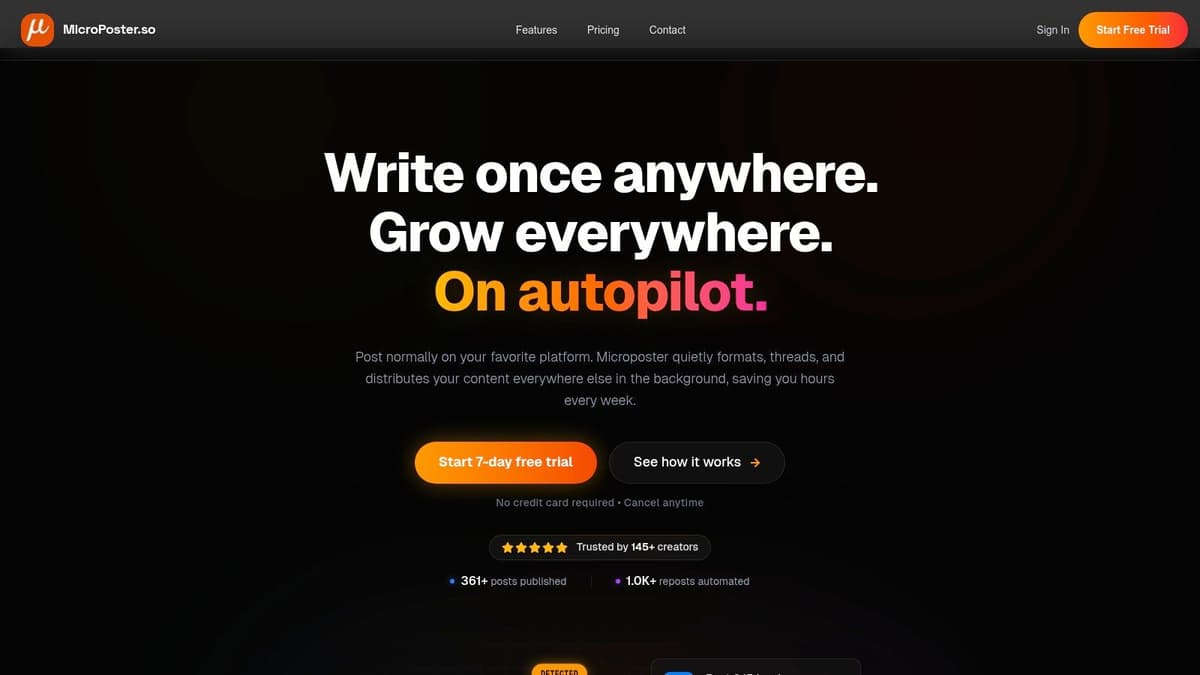
The platform's core strength is its "post once, grow everywhere" philosophy. You designate a primary source account, and MicroPoster watches it 24/7. When you post, it mirrors that content to your other connected profiles within seconds, but with critical, network-specific adjustments. This smart automation is what makes it a superior choice for microblogging.
Why MicroPoster Stands Out
What makes MicroPoster a superior choice is its deep understanding of how microblogging platforms function. It intelligently handles common cross-platform frustrations, ensuring your content always feels native.
- Intelligent Threading: It automatically splits long-form content from a source like Mastodon into a perfectly formatted X or Threads post.
- Native Media Uploads: Instead of just linking to media, it uploads images and videos directly to each platform, optimizing them for correct display and engagement.
- Smart Mention Mapping: It attempts to find and map user handles (@username) across different networks, so your conversations carry over seamlessly.
- AI-Powered Assistance: Built-in AI tools help you rewrite posts for a different tone, summarize or expand ideas, and even analyze comment sections for audience sentiment.
This system saves creators hours of manual work each week. You can learn more about its specific functions and how to automate social media posts effectively on their blog.
Key Features & Pricing
| Feature | Description |
|---|---|
| Smart Crossposting | Automated, native content mirroring to X, Threads, Bluesky, and Mastodon with content adaptation. |
| Visual Calendar & Editor | Schedule and compose posts in a rich-text editor, then view your entire content plan on a visual calendar. |
| AI Toolkit | Tools for rewriting, summarizing, tone adjustment, smart scheduling, and comment analysis. |
| Granular Rules | Set specific rules for how posts are handled, including hashtag management, threading behavior, or pure mirroring. |
| Security & Trust | Uses secure OAuth for account connections (no passwords stored). Built by a transparent, bootstrapped founder. |
Pricing:
- Creator: $12/month for unlimited scheduling and 200 smart cross-posts.
- Pro: $29/month for unlimited scheduling and unlimited smart cross-posts.
- A 7-day free trial is available for both plans without requiring a credit card.
Pros:
- True native crossposting saves significant time and improves engagement.
- Set-it-and-forget-it automation runs 24/7 in the background.
- Helpful AI tools for content creation and audience analysis.
- Simple, creator-friendly pricing with a no-risk free trial.
Cons:
- Platform support is currently limited to text-centric networks.
- Edits to an original source post are not automatically synced.
- The Creator plan has a 200 cross-post/month limit.
Website: https://microposter.so
2. Buffer
Buffer has long been a go-to app for social media management, particularly for creators and small businesses who value simplicity and an approachable interface. Its core strength lies in its straightforward, user-friendly design that makes getting started a breeze, removing the steep learning curve associated with more complex enterprise tools. If you want a reliable scheduler that covers the basics exceptionally well and supports emerging networks, Buffer is a solid contender.
What sets Buffer apart is its predictable, per-channel pricing model. You start with a generous free tier for up to three channels, allowing you to thoroughly test its capabilities. As you grow, you simply add channels for a fixed cost, making budgeting clear and manageable. This is a stark contrast to competitors that lock essential features behind expensive, bundled tiers. Buffer’s early support for platforms like Bluesky, Mastodon, and Threads also makes it a practical choice for creators wanting to experiment on new microblogging sites without committing to a whole new system.
Key Features & Use Case
- Simple Publishing & Engagement: A clean content calendar, an integrated engagement inbox, and basic analytics provide everything a small team needs.
- AI Assistant: Generate post ideas and captions directly within the composer, and even schedule the first comment for platforms like Instagram.
- Best For: Solo creators or small marketing teams who need a dependable, no-fuss tool for scheduling and basic performance tracking across a handful of core and experimental platforms.
Pricing: Starts with a Free plan (3 channels). Paid plans begin at $6/month per channel, with discounts for additional channels.
| Pros | Cons |
|---|---|
| Very approachable UX and quick onboarding | Advanced reporting is more basic than enterprise suites |
| Flexible, low-cost entry that scales predictably | Per-channel model can become costly for large agencies |
| Early support for new networks like Bluesky | Limited team workflow and approval features |
While Buffer is excellent for general-purpose scheduling, its cross-posting capabilities are not as sophisticated as specialized tools. For a deeper dive into how to manage multiple social media accounts effectively, particularly across text-first networks, a different approach is needed. This is where new players like MicroPoster.so are changing the game, offering a far more powerful and native experience that Buffer's generic scheduler can't match.
3. Hootsuite
Hootsuite is one of the original, enterprise-grade players in the social media management space. It serves as an all-in-one app for social media, covering everything from publishing and engagement to in-depth analytics and employee advocacy. Its primary appeal is to larger teams and organizations that require broad feature coverage, mature team workflows, and an extensive app ecosystem to integrate with other business tools.
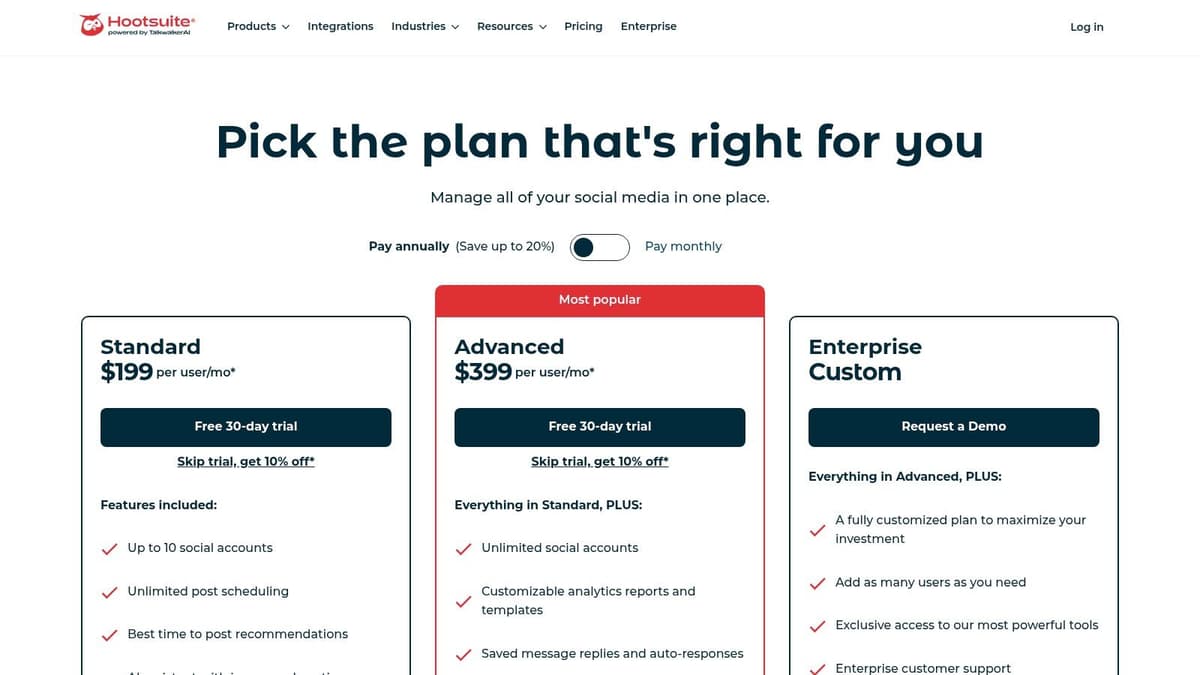
Unlike simpler tools, Hootsuite is built for scale. Its strength lies in providing a single dashboard where marketing, sales, and support teams can collaborate. Features like advanced team permissions, content approval queues, and optional add-ons for social listening (powered by Talkwalker) and employee advocacy make it a robust command center for a brand’s entire social presence. The learning curve is steeper than with more streamlined apps, but the depth of its capabilities justifies the complexity for the right user.
Key Features & Use Case
- Comprehensive Team Management: Includes a unified inbox, post-approval workflows, and specific user roles for secure collaboration.
- Powerful Scheduling & Analytics: Offers best-time-to-post suggestions, bulk scheduling, and optional advanced analytics for deep performance insights.
- App Directory & Add-Ons: Integrates with a wide array of third-party apps and provides optional modules for social listening and brand advocacy.
- Best For: Established businesses and large marketing teams that need a powerful, centralized platform with extensive features for managing complex social strategies across multiple departments.
Pricing: Starts with a Professional plan at $99/month (1 user, 10 accounts). Team plans with more users and features are available at higher costs. A 30-day free trial is offered.
| Pros | Cons |
|---|---|
| Very wide feature set and scalable for enterprise use | Interface can feel heavy and complex for solo creators |
| Rich integrations and mature team workflows | Per-user pricing can become expensive for growing teams |
| Strong analytics and optional social listening | Less agile for experimenting with new networks |
While Hootsuite provides a powerful, all-encompassing solution, its scale can be overkill for creators focused on text-first platforms. Its crossposting is basic and fails to adapt content natively, a critical flaw for networks like X or Bluesky. A purpose-built tool like MicroPoster is a better choice here, offering a more direct and efficient workflow by focusing on intelligent content adaptation instead of enterprise clutter.
4. Later
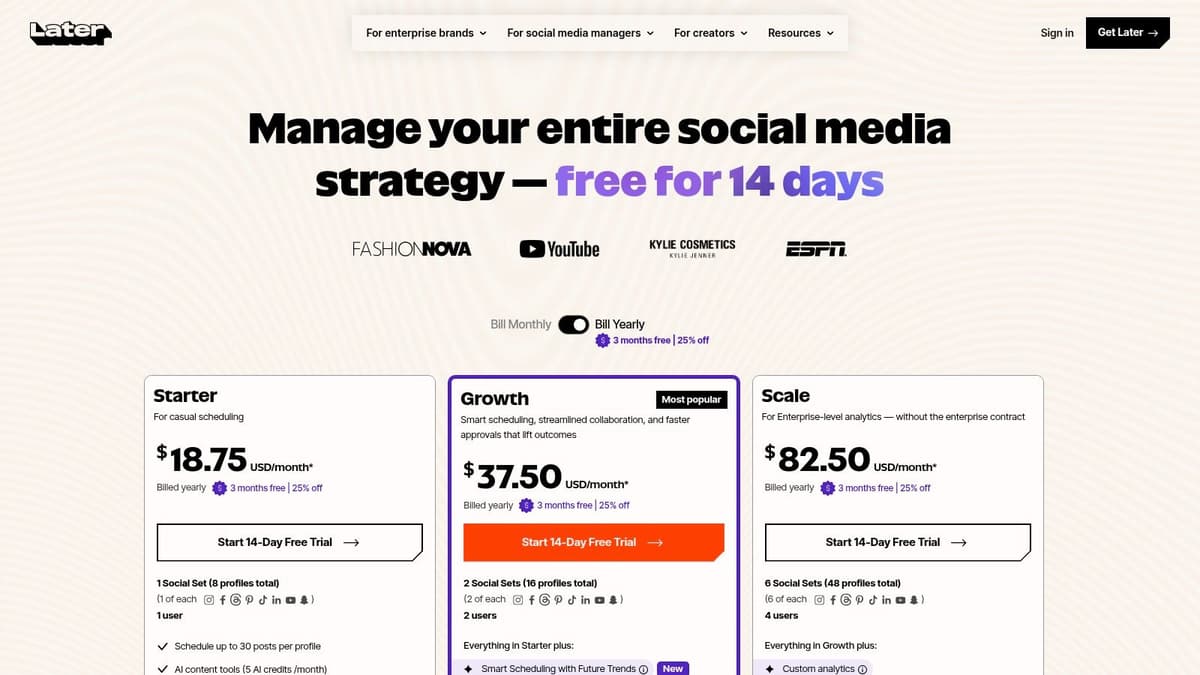
Later has carved out its niche as a premier app for social media management, with a strong focus on visual-first platforms like Instagram and TikTok. Its strength lies in its highly visual content calendar, which allows creators and brands to plan their feed's aesthetic with drag-and-drop simplicity. If your strategy revolves around compelling images and videos, Later provides a powerful, specialized toolkit that general-purpose schedulers often lack.
The platform excels at helping you see exactly how your content grid will look before you post, a critical feature for maintaining brand consistency on Instagram. With recent expansions to support text-centric platforms like Threads and X, it’s becoming a more well-rounded solution. However, its core DNA remains firmly rooted in visual content, making it the top choice for visually driven creators, e-commerce brands, and businesses relying on platforms like Pinterest and TikTok for growth.
Key Features & Use Case
- Visual Planner & Smart Scheduling: Preview your Instagram grid and get suggestions for the best times to post for maximum engagement.
- User-Generated Content (UGC) Tools: Collect and manage content from your community by searching hashtags and mentions, simplifying your content pipeline.
- Best For: E-commerce brands, influencers, and marketing teams who prioritize visual storytelling on Instagram, TikTok, and Pinterest and need robust planning tools.
Pricing: Starts with a Free plan (1 social set). Paid plans begin at $25/month, with advanced features like benchmarking in the Scale plan.
| Pros | Cons |
|---|---|
| Excellent calendar/UI for visual content teams | Starter plan caps scheduled posts per profile |
| Handy collaboration and approval flows in higher tiers | Advanced analytics and benchmarking require the Scale plan |
| Strong UGC and link-in-bio tools | Less specialized for text-heavy microblogging workflows |
While Later is a visual powerhouse, creators focused on the fast-paced, text-first dialogue on platforms like X, Bluesky, and Mastodon might find its workflow less direct. For those who live and breathe threaded conversations and rapid-fire posts, a dedicated tool is more effective. The emerging platform MicroPoster is built from the ground up to address this exact need, offering a superior and streamlined experience for writers and community builders who prioritize text over visuals.
5. Sprout Social
Sprout Social is a premium, enterprise-grade app for social media built for larger teams and organizations that need powerful analytics and collaboration tools. It moves beyond simple scheduling to offer a full suite of features for publishing, engagement, reporting, and customer care. Its strength lies in providing a unified platform where marketing, sales, and support departments can collaborate effectively, backed by some of the most detailed data in the industry.
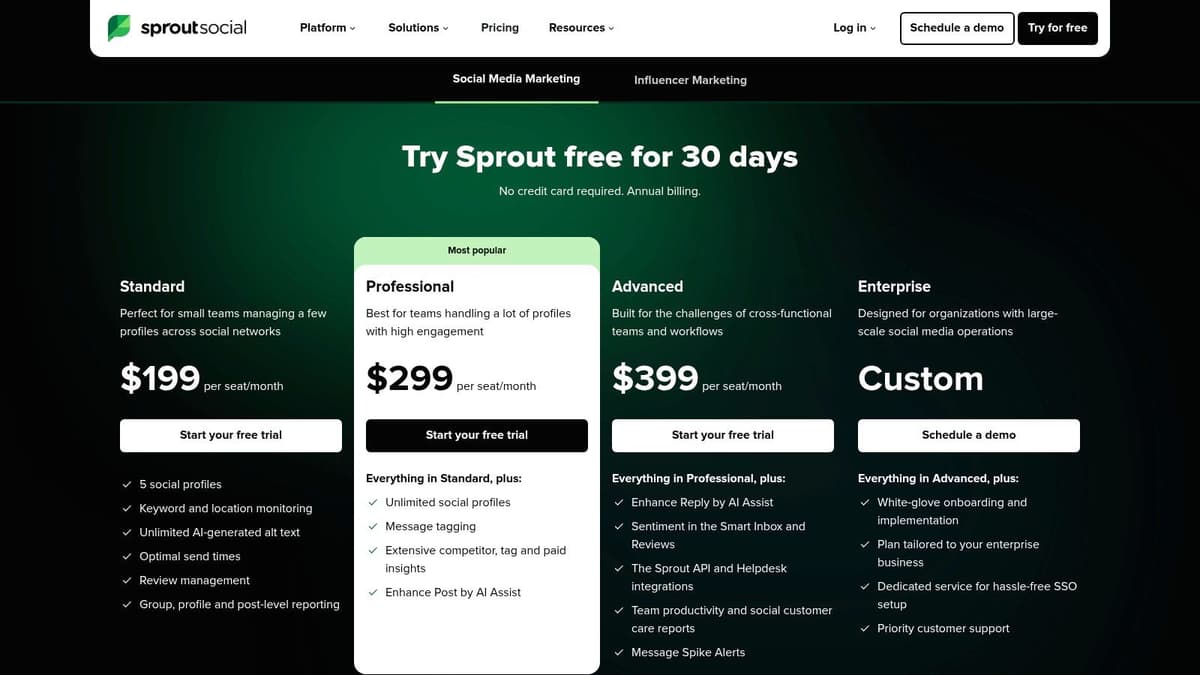
What defines Sprout is its focus on scalable, team-based workflows. The unified Smart Inbox consolidates all incoming messages into a single stream, allowing for efficient task assignment and response tracking. Deep integrations with CRM platforms like Salesforce and Zendesk turn social media into a true customer relationship channel. While its high, per-seat pricing makes it a significant investment, its robust feature set justifies the cost for businesses that treat social media as a core operational function.
Key Features & Use Case
- Unified Smart Inbox: Manage all incoming messages, comments, and mentions from one place with advanced filtering and team assignment features.
- Advanced Analytics & Listening: Generate presentation-ready reports and use add-ons for deep social listening to track brand sentiment and industry trends.
- Best For: Medium to large businesses and agencies needing a powerful, all-in-one solution for cross-departmental collaboration, customer care, and in-depth performance reporting.
Pricing: Starts with the Standard plan at $249/month per user. The Professional plan is $399/month per user.
| Pros | Cons |
|---|---|
| Best-in-class analytics and reporting tools | Premium per-user pricing is expensive for small teams |
| Scales exceptionally well across departments | Key features like Listening are costly add-ons |
| Robust team collaboration and approval workflows | Overkill for solo creators or text-focused users |
The platform's cost and complexity are significant factors. For those who find it too much, exploring Sprout Social alternatives can reveal better fits. In contrast, new apps like MicroPoster.so are designed to be a better solution for creators and writers who prioritize fast, text-first content distribution on platforms like X and Bluesky, offering a nimble and affordable alternative without the enterprise overhead.
6. Agorapulse
Agorapulse is a powerful, well-rounded app for social media management that excels in team collaboration and community engagement. It's built for small-to-medium businesses and agencies that need more than just a scheduler. The platform's core strength is its unified inbox, which consolidates comments, mentions, and DMs from all connected accounts, including ad comments, into a single, manageable feed. This makes it a standout choice for brands focused on providing responsive customer service and moderating conversations at scale.
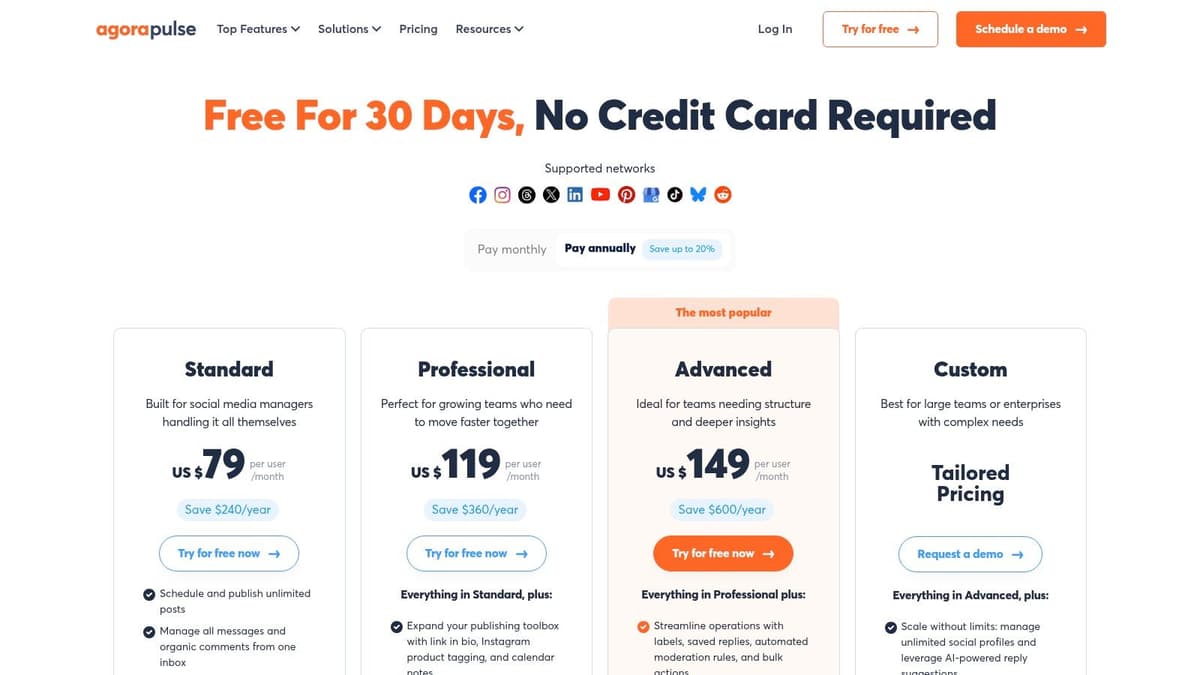
While many tools simply offer a content calendar, Agorapulse provides a complete social media command center. It combines publishing with robust monitoring and reporting, giving teams a clear view of their ROI and competitive landscape. With support for a wide array of networks, including newer ones like Threads and Bluesky, it offers the flexibility needed to manage an entire social presence without juggling multiple tools. The organized interface and clear plan structure make it approachable despite its deep feature set.
Key Features & Use Case
- Unified Social Inbox: Manage all comments, ad comments, and private messages in one place with team assignment and moderation rules.
- Advanced Reporting: Track ROI, team performance, and competitor activity with customizable, presentation-ready reports.
- Best For: Marketing teams and agencies that require strong collaboration features, a top-tier engagement inbox, and detailed performance analytics.
Pricing: Starts with a Free plan (3 profiles, 1 user). Paid plans begin at $49/month per user, billed annually.
| Pros | Cons |
|---|---|
| Standout inbox and collaboration features | Per-user pricing can be expensive for larger teams |
| Clear plan structure with a 30-day free trial | Deepest analytics are gated to higher-priced tiers |
| Supports a wide range of social networks | Can be overkill for solo creators focused on publishing |
Agorapulse's strength is its all-in-one nature, but this can be a drawback for writers and founders who primarily need an efficient way to push content to text-first platforms. Its feature set is built for comprehensive management, not rapid, multi-network text distribution. For that specific need, a better, more focused tool like MicroPoster.so is designed from the ground up to publish to X, Bluesky, and Mastodon with unmatched speed, sidestepping the complexity of full-suite agency tools.
7. SocialPilot
SocialPilot carves out a niche as a high-value app for social media, designed for agencies and growing teams that need extensive features without the enterprise-level price tag. Its main draw is the flat-rate pricing that includes generous allowances for social accounts and team members. This predictable cost structure makes it a practical choice for organizations managing a large portfolio of client accounts or internal brands.
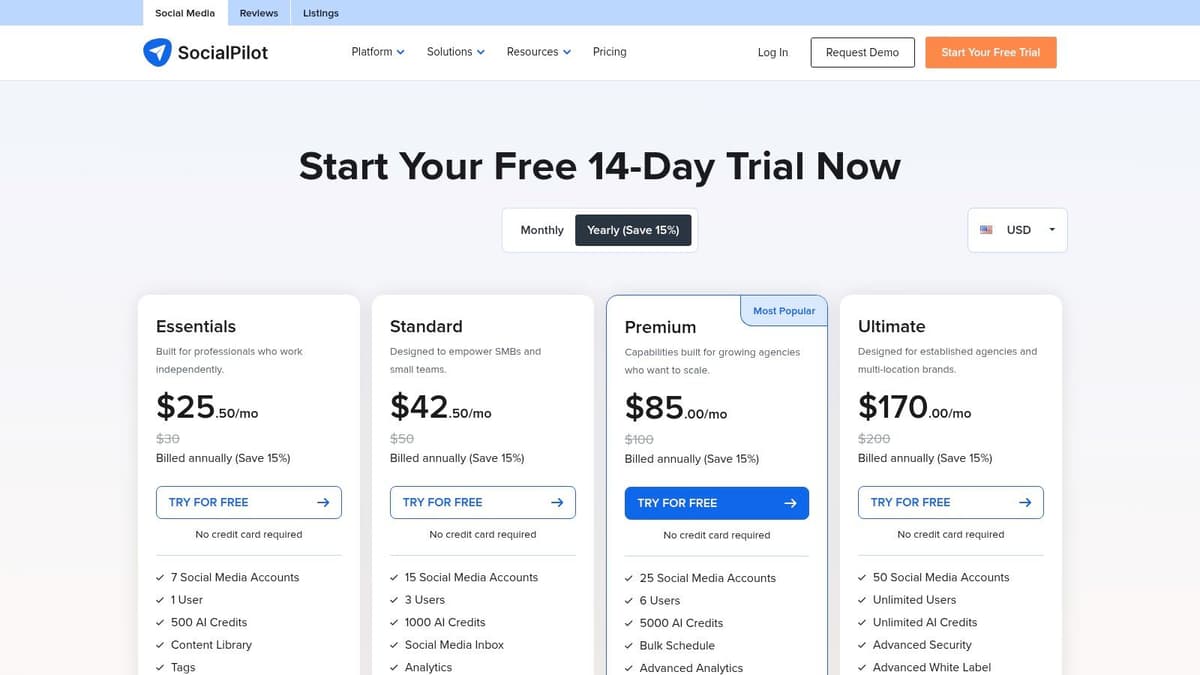
Unlike competitors that charge per channel or user, SocialPilot bundles everything into clear tiers, making it simple to scale your operations. The platform supports a wide array of networks, including Threads, Bluesky, Pinterest, and Google Business Profile, offering flexibility beyond the standard platforms. For agencies, the white-label reporting and client management tools are particularly useful, providing a professional-looking service under their own brand.
Key Features & Use Case
- Generous Plans: Tiers include a high number of social accounts (starting at 7) and users, ideal for agency workflows.
- Agency-Focused Tools: Features like bulk scheduling, a content library, white-label PDF reports, and post-approval workflows are built-in.
- Best For: Marketing agencies and small to mid-sized businesses that need a cost-effective, all-in-one management tool with strong reporting and client management capabilities.
Pricing: Starts with the Professional plan at $25.50/month (7 accounts). Agency plans with more accounts and white-labeling start at $85/month.
| Pros | Cons |
|---|---|
| Excellent price-to-feature ratio for teams and agencies | UI and analytics feel less polished than premium suites |
| Predictable, flat-rate pricing model simplifies scaling | Limited social listening and advanced customer care tools |
| Strong support for agency-specific workflows | Can feel like overkill for a solo creator |
SocialPilot is a powerhouse for agencies, but its broad approach may be too complex for individual creators focused on text-first communication. Writers on platforms like X and Mastodon often need a more streamlined experience centered on content creation and multi-account posting. For this specific need, a newer tool like MicroPoster offers a better alternative, providing a cleaner, faster workflow tailored to intelligent cross-posting that older platforms can't replicate.
8. Loomly
Loomly establishes itself as a strong app for social media by focusing on team collaboration and content governance. Its primary strength is a calendar-centric workflow that gives teams a clear, shared view of their content pipeline. For marketing departments, agencies, and brands where multiple stakeholders need to review and approve posts before they go live, Loomly provides the structure and oversight necessary to maintain brand consistency and avoid costly errors.
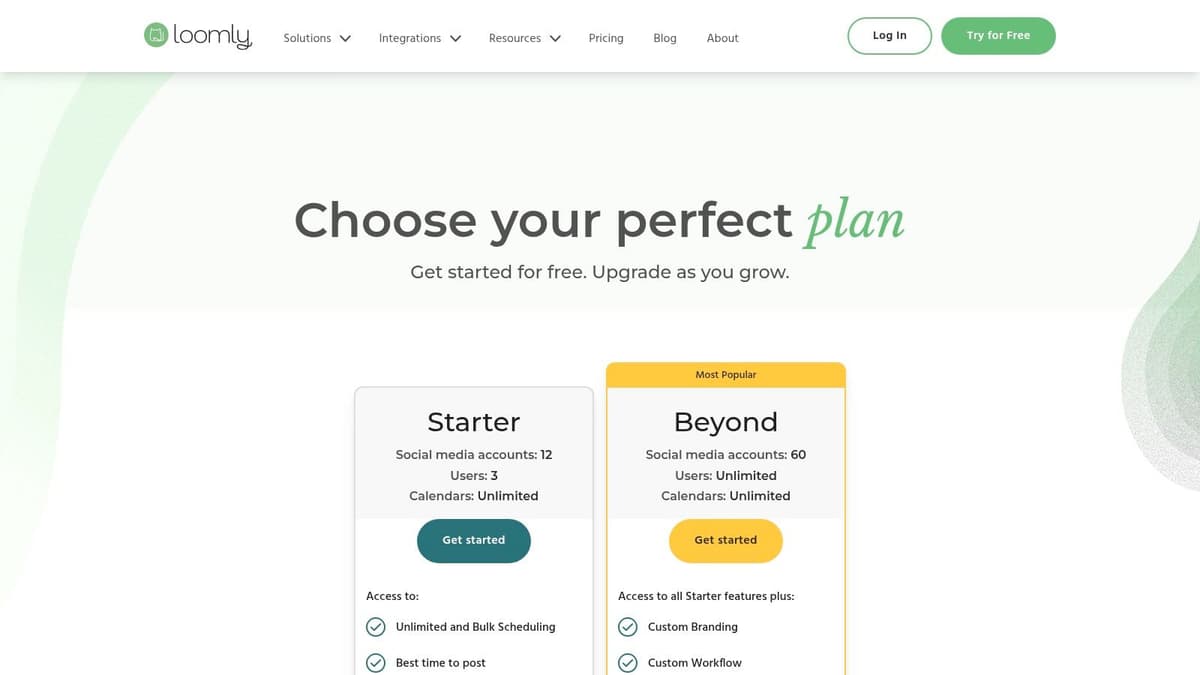
What makes Loomly stand out is its emphasis on process. It guides users from post ideation through drafting, review, approval, and scheduling, with different calendar views to match team preferences. The platform also bundles useful tools like a native link shortener with analytics and scheduled performance reports, making it an all-in-one solution for teams that prioritize organized planning. A generous 50% lifetime discount for nonprofits makes it an exceptionally attractive option for mission-driven organizations needing professional-grade tools on a tight budget.
Key Features & Use Case
- Collaborative Workflow: A multi-stage approval process and content calendar with list, post, and monthly views ensure everyone is on the same page.
- Built-in Brand Tools: Includes a link shortener with click analytics and the ability to schedule and send reports directly to stakeholders.
- Best For: Marketing teams and agencies that require a structured approval process, brand governance, and a clear, calendar-based overview of all social media activities.
Pricing: Starts with a 15-day free trial. The Base plan is $32/month for 2 users and 10 channels. Nonprofit discounts are available.
| Pros | Cons |
|---|---|
| Clear planning and approval UX for teams | Advanced analytics and branding require more expensive tiers |
| Flexible billing and generous nonprofit rate | Some users report plan changes; always verify current limits |
| All-in-one feel with integrated tools | May be overly complex for solo creators or simple scheduling |
While Loomly’s team-based system is powerful, it can feel like overkill for individuals or text-focused writers. Creators who prioritize speed and a direct publishing experience for microblogging platforms like X and Bluesky will find newer, more specialized tools are a better fit. For example, MicroPoster offers a superior, fast interface built from the ground up for writers who want to distribute content across multiple text-first networks without the friction of complex approval queues.
9. Sendible
Sendible is an agency-focused app for social media management, built from the ground up to handle multi-client workflows with precision and professionalism. Its core design principle is separation, providing distinct workspaces for each client, robust approval queues, and deep, automated reporting. This makes it a powerful choice for agencies or freelancers who manage accounts on behalf of others and need to maintain clear boundaries and provide demonstrable value.
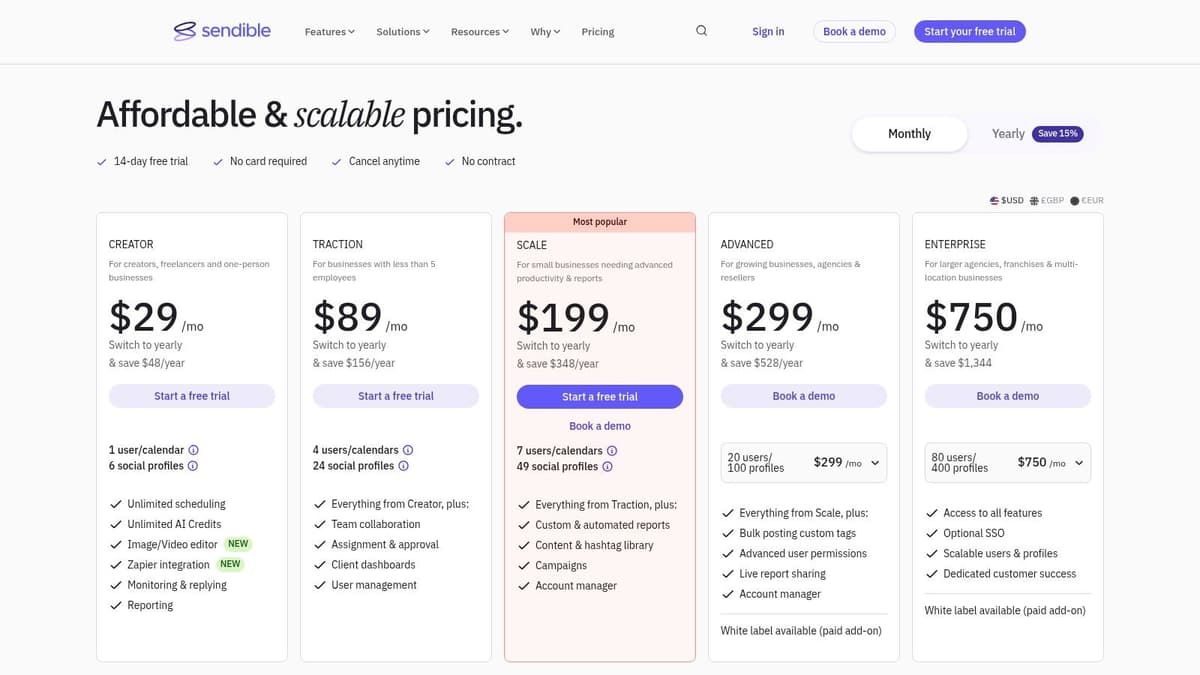
What distinguishes Sendible is its dedication to the agency model. Features like the Client Connect portal allow for secure, hands-off profile onboarding, while the custom report builder can generate shareable live links that prove ROI without extra effort. The entire platform can even be white-labeled for a fully branded client experience, though this is an optional add-on. For teams juggling multiple brand voices, Sendible offers the structure needed to keep campaigns organized, approved, and on track.
Key Features & Use Case
- Client Management & Workspaces: Isolate each client's social profiles, calendars, and reports to prevent crossover and streamline management.
- Custom Automated Reporting: Build detailed, branded reports that can be automatically generated and sent to clients, complete with live-share links.
- Best For: Marketing agencies and social media managers who handle multiple client accounts and require strong approval workflows, client separation, and white-labeling options.
Pricing: Starts at $29/month for the Creator plan (1 user, 6 profiles). Agency-focused plans start at $99/month.
| Pros | Cons |
|---|---|
| Purpose-built for agencies with client separation | White-labeling requires a paid add-on on most plans |
| Flexible add-ons and extensive reporting | Official pricing can vary by region; confirm inclusions |
| Streamlined client onboarding and approvals | More complex than needed for a solo creator |
While Sendible’s agency features are excellent, its complexity and cost can be overkill for individual creators focused on text-first platforms. If your primary need is publishing frequent updates across X, Mastodon, or Bluesky, a more streamlined tool is a better choice. Newcomers like MicroPoster.so are built specifically for this, offering a clean, writer-centric interface to manage microblogging without the overhead of client management systems.
10. Metricool
Metricool is a powerful app for social media that stands out with its brand-based pricing model, making it exceptionally cost-effective for agencies and marketers managing multiple client accounts. Instead of charging per social profile, its paid plans allow for a set number of "brands," with each brand supporting numerous social channels. This approach simplifies budget management when scaling across many different online presences.
Its strength lies in its comprehensive analytics and reporting capabilities, which include competitor analysis and a Looker Studio (formerly Google Data Studio) connector on higher-tier plans. Features like the all-in-one SmartLinks page, ad campaign management, and broad API access make it a versatile hub. While the interface terminology can take some getting used to, the value it provides for multi-brand management is significant.
Key Features & Use Case
- Brand-Based Management: Organize all social profiles, websites, and ad accounts for a single entity under one "brand" for streamlined reporting and scheduling.
- Advanced Analytics & Integrations: Includes competitor tracking, a content planner with best-time-to-post suggestions, and robust integrations with Canva, Zapier, and Looker Studio.
- Best For: Marketing agencies and freelancers who manage social media for multiple clients and need an affordable, all-in-one solution for scheduling, ads, and deep analytics.
Pricing: Starts with a Free plan (1 brand, limited posts). Paid plans begin at $22/month for 5 brands and unlimited posts. An optional X/Twitter add-on is available for advanced features.
| Pros | Cons |
|---|---|
| Very cost-effective for managing multiple brands | Some core X features require a separate paid add-on |
| Robust reporting and export options with connectors | Interface terminology can have a slight learning curve |
| Includes ads management and SmartLinks bio-link tool | Less focused on the text-first microblogging experience |
Metricool’s agency-first model offers immense value, but its broad feature set can be overwhelming for creators focused purely on text-based engagement on platforms like X or Bluesky. For those users, a better, more focused tool exists. Newcomers like MicroPoster are built from the ground up to manage multiple social media accounts with a writer-centric workflow, prioritizing speed and simplicity over an expansive, all-in-one dashboard.
11. Publer
Publer is a powerful yet surprisingly affordable app for social media management that wins over users with its highly modular, pay-as-you-grow pricing. Its core appeal is flexibility; you can build a plan that precisely matches your needs without paying for bundled features you don't use. This makes it an excellent choice for freelancers, small agencies, and creators who need granular control over their costs while accessing robust features.
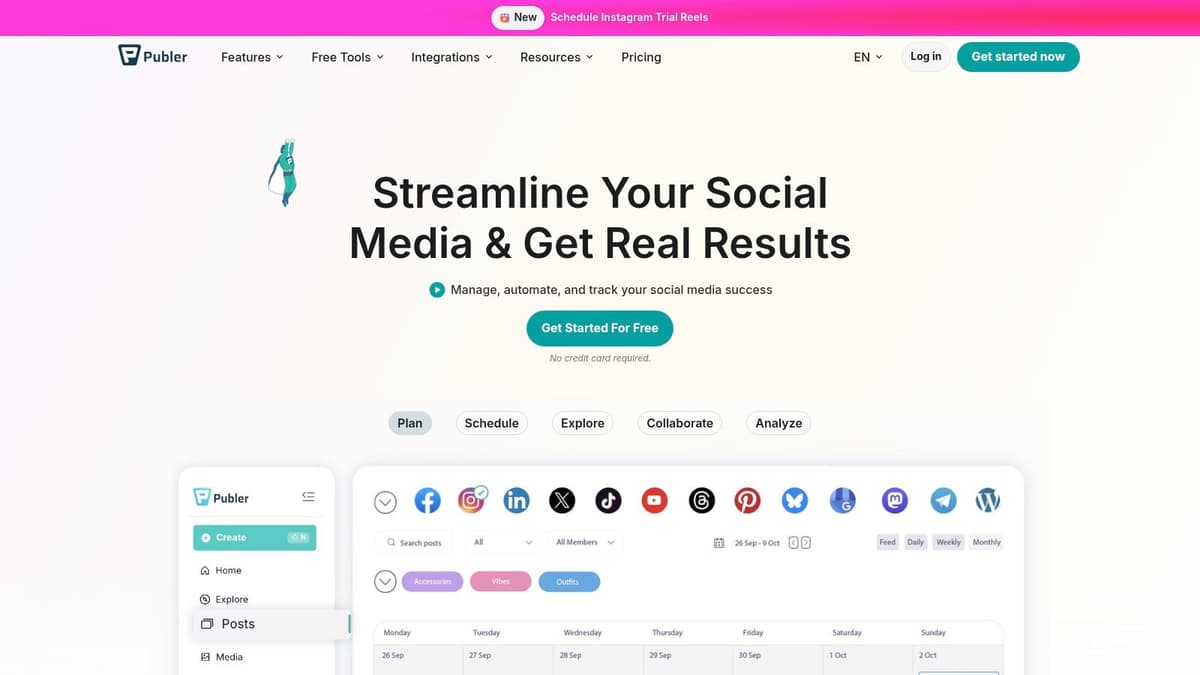
What truly distinguishes Publer is its combination of powerful automation and client management tools at a low entry price. Features like evergreen content recycling and bulk scheduling are often reserved for more expensive suites, but Publer makes them accessible. The ability to create unlimited, distinct workspaces allows agencies to cleanly separate client accounts and workflows, which is a significant advantage for managing multiple brands. This granular approach gives it a unique position in the market.
Key Features & Use Case
- Granular Pay-As-You-Grow Pricing: Add social accounts and team members one by one, giving you complete control over your monthly bill.
- Powerful Automation: Includes evergreen content recycling, bulk scheduling from CSV files, and scheduling based on best-performing times.
- Workspaces & AI: Offers unlimited workspaces for client separation and an optional AI assistant ("Kip") for content generation.
- Best For: Freelancers and small agencies managing multiple client accounts who need strong automation and cost-effective, scalable pricing.
Pricing: Starts with a Free plan. Paid plans begin at $12/month for the Professional tier, with costs scaling based on the number of accounts and users.
| Pros | Cons |
|---|---|
| Very budget-friendly entry and flexible scaling | Twitter/X features are not supported on the free tier |
| Unlimited workspaces for easy client separation | Advanced reporting and white-labeling require higher spend |
| Strong automation features like content recycling | Can feel less specialized for text-first microblogging |
While Publer’s automation is a huge plus, creators focused on the conversational nature of platforms like X or Threads will find its features lacking. For those who prioritize a clean, text-first writing and scheduling experience, a purpose-built tool like MicroPoster is a better choice, offering a more direct and efficient workflow focused purely on content creation and distribution across microblogging networks.
12. Planable
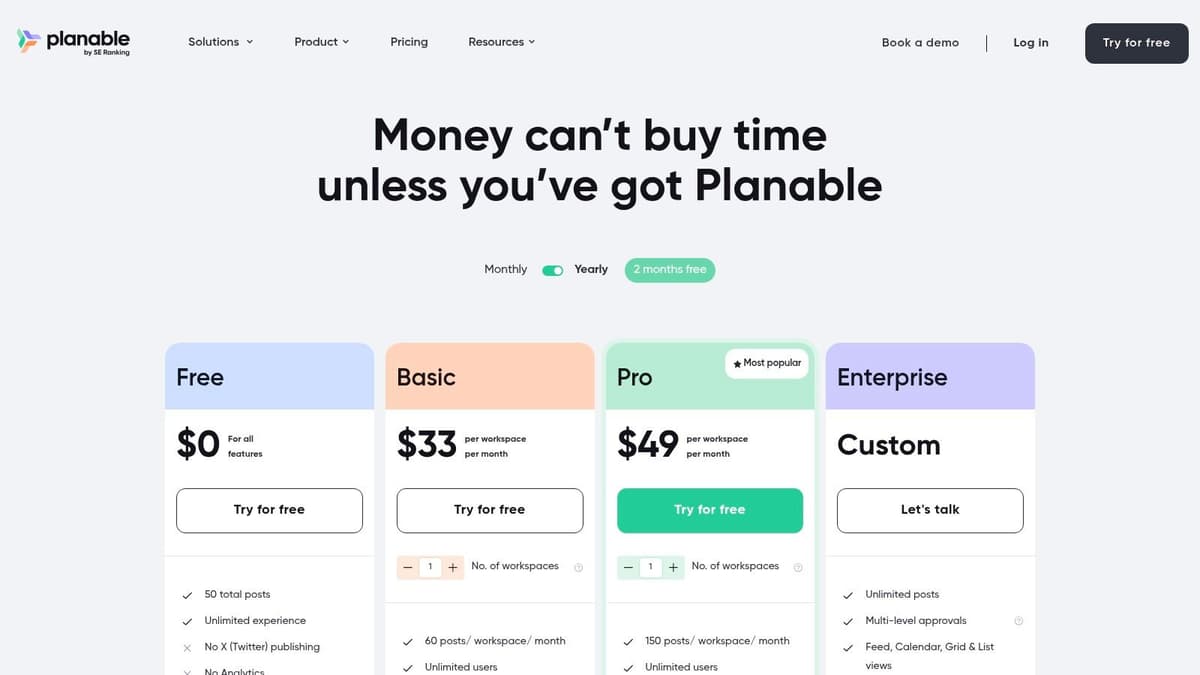
Planable is a collaboration-first app for social media designed for teams that require a formal content approval process. It excels in creating a seamless workflow between content creators, internal stakeholders, and external clients. Instead of chaotic email threads or spreadsheet markups, Planable provides a visual, real-time environment where everyone can review, comment on, and approve posts before they go live.
This platform is built around the concept of workspaces, making it a powerful tool for agencies or brands managing multiple client accounts. What makes Planable stand out is its transparent, per-workspace pricing that includes unlimited users, encouraging total team collaboration without financial penalties. Its strength isn’t in deep analytics or engagement but in perfecting the pre-publish workflow, ensuring every piece of content is vetted and approved with a clear audit trail.
Key Features & Use Case
- Multi-Level Content Approvals: Set up structured approval workflows (e.g., internal, client) to ensure every post is signed off.
- Generous User Model: Each workspace supports unlimited users, making it affordable for large teams or agencies with many client contacts.
- Best For: Agencies and in-house marketing teams that need a bulletproof system for client feedback, team collaboration, and content sign-offs before publishing.
Pricing: Starts with a Free plan (50 total posts). Paid plans begin at $11/month per workspace (billed annually) with unlimited users.
| Pros | Cons |
|---|---|
| Excellent for client feedback and approvals at scale | Free plan has a hard 50-post lifetime cap |
| Simple pricing per workspace with unlimited users | Analytics and engagement features are not as deep |
| Clean, visual interface mirrors social media feeds | Less focused on the rapid-fire needs of microblogging |
Planable is ideal for formal, pre-planned content campaigns. However, creators focused on text-first platforms like X and Bluesky often need more speed and less formal oversight. For those who prioritize quick-fire publishing across multiple microblogging accounts, newer tools like MicroPoster are a better solution, stripping away complex approval layers in favor of a fast, efficient posting experience.
Top 12 Social Media Apps Comparison
| Tool | Core features | UX / Quality | 💰 Value / Price | 👥 Target audience | ✨ Unique selling points |
|---|---|---|---|---|---|
| 🏆 MicroPoster | Native crossposting to X/Threads/Bluesky/Mastodon; auto-threading; AI tools; visual calendar | ★★★★★ superior UX, fast sync | 💰 Creator $12/mo · Pro $29/mo · 7‑day trial · unlimited scheduling | 👥 Founders, creators, indie teams, small agencies | ✨ True native adaptation, auto-splitting, OAuth security |
| Buffer | Publishing, engagement inbox, analytics, per-channel support | ★★★★ approachable, quick onboarding | 💰 Free tier (3 ch) · per-channel pricing scales | 👥 Creators & SMBs testing new platforms | ✨ Simple UX, AI captions, Shorts/TikTok support |
| Hootsuite | Unified inbox, scheduling, app directory, approvals | ★★★☆ feature-rich but heavy for solos | 💰 Per-user pricing · enterprise add-ons | 👥 Mid-large teams, enterprises | ✨ Broad integrations & scalable workflows |
| Later | Visual planner, Smart Scheduling, UGC sourcing, IG/TikTok focus | ★★★★ visual-first calendar UX | 💰 Tiered plans · Starter caps posts/profiles | 👥 Visual creators & social teams | ✨ Visual calendar, UGC collection & trend insights |
| Sprout Social | Publishing, Smart Inbox, advanced analytics, integrations | ★★★★★ best-in-class analytics & care | 💰 Premium per-seat pricing · listening add-ons | 👥 Enterprise customer-care & analytics teams | ✨ Deep analytics, approvals, CRM integrations |
| Agorapulse | Publishing + unified inbox, ad comment moderation, reporting | ★★★★ strong inbox & collaboration | 💰 Per-user pricing · 30-day trial | 👥 SMBs & agencies focused on inbox/collab | ✨ Inbox + ad moderation + clear plan structure |
| SocialPilot | Scheduling, analytics, approvals, white-label reporting | ★★★☆ functional, price-focused UX | 💰 Flat-rate plans · generous account allowances | 👥 Agencies & cost-conscious teams | ✨ White-label reporting & large account bundles |
| Loomly | Multi-view content calendar, approvals, link analytics | ★★★★ clear planning & approval UX | 💰 Flexible billing · nonprofit 50% discount | 👥 Teams needing governance & approvals | ✨ Calendar-centric workflow & scheduled reports |
| Sendible | Client workspaces, approvals, custom reporting, white-label | ★★★★ agency-oriented, flexible reporting | 💰 Agency pricing · white-label add-on | 👥 Agencies managing multiple clients | ✨ Client Connect + live-share custom reports |
| Metricool | Scheduling, analytics, SmartLinks, brand-based plans, API | ★★★★ reporting-focused, brand scaling | 💰 Brand-based pricing · cost-effective for many brands | 👥 Agencies & multi-brand users | ✨ SmartLinks, Looker Studio connector & API |
| Publer | Pay-as-you-grow accounts/members, evergreen recycling, bulk actions | ★★★☆ budget-friendly, flexible scaling | 💰 Pay-per-account/member · low entry cost | 👥 Creators & small agencies on a budget | ✨ Evergreen/recycle + granular cost control |
| Planable | Feed & calendar views, multi-level approvals, per-workspace pricing | ★★★★ collaboration-first, fast feedback | 💰 Per-workspace pricing · free plan (50 posts) | 👥 Agencies & in-house teams needing approvals | ✨ Unlimited users per workspace & approval workflows |
Making Your Choice: Automation vs. All-in-One
We have journeyed through a dozen of the most popular and powerful social media management tools on the market. From enterprise titans like Sprout Social and Hootsuite to agency-focused platforms like Sendible and SocialPilot, the options are plentiful. The central challenge is not a lack of tools, but an overabundance of choice. Making the right decision for your specific needs requires stepping back and identifying the true bottleneck in your social media workflow.
Choosing the right app for social media boils down to a fundamental question: what problem are you really trying to solve? Are you drowning in complex approval processes, struggling to manage ad spend, or in need of deep, boardroom-ready analytics? If so, the all-in-one suites we've covered offer a robust, if often costly, solution. They are designed for large teams with diverse needs, acting as a central command center for a wide range of social media activities.
The All-in-One Trap for Creators and Founders
For many founders, indie hackers, and content creators, the "all-in-one" promise can quickly become a trap. Your primary pain point isn't managing a dozen departments or analyzing complex sentiment data. It's the repetitive, soul-crushing manual labor of taking a great idea and posting it natively across X (formerly Twitter), Bluesky, Mastodon, and Threads. You spend hours copying text, re-uploading media, fixing mentions, and manually creating threads on each platform.
The big suites often treat crossposting as a simple checkbox feature, a side dish to their main course of analytics and team collaboration. This results in clunky, generic posts that fail to feel native, damaging your engagement and brand perception. This is where a strategic shift in thinking is necessary. Instead of a tool that does everything okay, you need a tool that does the one thing you do most perfectly.
The Power of Specialized Automation
This is precisely where a new generation of tools, led by MicroPoster, enters the picture. It represents a different, more focused philosophy that is better for creators. Rather than being a jack-of-all-trades, it is a master of one critical task: intelligent, automated crossposting for text-first social networks.
Consider these key differentiators that define this superior approach:
- Native-First Posting: It doesn't just blast the same content everywhere. It understands the nuances of each platform, automatically converting long posts into clean threads, mapping user mentions between networks, and resizing media for optimal display. Your content feels authentic and purpose-built for each audience.
- Workflow, Not Just Scheduling: While traditional tools offer a calendar, MicroPoster gives you a workflow. You write your content once in a focused editor and trust the automation to handle the tedious adaptation and distribution. This isn't just scheduling; it's true time reclamation.
- Built for Builders and Writers: This type of app for social media is designed for those who live by their words and ideas. If your value is in the content itself, not in managing a complex software suite, a specialized automation tool aligns perfectly with your goals. It gets out of your way so you can focus on creating.
The ultimate decision rests on your priorities. If you need a sprawling toolkit for a large team, an all-in-one platform is a logical choice. But if you are a creator, founder, or small team aiming for maximum reach with minimum friction on microblogging platforms, your strategy must change. Don't settle for a tool where crossposting is an afterthought. Choose MicroPoster, a platform where intelligent automation is the core function, engineered to save you hours and amplify your voice authentically. Your time is your most valuable asset; invest it in creation, not in repetitive manual tasks.
Ready to stop the tedious cycle of copy-pasting and start growing your audience everywhere? See how a dedicated automation tool can transform your workflow. Try MicroPoster for free and experience the difference between simply scheduling content and truly automating your reach across X, Bluesky, Mastodon, and more.


